
Lenovoa Ideapad Flex 5 14ALC05 - AMD 5700RU - Sequoia 15.7.4 - Sleep Not Working

masonb

New member
AMD OS X Member
Feb 20, 2026
16
0
1
CPU:
Ryzen 7 5700U
I was able to succesfully boot my Lenovo and everything else seems to be working in Sequoia v15.7.4 (minues WiFI/BT - waiting for an AX200 to arrive). Touchscreen, USB ports, audio, touchpad and keyboard etc all seem to fine - I just can't seem to get skeep working

I press the power button, nothing
Apple Menu sleep - the display turns off but a strike of the keyboard and it comes back on - fans never turn off.

I've tried various USB Map kexts and am currenly using USBMap with the below setup. I may have not fully understood the process here so perhaps thats where im going wrong,, but basically mapped, nicknamed the USB ports im using and then disabled everything else (ensuring they were set to Type 3 for USB 3?)
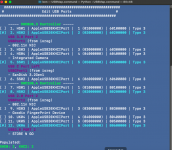
Screenshot 2026-02-26 at 9.33.46 pm.png


Config.plist, I Kernel - Add the USBMap Kext

Screenshot 2026-02-26 at 9.38.11 pm.png


Full Specs - Using NootedRed kext for graphics
  • CPU - Ryzen 7 5700U
  • RAM - 16 GB DDR4 3200mhz
  • GPU - Vega 8
  • WIFI - Intel AX200 (when it arrives), disconnected the built in WIFi and currently using USB dongle

Have I done something dumb with my USB Map - can anyone point me in the right direction?
 
Have you tried enabling ‘Lidwake’ to see what that offers?

What difference, if any, does Hibernatemode 3 make?

What is different about hibernatemode 25 compared to 0 or 3?
Both 3 and 25 yield the same result. I close the lid and the screen turns off, fans keep spinning.

Lidwake apppears to have no effect, 0 or 1, when I open the lid the screen comes back on
 
How have you configured the fan(s) to work in the system Bios - Performance or Balanced? Is there an option in your Bios for the fan(s) to not work so aggressively?
 
There are 3 options,

Intelligent Cooling (this is what was set)
Extereme Performance
Battery Saving


I just tried setting to Exterme Performance and Battery Saving but same result - Apple - Sleep, screen goes off but fans continue to spin.
 
Am I understanding these logs correctly? It still seems to be showing USB ports under kernel assertions which I assume are preventing sleep? This is my USB-C dock plugged into the laptop.

Kernel Assertions: 0x4=USB

id=511 level=255 0x4=USB creat= description=com.apple.usb.externaldevice.60100000 owner=USB2.0 Hub
id=513 level=255 0x4=USB creat= description=com.apple.usb.externaldevice.60400000 owner=USB3.1 Hub
id=517 level=255 0x4=USB creat= description=com.apple.usb.externaldevice.60135000 owner=USB Audio
id=518 level=255 0x4=USB creat= description=com.apple.usb.externaldevice.60137000 owner=WinUSB
id=522 level=255 0x4=USB creat= description=com.apple.usb.externaldevice.60433000 owner=USB 10/100/1000 LAN

Idle sleep preventers: IODisplayWrangler


However with nothing plugged in it still fails to sleep and the log shows

No kernel assertions.
Idle sleep preventers: IODisplayWrangler


I'm also seeing a bunch of these in the logs related to coreaudio?


2026-03-01 08:45:59 +0800 Assertions PID 215(coreaudiod) Released PreventUserIdleDisplaySleep "com.apple.audio.context281.preventuseridledisplaysleep" 00:04:43 id:0x0x5000081ae [System: PrevIdle DeclUser kDisp]


2026-03-01 08:45:59 +0800 Assertions PID 215(coreaudiod) Released PreventUserIdleSystemSleep "com.apple.audio.context281.preventuseridlesleep" 00:04:43 id:0x0x1000081ad [System: PrevIdle DeclUser kDisp]


2026-03-01 08:45:59 +0800 Assertions PID 215(coreaudiod) Released PreventUserIdleDisplaySleep "com.apple.audio.context277.preventuseridledisplaysleep" 00:04:43 id:0x0x5000081a6 [System: PrevIdle DeclUser kDisp]


2026-03-01 08:45:59 +0800 Assertions PID 215(coreaudiod) Released PreventUserIdleSystemSleep "com.apple.audio.context277.preventuseridlesleep" 00:04:43 id:0x0x1000081a5 [System: PrevIdle DeclUser kDisp]


2026-03-01 08:45:59 +0800 Assertions PID 215(coreaudiod) Released PreventUserIdleDisplaySleep "com.apple.audio.context280.preventuseridledisplaysleep" 00:04:43 id:0x0x5000081ac [System: PrevIdle DeclUser kDisp]


2026-03-01 08:45:59 +0800 Assertions PID 215(coreaudiod) Released PreventUserIdleSystemSleep "com.apple.audio.context280.preventuseridlesleep" 00:04:43 id:0x0x1000081ab [System: PrevIdle DeclUser kDisp]
 
What happens when you put the laptop to sleep and the dock isn’t plugged in?
 
Thats how most of my tests have been done, it was just docked when I grabbed those logs.

Its the same docked or undocked

Apple - Sleep
Black screen
Fans spining
Touch keyboard/trackpad immediately back to desktop.
 
So no sleep function working in any form. I am not sure what else to suggest.

Unfortunately that may end up being the case whatever you try, due to the AMD architecture.
 
Yeh seems regardless of what settings are changed, sleep never works in any form.

I just spent all day on it, playing with ACPIs and exploring creating my own SSDTs - but i've come to the same conclusion - im not sure what else to try.

This guy reckons he has it working on a 5500U which isnt dissimiliar to my device, but he wont share files to reference, so I'm flying blind.


Many thanks for your help.
 
That is normal for Reddit, they don't like their members sharing EFI's. The Moderators would remove the post if they did attach an EFI.

Sorry I couldn't be of more help.
 
  AdBlock Detected
Sure, ad-blocking software does a great job at blocking ads, but it also blocks some useful and important features of our website. For the best possible site experience please take a moment to disable your AdBlocker.