
I was able to succesfully boot my Lenovo and everything else seems to be working in Sequoia v15.7.4 (minues WiFI/BT - waiting for an AX200 to arrive). Touchscreen, USB ports, audio, touchpad and keyboard etc all seem to fine - I just can't seem to get skeep working
I press the power button, nothing
Apple Menu sleep - the display turns off but a strike of the keyboard and it comes back on - fans never turn off.
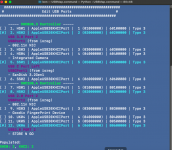
I've tried various USB Map kexts and am currenly using USBMap with the below setup. I may have not fully understood the process here so perhaps thats where im going wrong,, but basically mapped, nicknamed the USB ports im using and then disabled everything else (ensuring they were set to Type 3 for USB 3?)
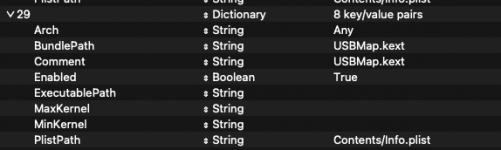
Config.plist, I Kernel - Add the USBMap Kext
Full Specs - Using NootedRed kext for graphics
Have I done something dumb with my USB Map - can anyone point me in the right direction?
I press the power button, nothing
Apple Menu sleep - the display turns off but a strike of the keyboard and it comes back on - fans never turn off.
I've tried various USB Map kexts and am currenly using USBMap with the below setup. I may have not fully understood the process here so perhaps thats where im going wrong,, but basically mapped, nicknamed the USB ports im using and then disabled everything else (ensuring they were set to Type 3 for USB 3?)
Config.plist, I Kernel - Add the USBMap Kext
Full Specs - Using NootedRed kext for graphics
- CPU - Ryzen 7 5700U
- RAM - 16 GB DDR4 3200mhz
- GPU - Vega 8
- WIFI - Intel AX200 (when it arrives), disconnected the built in WIFi and currently using USB dongle
Have I done something dumb with my USB Map - can anyone point me in the right direction?
