Lenovoa Ideapad Flex 5 14ALC05 - AMD 5700RU - Sequoia 15.7.4 - Sleep Not Working

masonb

New member
AMD OS X Member
Feb 20, 2026
9
0
1
CPU:
Ryzen 7 5700U
I was able to succesfully boot my Lenovo and everything else seems to be working in Sequoia v15.7.4 (minues WiFI/BT - waiting for an AX200 to arrive). Touchscreen, USB ports, audio, touchpad and keyboard etc all seem to fine - I just can't seem to get skeep working

I press the power button, nothing
Apple Menu sleep - the display turns off but a strike of the keyboard and it comes back on - fans never turn off.

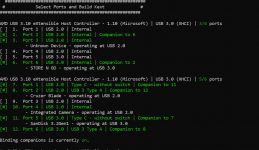
I've tried various USB Map kexts and am currenly using USBMap with the below setup. I may have not fully understood the process here so perhaps thats where im going wrong,, but basically mapped, nicknamed the USB ports im using and then disabled everything else (ensuring they were set to Type 3 for USB 3?)
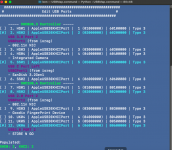
Screenshot 2026-02-26 at 9.33.46 pm.png


Config.plist, I Kernel - Add the USBMap Kext
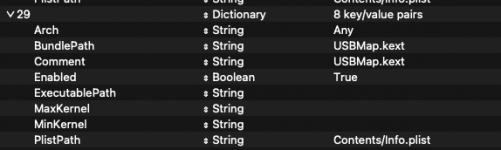
Screenshot 2026-02-26 at 9.38.11 pm.png


Full Specs - Using NootedRed kext for graphics
  • CPU - Ryzen 7 5700U
  • RAM - 16 GB DDR4 3200mhz
  • GPU - Vega 8
  • WIFI - Intel AX200 (when it arrives), disconnected the built in WIFi and currently using USB dongle

Have I done something dumb with my USB Map - can anyone point me in the right direction?
 
I figured this might help also?


ben@Bens-MacBook-Pro ~ % pmset -g assertions


2026-02-26 21:44:36 +0800


Assertion status system-wide:


BackgroundTask 0


ApplePushServiceTask 0


UserIsActive 1


PreventUserIdleDisplaySleep 0


PreventSystemSleep 0


ExternalMedia 0


PreventUserIdleSystemSleep 1


NetworkClientActive 0


Listed by owning process:


pid 184(coreaudiod): [0x0000059200018146] 00:01:04 PreventUserIdleSystemSleep named: "com.apple.audio.AppleHDAEngineOutput:0,6,0,1,2:0.context.preventuseridlesleep"


Created for PID: 408.


Resources: audio-out AppleHDAEngineOutput:0,6,0,1,2:0


pid 157(WindowServer): [0x0000001100098066] 00:00:00 UserIsActive named: "com.apple.iohideventsystem.queue.tickle serviceID:1000003df service:AppleUserHIDEventService product:Keyboard eventType:3"


Timeout will fire in 180 secs Action=TimeoutActionRelease


Kernel Assertions: 0x4=USB


id=501 level=255 0x4=USB creat= description=com.apple.usb.externaldevice.60100000 owner=802.11n NIC


Idle sleep preventers: IODisplayWrangler


ben@Bens-MacBook-Pro ~ %
 
To start your USBMap lacks any ports set as Internal (255) & Type-C (9) or (10). The screen image above says you have at least one Type-C port (port #5), but it is set as USB3. You don’t have a Webcam showing or any other internal USB devices (Bluetooth).

Does your laptop have any physical USB2 ports on the left or right side? If yes, these aren’t set correctly either (port #8).

I would recommend wiping your current USBMap.kext and starting again with the USB port discovery phase. Giving them names is a great idea, but make the names fit the port type and location, I.e. USB 3 Port1 left side or USB 3/2 Port1 left side, for the virtual USB2 companion port.
 
Hey, thanks for the response. I think I was naive to think I could just disable all of those in USBMap (camera etc) and that would have sorted it.

Ill give the map another shot .
 
Ok so I ended up created a WindowsToGo boot disk so I could utilise USB Toolbox.

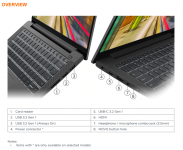
This is where I ended up with the mappings, I used the Lenovoa manual to guide me on port types:

Screenshot 2026-02-27 121710.png

I plugged USBs in during the Dicover phase and then came up with the below

Controller 1
Port 6 = Port 2 on Lenovo Tech Sheet which is USB 3.2 Gen1

Controller 2
Port 11 = Port 5 on Lenovo Tech Sheet which is USB-C 3.2 Gen1
Port 8 - Port 3 on Lenovo Tech Sheet is USB3.2 Gen 1 (Always On)

I then set all other ports to 255 (Internal)

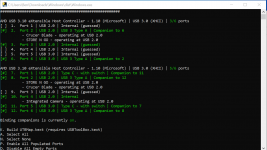
usbmap.PNGDumped this to a mapping KEXT and popped that into my EFI with USBToolBox.

Sadly sleep is still not working

Have I got it right this time - if not what am I doing wrong?
 
I ran pmset - g assertions again and can see its still calling out those USB devices, despite being set to Internal?

I decided to just disconnect the Fingerprint sensor from the motherboard, and the refrence to the 802.11n NIC is a USB nic, so i removed this (this is tempoary until the AX200 arrives). Still can't sleep.

That leaves this which im not sure about....

pid 158(WindowServer): [0x0000002800098068] 00:00:00 UserIsActive named: "com.apple.iohideventsystem.queue.tickle serviceID:10000043c service:AppleUserHIDEventService product:Keyboard eventType:3"


2026-02-27 13:07:42 +0800


Assertion status system-wide:


BackgroundTask 1


ApplePushServiceTask 0


UserIsActive 1


PreventUserIdleDisplaySleep 0


PreventSystemSleep 0


ExternalMedia 0


PreventUserIdleSystemSleep 0


NetworkClientActive 0


Listed by owning process:


pid 315(mds_stores): [0x00000272000b81f9] 00:00:00 BackgroundTask named: "com.apple.metadata.mds_stores.power"


pid 158(WindowServer): [0x0000002800098068] 00:00:00 UserIsActive named: "com.apple.iohideventsystem.queue.tickle serviceID:10000043c service:AppleUserHIDEventService product:Keyboard eventType:3"


Timeout will fire in 600 secs Action=TimeoutActionRelease


Kernel Assertions: 0x4=USB


id=501 level=255 0x4=USB creat= description=com.apple.usb.externaldevice.80300000 owner=Goodix FingerPrint Device


id=504 level=255 0x4=USB creat= description=com.apple.usb.externaldevice.60200000 owner=802.11n NIC


Idle sleep preventers: IODisplayWrangler


ben@Bens-MacBook-Pro ~ %
 
Last edited:
Setting all other ports as Internal is wrong.
 
Ports 2 & 6 should be set as USB3 (3), not Internal (255).
Ports 7 & 11 should be set as Type-C with switch (9), not Type#C without switch (10).
Ports 8 & 12 should be set as USB3 (3).
Ports 3 & 10 look correct as internal (255).

Port 3 is probably your disabled Bluetooth device.

Post a copy of the UTBMap.kext and I will manually edit the kext to correct any errors.
 
Many thanks for your help.

I booted up Windows again and set those ports as described. I saved a copy with all ports enabled as I figured you only need to disable them if 15 ports or more - is that correct? I also tried with just the external USB ports but no sleep.

Still no luck - see attached (copy with all enabled).
 

Attachments

No, if the port doesn’t exist, it should be disabled or better yet removed from the kext. As a phantom port with a random connection type could as easily cause problems, macOS won’t know it is a phantom port.

Always best to remove the phantom ports, so only known Internal, physical and virtual ports are present and enabled in the kext.
 
Ok, so I would just have the exetrnal USB ports, camera and bluetooth ports enabled and the rest disabled (noting the fingerprint scanner appeared in original scan but has since been disconnected physically).

Like so?

Capture.PNG

Still fails :(
 
Do the USB ports work at their expected speeds?
Does the devices connected to the external ports show on the Desktop and in Finder?
Does the Webcam work?
Have you seen any more USB related errors in the logs you generate after the sleep/wake test?
If yes, are they solely related to the Bluetooth and Fingerprint devices?

Do you know if your Card Reader, on the right-hand side of your laptop, is USB based?
If it is a Realtek model there may be a kext that will allow it to work in macOS, with a little editing to the info.plist within the kext.

Continued sleep/wake issues related to the USB port configuration may be fixed, but another aspect may still require attention before your laptop sleeps and wakes on macOS. Also it won’t work exactly the same as it does on Windows as the same controls and drivers aren’t present in macOS.

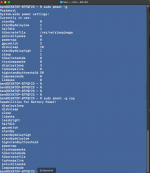
What do the Systemwide Powerr settings look like on macOS?
Open Terminal and copy and paste the following command, you will be asked to enter your password before the command executes.

sudo pmset-g

Then take a screenshot of the current setting that are displayed.

Enter (copy & paste) this command to show the power setting supported by the system.

sudo pmset-g cap

Take a screenshot of the new output and post both here so I can see if anything needs editing.
 
Ah right, honestly havent looked at the Camera or Card Reader - I had no intention to use either with this device. I just tried to open Photo Booth and teh webcam light turned on, but the application crashed and did not produce a video feed, so I guess thats not working. Will take a look at how to test USB speeds in the morning.

pmset -g assertions only shows the USB NIC - but i have this unplugged when I'm testing sleep.

Kernel Assertions: 0x4=USB
id=504 level=255 0x4=USB creat= description=com.apple.usb.externaldevice.60200000 owner=802.11n NIC

Power settings below:
Screenshot 2026-02-27 at 10.46.21 pm.png
 
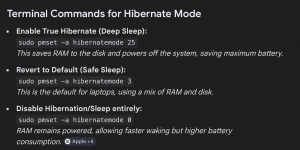
First, hibernate mode 0 isn’t ideal for a laptop, it is normally used for a desktop computer. You maybe better served using hibernatemode 3, 25 or 29. Use the following command to test each mode, see what difference each makes, I.e. test your system before switching to the next mode.

sudo pmset -a hibernatemode 3

This is based on the following.

hibernatemode terminal commands.png

Ther are different power settings available for battery or charger, plus options to say how long a delay before the system hibernates.

Alternative Settings: Use sudo pmset -b for battery settings only, or sudo pmset -c for charger settings.

Standby Delay: You can further tweak when a Mac moves from sleep to hibernate using sudo pmset -a standbydelayhigh [seconds].

Both of the above may be worth considering and testing, depending on your needs and use case.
 
Does your laptop contain a discrete GPU, I.e. an Nvidia dGPU?
If yes, how is it being disabled in macOS?
If via boot argument, I.e. -wegnoegpu, then this may be part of the problem.

An SSDT-DISABLE-DGPU.aml table would probably be a better solution.
 
  AdBlock Detected
Sure, ad-blocking software does a great job at blocking ads, but it also blocks some useful and important features of our website. For the best possible site experience please take a moment to disable your AdBlocker.