issue : Tahoe Installation on AMD Ryzen 5 3500X 6-Core Processor | AMD Radeon RX 5500 XT 8 GB | 16 GB 3200 MHz DDR4 | Sonoma 14.8.9 | Metal 3

Scorpio-Mac

New member
AMD OS X Member
Oct 15, 2026
2
0
1
CPU:
AMD Ryzen 5 3500X
Hello everyone,

I’m new to the forum, but it has already been an incredible help in getting my first Hackintosh up and running. I'm really glad I found this community and am excited to be a part of it!

I'm currently looking for guidance on upgrading to or performing a fresh install of macOS Tahoe on my AMD desktop.

My Current Setup:

  • CPU: AMD Ryzen 5 3500X 6-Core
  • Motherboard: ASUS TUF B550M
  • GPU: AMD Radeon RX 5500 XT (8 GB, Metal 3)
  • RAM: 16 GB 3200 MHz DDR4
  • Current OS: macOS Sonoma 14.8.9
  • Networking: PCIe Wi-Fi card
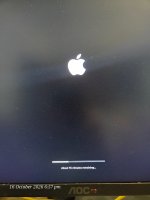
When trying to set up a new configuration with the Tahoe image on a pen drive, the Apple logo appears briefly with an error before bouncing back to the OpenCore boot menu.

I would prefer an in-place upgrade option if possible, but a clean installation is fine too. If anyone has tips or a working setup for this, I’d greatly appreciate the help.

(Note: I've attached my currently working EFI/Boot folder below in case it helps anyone else with a similar configuration. Front USB ports aren't working on this one yet, but I figured I'd leave that for future experimenting! 😉)

Thanks in advance!
 

Attachments

I did updated the USB as per the guidelines, able to boot into installation.
.but seems getting hanged at phase 2, where keyboard and mouse dont respond around 14 minute remaining.
And for some reason boot argument -v is not working ... will share the files once online ..
 

Attachments

  • 17921572727445999087476918676010.jpg
    17921572727445999087476918676010.jpg
    1.4 MB · Views: 0
When installing macOS Tahoe it is advised to use a minimum number of kexts, the essential kexts only, so no Sensor or other unnecessary kexts.

You also need to look at the ACPI folder contents, you have duplicate SSDT's for CPU, EC & USB power in your setup.

Also the iMacPro1,1 SMBIOS isn't supported in macOS Tahoe, it was dropped by Apple for this release. You need to use a MacPro7,1 SMBIOS for Tahoe.

This is what I mean by a Minimalist kext folder.
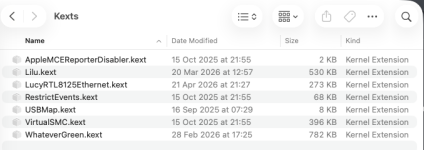

Screenshot 2026-10-16 at 15.57.31.png Minimalist /EFI/OC/Kexts folder contents for installing Tahoe.

These kexts should probably be updated, but they work in my system.

This is the contents of the EFI I would use for installing Tahoe on your Asus B550m system.

Screenshot 2026-10-16 at 15.58.33.png OC EFI folder contents revised for Tahoe to install.

Copy of the OC 1.0.7 EFI is attached for you to use as a base for revising your own EFI. My MacPro7,1 SMBIOS data has been removed from the config.plist, naturally.

This isn't the EFI I currently use in my Asus B550m Plus WiFi system, just the one with the chance of installing Tahoe. My current EFI in this system, which runs Sequoia, Tahoe and Windows 11 looks like this to take in to account the different/additonal components I use in my system.
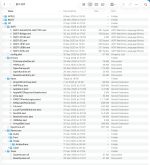
Screenshot 2026-10-16 at 16.05.46.png my current OC EFI folder contents

Hope this helps.

 

Attachments

✖
  AdBlock Detected
Sure, ad-blocking software does a great job at blocking ads, but it also blocks some useful and important features of our website. For the best possible site experience please take a moment to disable your AdBlocker.