Hello everyone,
I’m new to the forum, but it has already been an incredible help in getting my first Hackintosh up and running. I'm really glad I found this community and am excited to be a part of it!
I'm currently looking for guidance on upgrading to or performing a fresh install of macOS Tahoe on my AMD desktop.
My Current Setup:
- CPU: AMD Ryzen 5 3500X 6-Core
- Motherboard: ASUS TUF B550M
- GPU: AMD Radeon RX 5500 XT (8 GB, Metal 3)
- RAM: 16 GB 3200 MHz DDR4
- Current OS: macOS Sonoma 14.8.9
- Networking: PCIe Wi-Fi card
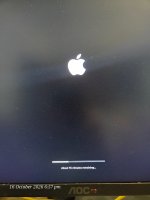
When trying to set up a new configuration with the Tahoe image on a pen drive, the Apple logo appears briefly with an error before bouncing back to the OpenCore boot menu.
I would prefer an in-place upgrade option if possible, but a clean installation is fine too. If anyone has tips or a working setup for this, I’d greatly appreciate the help.
(Note: I've attached my currently working EFI/Boot folder below in case it helps anyone else with a similar configuration. Front USB ports aren't working on this one yet, but I figured I'd leave that for future experimenting!  )
)
Thanks in advance!