so today I made my own configul and I put the https://opencore.slowgeek.com/?file=amd066vhJl6V&rs=amd066 to see if I did well but I get some errors,and do not know how to solve them,accestea are errors 16 patches found - Did you apply the kernel patches correctly? Please review the Kernel Docs , Need either VBoxHfs.efi, OpenHfsPlus.efi or HfsPlus.efi here,
OpenRuntime.efi is missing and You should have exactly 12 settings in the UEFI/Output section
The SlowGeek checker is out of date and should not be used with current versions of OpenCore. You are supposed to select the version of OpenCore from the drop down list. This list stopped being updated some time ago.
You should instead be using the OCValidate terminal command that is provided with each version of OpenCore.
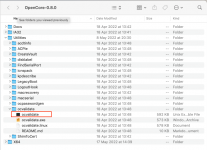
Navigate to the /OpenCore-0.x.x/Utilities/ocvalidate folder and select the ocvalidate terminal file, highlighted in the screenshot below. This is assuming you are using macOS. If not select the ocvalidate.Linux or for Windows the ocvalidate.exe option, if using one of those OS's to create your OC EFI.
ocvalidate macOS Terminal file highlighted.
When this is opened it will ask you to drag and drop your OC config.plist to the Terminal window. It will then compare the OC setup against a set of rules. Any rules broken or not meet will be highlighted.
This is important: You need to use the version of ocvalidate with the same version config.plist, otherwise the terminal file won't complete/work.
I also have the same system error as you. I don't know why, even though I've deleted and reinstalled many times, it still doesn't work. Even though I tried installing the techloky apk version of the game, my computer still crashes and cannot be used. Can I comment here to get answers and help from everyone?
This site uses cookies to help personalise content, tailor your experience and to keep you logged in if you register.
By continuing to use this site, you are consenting to our use of cookies.
Sure, ad-blocking software does a great job at blocking ads, but it also blocks some useful and important features of our website. For the best possible site experience please take a moment to disable your AdBlocker.