[HELP] Hackintosh on Ryzen 3 2200G (Vega 8) – No Hardware Acceleration

vieerdubey

New member
AMD OS X Member
Apr 15, 2026
1
0
1
CPU:
Ryzen 3200g vega 8 graphics
Hi everyone,


I’m currently running a Hackintosh setup and facing issues with graphics acceleration on my system. I’d really appreciate any guidance or suggestions.

Hardware Overview

  • SMBIOS: iMacPro1,1
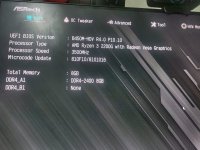
  • CPU: AMD Ryzen 3 2200G (Raven Ridge)
  • GPU: Integrated Radeon Vega 8
  • RAM: 8 GB
  • Mother Board: Asrock B450M-HDV

Issue

  • System boots successfully into macOS Ventura
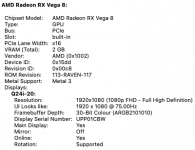
  • iGPU is detected (shows as Radeon Vega 8)
  • No hardware acceleration
  • Apps like video playback, animations, etc. are not smooth
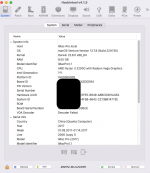
  • Tools like VDADecoderChecker fail

Please someone help me finxing the "VDADecoderChecker"
Facing this issue past 1 month
 

Attachments

  • EFI.zip
    EFI.zip
    8.3 MB · Views: 1
  • Screenshot 2026-04-15 at 7.50.43 PM.png
    Screenshot 2026-04-15 at 7.50.43 PM.png
    90.8 KB · Views: 7
  • Screenshot 2026-04-15 at 7.48.14 PM.png
    Screenshot 2026-04-15 at 7.48.14 PM.png
    35.6 KB · Views: 6
  • WhatsApp Image 2026-04-15 at 19.55.39.jpeg
    WhatsApp Image 2026-04-15 at 19.55.39.jpeg
    230.2 KB · Views: 6
Doesn't look as though graphics acceleration is affected. Your System Information > Graphics/Displays report looks OK.

The VDA Decoder failed message in Hackintool is normal for any AMD system using the Integrated GPU. It is expecting an Intel IGPU, so the AMD IGPU fails the test.
 
I have the same processor in an HP mid-tower PC running macOS Ventura. Everything is working well, except for the HDMI audio output, which isn't working
 
Which version of macOS are you running on your HP mid-tower system?
Which if any audio kexts are you using?
Have you installed any helper kexts, SSDT’s or patches while you are working on the HDMI audio?
 
Which version of macOS are you running on your HP mid-tower system?
Which if any audio kexts are you using?
Have you installed any helper kexts, SSDT’s or patches while you are working on the HDMI audio?
On both macOS Monterey and Ventura, AppleALC.kext works fine for my CPU's internal speakers and audio output. However, I am trying to fix HDMI audio output. I tried using VoodooHDA.kext, but it didn't work. I also tried adding a fake ID under DeviceProperties using AppleALC.kext; while the audio worked, it caused severe lagging issues.
 
Reset all and any ‘Fixes’ you have added to your setup, so you go back to using just the native AppleALC.kext and layout-id that previously worked.

Does the HDMI audio device show in the list of available audio devices in System Preferences > Sound?

It is normal for HDMI & DP audio devices to show in the sound preferences but to lack any volume controls, as macOS doesn’t provide any for these devices. You need to adjust the HDMI audio volume on the TV or display you are connected with, using the remote or onboard controls.
 
  AdBlock Detected
Sure, ad-blocking software does a great job at blocking ads, but it also blocks some useful and important features of our website. For the best possible site experience please take a moment to disable your AdBlocker.