[Help] B550 Aorus Elite V2 + 5900X | Sleep Instant Wake/Freeze & 20s Black Screen Delay

[nick]

New member
AMD OS X Member
May 7, 2020
4
0
1
Hi everyone,

I’ve successfully installed macOS Tahoe 26.3 (Build 25D125) on my Ryzentosh. General performance is excellent, but I am facing two specific issues that I haven't been able to solve despite extensive troubleshooting.

Here is my build:
MB: Gigabyte B550 AORUS ELITE V2 (Rev. 1.0/1.1)
BIOS: Latest Version (ErP Enabled)
CPU: AMD Ryzen 9 5900X
GPU: Radeon RX 6650 XT 8GB
RAM: 64 GB 3600 MHz DDR4
SSD: AORUS NVMe Gen4 SSD 1TB
OS: macOS Tahoe 26.3 (25D125)
Bootloader: OpenCore (1.0.6)

---

### Issue 1: Sleep Failure (Instant Wake -> Fan Ramp Up -> System Freeze)
This is the most critical issue. Here is the exact behavior sequence:
1. I click Sleep.
2. The screen turns off.
3. The system power seems to cut for a brief moment (approx. 1 second).
4. The system immediately wakes up (Instant Wake).
5. Fans spin up to high RPM, and the system completely freezes/hangs. I cannot wake the screen up, and I have to hard reset via the case button.

Video Evidence:
I have attached a video of this behavior in the Google Drive link below:

Troubleshooting Steps Taken:

BIOS Configuration:
  • ErP: Enabled (Confirmed).
  • Wake on LAN: Disabled.
  • USB Wake Support: Disabled.
  • Above 4G Decoding: Enabled.

USB Mapping:
  • Mapped using the corpnewt/USBMap script.
  • Port 10 (Internal Hub/Card Reader) and Port 11 (ITE Device) are set to Type 255 (Internal).
  • Physical Isolation Test: I physically disconnected the USB 2.0 Front Panel Header cable from the motherboard to rule out hardware wake signals from the case hub. The issue persists exactly the same way even with the cable disconnected.

ACPI & Config:
  • DummyPowerManagement: True.
  • Fix RTC _STA bug: Enabled.
  • SSDT-GPRW: Currently Removed (Tried enabling it before, made no difference).

Kexts:
  • NVMeFix.kext is installed.
  • AMDRyzenCPUPowerManagement.kext & SMCAMDProcessor.kext are installed.

---

### Issue 2: Post-Verbose Black Screen (No Signal for 20s)
I am experiencing a long delay during the boot process right before the login screen.

Behavior: Immediately after the verbose text finishes scrolling, the screen goes Black.
The Signal Loss: My monitor reports "No Signal" and stays in this state for approximately 20 seconds.
Resolution: After the delay, the Login Screen appears, and the system works perfectly with full acceleration and refresh rate. Note that I never see the Apple Logo at any point (Verbose -> Black Screen -> Login).

Graphics Setup:
GPU: RX 6650 XT
Boot-args: agdpmod=pikera is active.
Monitors: Main via DP (240Hz), Secondary via HDMI (75Hz).

---

Attachments:
  • config.plist (Serial redacted)
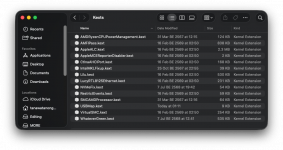
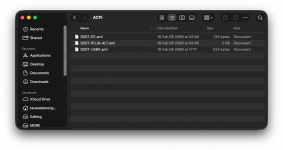
  • Screenshots of Kexts folder and ACPI folder.

I've exhausted all the standard fixes found on the forums. Any insights on the B550 instant wake/freeze or the black screen delay would be lifesavers.

Thank you in advance!
 

Attachments

  • config.plist
    config.plist
    42.5 KB · Views: 2
  • Screenshot 2569-02-19 at 01.58.58.png
    Screenshot 2569-02-19 at 01.58.58.png
    141.6 KB · Views: 5
  • Screenshot 2569-02-19 at 01.59.04.png
    Screenshot 2569-02-19 at 01.59.04.png
    219.9 KB · Views: 5
Hi. I could be wrong, but does the Radeon RX 6650 XT work properly in Tahoe? As far as I've seen, Fake ID is required for it to work. See Spoofing GPU for more information. But I could be wrong. I think they recommend using NootRX. There's also this
 
Hi. I could be wrong, but does the Radeon RX 6650 XT work properly in Tahoe? As far as I've seen, Fake ID is required for it to work. See Spoofing GPU for more information. But I could be wrong. I think they recommend using NootRX. There's also this
Hi luxferre,

Regarding the RX 6650 XT, I have successfully spoofed it using DeviceProperties (FakeID), and it works perfectly with full acceleration. So I think the GPU itself is fine.

However, thanks for the HibernationFixup link! That looks very promising for the "hang after resume" issue. I will add it to my EFI and test it right away. I'll report back if it solves the freeze.
 
While Troubleshooting these issues I would recommend disabling or removing the following kexts:
  1. CtlnaAHCIPort.kext
  2. AMDRyzenCPUPowerManagement.kext
  3. AppleALC.kext
  4. IntelMKLFixup.kext
  5. SMCAMDProcessor.kext
These are the boot args in your config.plist.

-v debug=0x100 keepsyms=1 agdpmod=pikera darkwake=0 revpatch=auto,sbvmm,cpuname revcpu=1 revblock=pci -lilubetaall unfairgva=1

I would recommend removing the following boot args.
  • darkwake=0
  • revpatch=auto,sbvmm,cpuname
  • revcpu=1
  • revblock=pci
  • -lilubetaall
Darkwake boot arg stopped working some time ago (years), and it was never meant for use on an AMD system.
You have NVRAM > Add entries for the RestrictEvents kext, which duplicate the revpatch and revcpu boot arguments.
under the revpatch NVRAM > Add entry change cpuname to auto and you then don't need the revblock=pci boot arg.
Tahoe is no longer in Beta, so the lilu.kext boot arg is not required.
 
Can you post a copy of your USBMap.kext, so we can check that it is configured correctly for Tahoe.

To help you I have attached a copy of the OC 1.0.5 EFI I use with my Asus B550 system to run Ventura, Sonoma, Sequoia and Tahoe. All run well with the same EFI setup. I have used the MinKernel & MaxKernel entries to set certain kexts to work with specific versions of macOS, such as Sonoma and Sequoia using OpenCore Legacy Patcher for my Broadcom WiFi card.

Just to clarify the system consists of the following:

OC1.0.5 for Asus TUF Gaming B550 Plus WiFi II / Ryzen 9 5900X / RX 6750 XT / BCM43602 WiFi & BT / RTL8125 2.5G NIC / AQC113CS 10G NIC

I don't use the builtin Intel WiFi/BT card that came with the motherboard, nor do I use the Realtek NIC, as my home network is setup for 10G.

Have a look through the EFI and see if anything looks interesting or that you would like to add to your setup. I can explain how to generate the custom SSDT's etc.

Just to clarify I don't have any Sleep/Wake issues with this B550 system.
 

Attachments

Can you post a copy of your USBMap.kext, so we can check that it is configured correctly for Tahoe.

To help you I have attached a copy of the OC 1.0.5 EFI I use with my Asus B550 system to run Ventura, Sonoma, Sequoia and Tahoe. All run well with the same EFI setup. I have used the MinKernel & MaxKernel entries to set certain kexts to work with specific versions of macOS, such as Sonoma and Sequoia using OpenCore Legacy Patcher for my Broadcom WiFi card.

Just to clarify the system consists of the following:

OC1.0.5 for Asus TUF Gaming B550 Plus WiFi II / Ryzen 9 5900X / RX 6750 XT / BCM43602 WiFi & BT / RTL8125 2.5G NIC / AQC113CS 10G NIC

I don't use the builtin Intel WiFi/BT card that came with the motherboard, nor do I use the Realtek NIC, as my home network is setup for 10G.

Have a look through the EFI and see if anything looks interesting or that you would like to add to your setup. I can explain how to generate the custom SSDT's etc.

Just to clarify I don't have any Sleep/Wake issues with this B550 system.
Wow, thanks Edhawk! It's super helpful to know someone with almost the exact same spec (B550+5900X) has sleep working perfectly. Gives me hope lol.

I'm on it:
1. Cleaning up the boot-args and fixing the NVRAM revpatch to 'auto' right now.
2. I'll disable those non-essential kexts you mentioned to isolate the issue.

Attached is my USBMap.kext as requested. Let me know if it looks correct.

Also, big thanks for sharing your EFI. I'm gonna dig through your ACPI folder to see what I'm missing. If there's a specific SSDT that handles the instant wake, point me to it!

Cheers!
 

Attachments

Most of the SSDTs in my ACPI folder were created using Corpnewt’s SSDTTime script and my system ACPI tables. The exception being the Acquantia SSDT, which was obtained from a post over at Tonymacx86’s.

I will have a look at your USBMap.kext tomorrow (Thursday) when I am next at my desk.
 
OK, so your USBMap.kext is in the correct format for running Tahoe and any earlier versions of macOS back to Catalina. It should be OK to use in Tahoe.

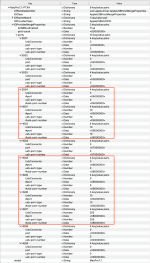
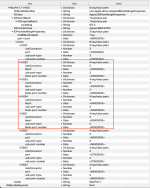
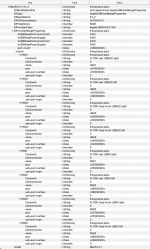
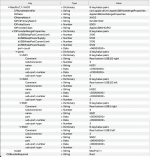
However, you have only a limited number of USB ports active under the 2 x USB controllers (PTXH & XHC0).

You have 6 of 13 ports enabled under the PTXH controller and 4 of 8 ports enabled under the XHC0 controller. As you have 2 x USB controllers there is no logical reason why you can't enable all 21 x ports under macOS. As EACH controller can enable and activate a maximum of 15 x USB ports. So in theory your B550 system could enable a maximum of 30 x USB ports through the 2 x USB controllers.

Unlike Intel systems, which usually only have 1 x USB controller (XHC), where Apple's 15 x port limit really does limit the number of ports that can be enabled and active in macOS. AMD system usually have 2 or more USB controllers, each allowing macOS to run 15 x ports.

So I would recommend that you reassess your USBMap.kext and Enable any ports that you have discovered and would like to have the option to use under macOS. There may not be that many ports you have disabled or left inactive, but having at least 50% of the ports under each controller disabled seems wrong to me.

Screenshot 2026-02-19 at 14.26.10.png PTXH USB controller ports, highlighted ports have been disabled.

Screenshot 2026-02-19 at 14.28.21.png XHC0USB controller ports, highlighted ports have been disabled.

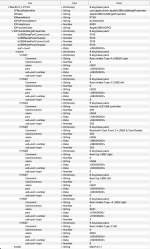
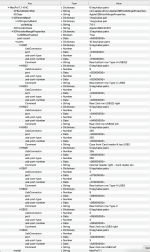
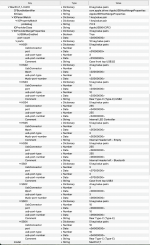
As an example, my B550 system currently enables the same two USB controllers as yours, but with an additional PCIe USB card (separate Fresco Logic USB controller) providing 8 x USB3 ports, for a total of 20 x USB ports (8, 8 & 4 x ports).

Screenshot 2026-02-19 at 14.33.49.pngScreenshot 2026-02-19 at 14.34.09.pngScreenshot 2026-02-19 at 14.34.36.png PTXH, X1-2 and XHC0 USB controllers and ports from my Asus B550 system.

My X570 motherboard has 3 x USB controllers builtin, which enable 28 x USB ports across the 3 controllers (10, 8 & 8 x ports).

Screenshot 2026-02-19 at 14.37.42.pngScreenshot 2026-02-19 at 14.38.15.pngScreenshot 2026-02-19 at 14.38.49.png PTXH, XHC0 and XHC0 (2) USB controllers and ports from my X570 system.
 
OK, so your USBMap.kext is in the correct format for running Tahoe and any earlier versions of macOS back to Catalina. It should be OK to use in Tahoe.

However, you have only a limited number of USB ports active under the 2 x USB controllers (PTXH & XHC0).

You have 6 of 13 ports enabled under the PTXH controller and 4 of 8 ports enabled under the XHC0 controller. As you have 2 x USB controllers there is no logical reason why you can't enable all 21 x ports under macOS. As EACH controller can enable and activate a maximum of 15 x USB ports. So in theory your B550 system could enable a maximum of 30 x USB ports through the 2 x USB controllers.

Unlike Intel systems, which usually only have 1 x USB controller (XHC), where Apple's 15 x port limit really does limit the number of ports that can be enabled and active in macOS. AMD system usually have 2 or more USB controllers, each allowing macOS to run 15 x ports.

So I would recommend that you reassess your USBMap.kext and Enable any ports that you have discovered and would like to have the option to use under macOS. There may not be that many ports you have disabled or left inactive, but having at least 50% of the ports under each controller disabled seems wrong to me.

View attachment 18903 PTXH USB controller ports, highlighted ports have been disabled.

View attachment 18904 XHC0USB controller ports, highlighted ports have been disabled.

As an example, my B550 system currently enables the same two USB controllers as yours, but with an additional PCIe USB card (separate Fresco Logic USB controller) providing 8 x USB3 ports, for a total of 20 x USB ports (8, 8 & 4 x ports).

View attachment 18905View attachment 18906View attachment 18907 PTXH, X1-2 and XHC0 USB controllers and ports from my Asus B550 system.

My X570 motherboard has 3 x USB controllers builtin, which enable 28 x USB ports across the 3 controllers (10, 8 & 8 x ports).

View attachment 18908View attachment 18909View attachment 18910 PTXH, XHC0 and XHC0 (2) USB controllers and ports from my X570 system.
Thanks for taking the time to look into my USBMap. That makes total sense! I was definitely stuck in the Intel mindset, thinking the 15-port limit applied to the entire system. I'll go into the Info.plist, remove the # to un-restrict those ports, and get them all enabled.

That being said, I should mention that even with the ports aggressively limited like this, my sleep issue is quite severe. When I click sleep, the machine seems to turn off for about 1 second, but then the fans suddenly spin up loudly and the entire system completely freezes/hangs. I can't wake it up and have to force a hard reset.

To rule out ACPI issues, I actually just rebuilt all my SSDTs from scratch using CorpNewt's SSDTTime. I'm currently running SSDT-HPET (with the required config patches), SSDT-EC, SSDT-USBX, SSDT-Bridge, and SSDT-SBUS-MCHC. I also tried using SSDT-GPRW.aml (with the GPRW to XPRW patch), but that exact same fan-spin and freeze crash happens whether the GPRW patch is enabled or completely removed.

On top of that, I'm still dealing with a frustrating black screen issue. During a normal boot, the screen goes black for about 20 seconds before hitting the login screen. Worse, sometimes when I do a normal restart, it just hangs on a black screen indefinitely. The strange thing is this happens exactly the same whether I use ChefKissInc/NootRX or WhateverGreen for my RX 6650 XT.

Do you think the black screen and this hard sleep crash could somehow be connected? Any pointers on what to check next would be hugely appreciated!
 

Attachments

Have you tried using the Algrey/Zormeister PAT fixes in the AMD Kernel patches in place of the Shaneee/Zormeister patches? Did this make any difference with the black screen behaviour?

When you used NootRX.kext, in place of WhateverGreen.kext:
  1. Did you retain the fake Device ID entry in the DeviceProperties section of your config.plist?
  2. Did you retain the other DeviceProperties entry (audio)? Use alcid=1 inlace of the DeviceProperties entry. Does the same job.
  3. As NootRX.kext has issues with ANY DeviceProperties being used in the config.plist.
  4. It is always best to use a custom SSDT or a boot argument to inject properties when using NootRX.kext or NootedRed.kext.
  5. Did you retain the agdpmod=pikera boot argument, as again this isn't required when using NootRX.kext.
  6. The Fake ID isn't required for your RX 6650 XT when using NootRX.kext, as the Device ID for all supported Navi II dGPU's are baked in to the kext.
Neither of my RX 6750 XT cards require any additional patches or fixes when I use NootRX.kext.

You still need to remove the -lilubetaall boot argument, as it is not required.

Add sbvmm to the revpatch NVRAM > Add entry, separated from the 'auto' entry by a comma, i.e. auto,sbvmm (no spaces).

What did you use the SSDT-Bridge.aml table to fix, i.e. which device?
 
  AdBlock Detected
Sure, ad-blocking software does a great job at blocking ads, but it also blocks some useful and important features of our website. For the best possible site experience please take a moment to disable your AdBlocker.