
GV-WAKE Failure AMD Ryzen 7 5825U
- Thread starter k1tt3nz
- Start date
-
Hello Guest. Before you post check the Troubleshooting guide here, Dortania Troubleshooting
You are using an out of date browser. It may not display this or other websites correctly.
You should upgrade or use an alternative browser.
You should upgrade or use an alternative browser.


To fix the graphics on your laptop you need to install NootedRed.kext.
Use the Nightly Build link to download the latest version of the kext.
There are a couple of elements you need to be aware of when using this kext.
Can't help with the WiFi/Bluetooth or any other issues, as you haven't provided any information regarding these devices.

Use the Nightly Build link to download the latest version of the kext.
There are a couple of elements you need to be aware of when using this kext.
- You need to increase the graphics VRAM (shared system memory) from 512MB to a minimum of 1GB, more is obviously better.
- Use Smokeless_UMAF Bios editor to increase the amount of VRAM. Only change the VRAM with this Bios Tool.
- https://github.com/DavidS95/Smokeless_UMAF
- Do not have WhateverGreen.kext or NootRX.kext in your OC setup along side NootedRed.kext, as they will clash.
- Do not have any DeviceProperties in your config.plist, as these will clash with NootedRed.kext.
- Use MacBookPro16,3 SMBIOS
Can't help with the WiFi/Bluetooth or any other issues, as you haven't provided any information regarding these devices.
How did you solve the issue? I am facing the same error on my ASUS laptop.I solved the issue, and also make sure that I'm refreshing the snapshot. So I'm currently in, but facing other issues with drivers (wifi/bluetooth, video graphics, etc)
I am also curious to know, coz I am trying for 2 days to fix it, but without success.I solved the issue, and also make sure that I'm refreshing the snapshot. So I'm currently in, but facing other issues with drivers (wifi/bluetooth, video graphics, etc)
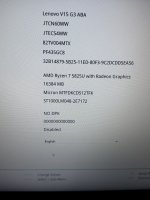
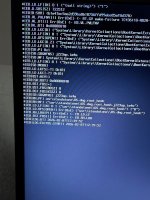
Post a copy of the EFI folder you are using to boot your laptop. As we can't help you if we don't know what you are using and what could be causeing the kernel panic.
Just make sure you redact/delete the serial number from the config.plist before posting a copy here.
Dizüstü bilgisayarınızı başlatmak için kullandığınız EFI klasörünün bir kopyasını gönderin. Ne kullandığınızı bilmiyorsak size yardımcı olamayız ve bu çekirdek paniğini yaratır/neden olur.
Buraya bir kopyasını göndermeden önce seri numarasını config.plist'ten düzelttiğinizden/sildiğinizden emin olun.
Just make sure you redact/delete the serial number from the config.plist before posting a copy here.
- Also give us full details of the NVME or SATA SSD you are using, do you have Windows already installed on the drive?
- Which WiFi/Bluetooth card are you using, i.e. make and model?
- Which LAN/Ethernet controller does your laptop use, make and model?
Dizüstü bilgisayarınızı başlatmak için kullandığınız EFI klasörünün bir kopyasını gönderin. Ne kullandığınızı bilmiyorsak size yardımcı olamayız ve bu çekirdek paniğini yaratır/neden olur.
Buraya bir kopyasını göndermeden önce seri numarasını config.plist'ten düzelttiğinizden/sildiğinizden emin olun.
- Ayrıca bize kullandığınız NVME veya SATA SSD'nin tüm ayrıntılarını verin, sürücüde zaten yüklü Windows var mı?
- Hangi WiFi/Bluetooth kartını kullanıyorsunuz, yani marka ve model?
- Dizüstü bilgisayarınız hangi LAN/Ethernet denetleyicisini kullanıyor, markası ve modeli?
Cevabınız için teşekkürler: İşte EFI ve Config.plistDizüstü bilgisayarınızı başlatmak için kullandığınız EFI klasörünün bir kopyasını paylaşın. Çünkü ne kullandığınızı ve çekirdek paniğine neyin sebep olabileceğini bilmiyorsanız size yardımcı olamayız.
Burada bir kopya göndermeden önce config.plist'ten seri numarasını sansürlediğinizden veya sildiğinizden emin olun.
- Ayrıca kullandığınız NVME veya SATA SSD'nin tam detaylarını verin, sürücüde Windows zaten yüklü mu?
- Hangi WiFi/Bluetooth kartını kullanıyorsunuz, yani marka ve model?
- Dizüstü bilgisayarınız hangi LAN/Ethernet kontrolcüsü kullanıyor, markası ve modeli?
Dizüstü bilgisayarınızı başlatmak için kullandığınız EFI klasörünün bir kopyasını gönderin. Ne kullandığınızı bilmiyorsak size yardımcı olamayız ve bu çekirdek paniğini yaratır/neden olur.
Buraya bir kopyasını göndermeden önce seri numarasını config.plist'ten düzelttiğinizden/sildiğinizden emin olun.
- Ayrıca bize kullandığınız NVME veya SATA SSD'nin tüm ayrıntılarını verin, sürücüde zaten yüklü Windows var mı?
- Hangi WiFi/Bluetooth kartını kullanıyorsunuz, yani marka ve model?
- Dizüstü bilgisayarınız hangi LAN/Ethernet denetleyicisini kullanıyor, markası ve modeli?
Attachments
I will have a look at the files and folder when I am next at my desk, later this evening.
Probably won’t get to it until tomorrow.
Probably won’t get to it until tomorrow.
Last edited:
@hitekbas The SSDT's present in the /EFI/OC/ACPI folder look to have been collected from a number of places. They do not look like they were created in Windows using Corpnewt's SSDTTime script, which would be the best option. So I would distrust a number of the SSDT's straightaway, as some appear to be created for Intel systems.
The Drivers & Resources folder contents looks fine.
You don't need CsrUtil.efi in your Tools folder.
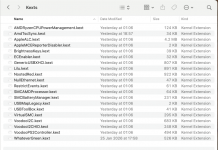
Your Kexts folder contents is a mess, for a first time installation of macOS Sequoia.
The screenshot below shows the current contents of your /EFI/OC/Kexts folder:
This is what I would expect to see in your Kexts folder:
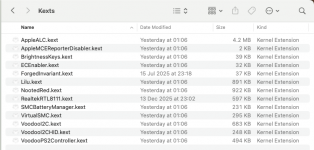
Sometimes less is more!
When using NootedRed.kext to drive the AMD IGPU you should not be using any DeviceProperties in your config.plist, as these will likely clash with the kext and cause an unnecessary kernel panic while booting the system.
I have gone through your config.plist, changing things to better match the Ryzen guide.
I have also removed a number of kexts, SSDT's and an entry from the Tools folder.
See if the revised EFI gets you any closer to the installation phase.
- I don't know if your Laptop requires SSDT-CPUR.aml, as I doubt the chipset used is an AMD B550 chip.
- SSDT-PLUG-ALT.aml does a very similar job to SSDT-CPUR.aml, so you definitely don't need both ACPI tables. I would remove the SSDT-CPUR.aml table if choosing between the two tables.
- SSDT-EC-USBX-AMD.aml is a table that is used for AMD Desktop systems. This is also being duplicated by the presence of SSDT-EC.aml and SSDT-USBX.aml. I would remove SSDT-EC-USBX-AMD.aml if choosing between the two options.
- I am not sure if your SSDT-HPET.aml table and the associated ACPI Patches in your config.plist are set correctly for your laptop. They look sort of OK, but ....
- SSDT-SBUS-MCHC.aml looks to be from an Intel system, it would have a completely different device path in the SSDT if it had been created for an AMD system/laptop. I would remove this table as it is not essential for booting macOS.
- I am not sure about SSDT-ALS0.aml or SSDT-PNLF.aml. These will both be essential if your laptop contains an Ambient Light Sensor (ALS), only SSDT-PLNF is required if your laptop doesn't have an ALS. So confirming if an ALS is present and getting the correct tables in your setup is not an option.
- SSDT-ALS0.aml is required for Ambient Light Sensor ACPI Device; Required for Backlight functioning; Required for AIO and Laptops
- SSDT-PNLF.aml sets up a PNLF device for laptop backlight control.
The Drivers & Resources folder contents looks fine.
You don't need CsrUtil.efi in your Tools folder.
Your Kexts folder contents is a mess, for a first time installation of macOS Sequoia.
The screenshot below shows the current contents of your /EFI/OC/Kexts folder:
This is what I would expect to see in your Kexts folder:
Sometimes less is more!
When using NootedRed.kext to drive the AMD IGPU you should not be using any DeviceProperties in your config.plist, as these will likely clash with the kext and cause an unnecessary kernel panic while booting the system.
I have gone through your config.plist, changing things to better match the Ryzen guide.
I have also removed a number of kexts, SSDT's and an entry from the Tools folder.
See if the revised EFI gets you any closer to the installation phase.