Ghost Reboot / Restart instead of Shutdown - ASRock B650E Steel Legend WiFi

errevi

Donator
Donator
AMD OS X Member
Mar 8, 2021
91
1
23
8
Italia
CPU:
7800x3d

Hardware​

  • Motherboard: ASRock B650E Steel Legend WiFi
  • BIOS: 4.10 (AGESA ComboAM5 PI 1.3.0.0a) — tested also on 3.50, same issue
  • CPU: AMD Ryzen 7 7800X3D
  • OS: macOS Tahoe 26.3 / Sequoia (same issue on both)
  • Bootloader: OpenCore 1.0.6
  • OCLP laobamac 3.5.1

Problem​

The system shuts down for a second and then immediately restarts instead of staying powered off. The issue is present on every BIOS version from 3.08 onwards (AGESA 1.2.x and 1.3.x). AGESA 1.1.x was not tested.

Sleep/Wake works fine, I just need a second click after keyboard/mouse has been waked up.

Investigation​

pmset logs confirm:

  • SMC shutdown cause: 5 → macOS correctly sends S5 shutdown signal
  • Dark Wake Count: 3 → system wakes immediately 3 times after every shutdown
  • The system enters S5 correctly, but something triggers an immediate wake at hardware level
Root cause identified in DSDT:

In Method (SPTS), when Arg0 == 0x05 (S5 shutdown):

asl
If ((Arg0 == 0x05))
{
PWDE = One // This is the problem!
}

PWDE is bit 6 at offset 0x3BB of OperationRegion (GSMM, SystemMemory, 0xFED80000, 0x1000).

Setting PWDE = 1 during S5 appears to trigger an AGESA-level wake event, causing the immediate reboot. This behavior is identical across BIOS 3.08 through 4.10.

_S5 is correct: {0x05, 0, 0, 0} — macOS knows S5 properly.

What has been tried (all failed)​

  1. Binary patches — _PRW S4→S3 for 0x02 and 0x08 wake sources (DSDT has 76 static Name (_PRW) declarations)
  2. SSDT-PRWFIX — override all 76 static _PRW with Method returning {0x00, 0x00} → fails with AE_ALREADY_EXISTS
  3. SSDT-SPTSFIX — rename SPTS→XPTS, redefine SPTS to call XPTS then set PWDE = Zero after S5 → SSDT loads correctly but reboot persists
  4. SSDT-DisableXHC — disable _STA of XHC0/XHC1/XHC2 via Darwin-only _STA = 0 → loads correctly but reboot persists
  5. HibernationFixup with hbfx-ahbm=129 → no effect
  6. FadtEnableReset = true → no effect
  7. BIOS settings — Deep Sleep disabled, USB Device Power On disabled, PCIE Devices Power On disabled, RTC Alarm Power On disabled, USB Power delivery in S5 disabled — all already disabled
  8. pmset — powernap=0, womp=0, tcpkeepalive=0 — no effect on shutdown behavior

Key observation​

The SSDT-SPTSFIX approach correctly loads and executes — the rename SPTS→XPTS works, the new SPTS calls XPTSand then sets PWDE = Zero. However the reboot still occurs, suggesting that PWDE is either not the sole trigger, or the AGESA acts on it before our ACPI override can clear it, or the wake event is triggered at a lower level than ACPI can reach.

Question​

Has anyone found a working solution for this specific issue on B650/X670 with AGESA 1.2.x or 1.3.x?

Is this truly only fixable via BIOS mod patching the AGESA binary directly?

Any help appreciated!
 

Attachments

Last edited:
  • Like
Reactions: Jumper981
I also have this problem on my X670 after BIOS 1.30, did you find the cause?

The evidence indicates that macOS is successfully requesting S5 and entering shutdown, but the AMD firmware/AGESA immediately asserts a wake or power-on event afterward. The fact that Windows and Linux shut down correctly strongly suggests they are following a different firmware path, setting different PMC/SMU state, or triggering different ACPI branches. At this point the problem looks much more like an AGESA/firmware incompatibility exposed by macOS than a macOS shutdown failure itself.
I have just updated BIOS to version 4.41 with new AGESA 1.3.0.1b, same problem, furthermore after BIOS update isn't waking from sleep properly and I need to investigate why (maybe USB ports or MMIO addresses have changed)
 
@errevi You have posted the ACPI tables but not the EFI folder you're using. In the spirit of the International Journal of Negative Results, even failed SSDTs could be interesting to analyse.

Are you using custom ACPI patches, such as those provided on request by CorpGhost? If not, you may try this set of three patches to (re)enable a few conditional ACPI devices which are not properly created under macOS.
 

Attachments

@errevi You have posted the ACPI tables but not the EFI folder you're using. In the spirit of the International Journal of Negative Results, even failed SSDTs could be interesting to analyse.

Are you using custom ACPI patches, such as those provided on request by CorpGhost? If not, you may try this set of three patches to (re)enable a few conditional ACPI devices which are not properly created under macOS.
@etorix Thanks for your interest in the matter, here's my EFI if you want to take a look
 

Attachments

You're welcome. So I see you are not using motherboard-specific patches for the conditional device declarations, so you may try my almost-generic patches above ("MSI" version).
I don't know if that alone will fix the ghost reboot issue, but it should improve how macOS sees the USB controllers and other devices hanging from the B650. Windows and Linux are not affected because these OSes correctly read operational values (G0xx), correctly parse the conditional declarations and correctly initialises the devices thereunder.
 
Last edited:
  • Like
Reactions: errevi
@etorix I have just tested your patches, after cleaning nvram, but unfortunately it still restart instead of shutdown.
At this point i do not know what else to try, thanks for your time, appreciated!
 
  • Like
Reactions: etorix
OK. At least, I infer that it still boots with my patches. And this has provided two more motherboards to my records, which has eventually prompted me to write a better explanation.

Do the patches affect USB behaviour, or other devices? (@Jumper981 reported that he had to modify the RTL812x kext…)
Is this with or without the acpi-wake properties and GPRW/PWDE patches?
 
Last edited:
@etorix usb or other device seems to be unaffected, regarding your patches I have just added them to my configuration without touching anything else
 
Browsing through your configuration (keep in mind I'm no expert…) I wonder what the GPRW and PWDE patches are doing, as there's no SSDT which use the renamed functions.
Based on the comments, the USB map appears to feature logical HS ports with type 0 and SS ports with type 3 for the same physical ports. These should all be 3. 0 is for pure USB 2 ports.
 
  • Like
Reactions: errevi
@etorix: sorry for very late reply, I've finally had some time to check your suggestions and :
  • removed the 2 patches (GPRW and PWDE), you are right, they were actually doing nothing
  • reverted to BIOS 4.20, sleep and wake work again now
  • added your 3 patches
  • changed the logical HS ports with type 0 to type 3
  • nvram reset
  • tested a shutdown from opencore picker: it works correctly
  • tested a shutdown from recovery: same restart instead of shutdown
  • tested a shutdown from os: same restart instead of shutdown

I think I have now try everything I could imagine
 
  • Like
Reactions: etorix
@etorix: sorry for very late reply, I've finally had some time to check your suggestions and :
  • removed the 2 patches (GPRW and PWDE), you are right, they were actually doing nothing
  • reverted to BIOS 4.20, sleep and wake work again now
  • added your 3 patches
  • changed the logical HS ports with type 0 to type 3
  • nvram reset
  • tested a shutdown from opencore picker: it works correctly
  • tested a shutdown from recovery: same restart instead of shutdown
  • tested a shutdown from os: same restart instead of shutdown

I think I have now try everything I could imagine
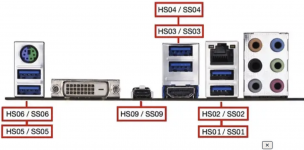
Hi @errevi . Glad you got your ACPI SSDTs files worked out. Now that you have that settled you need to take another run at USB Port Mapping which is usually the cause of a reboot on shutdown. I have lost count on how many times that same issue has been reported, not just here but on other Hackintosh sites, and how many times I’ve seen an answer like this posted to resolve the issue.

The solution is to first understand how various types of USB ports should be mapped. You can use the guide below, I stole from Ed Hawk, to work off of being aware that each USB 3 and each USBc port has two ports to identify. Both have an HS0 port and an S0 port and both need to be mapped as the same type. If it is a USB3 then both the HS0 and S0 ports are labeled as type 3. If it is a USBc then both are labeled as type 9 or sometimes, and less commonly, as type 10.

Starting there then it’s necessary to spend time to correctly identify which ports you want and what type they are before you create the kext. Once that’s done then you will have to trouble shoot the end result to make sure your devices work as anticipated, the machine sleeps and wakes properly and it shuts down instead of reboot. It’s rare a first effort is 100% correct and tweaks to the kext often need to be made. I usually use a plist editor to open the kext and make changes.

I can see from your port map labeling you seem to have USB3 ports mapped as both type 0 and type 3, that is incorrect. You also seem to be missing the HS0 part of your USBc ports which is also incorrect. If you can straighten that out its very likely your reboot issue will be corrected. Good Luck!


Courtesy of Ed Hawk


How to set USB Port Status

  1. USB2 (0) - Physical USB2 ports on rear I/O plate, these ports always have a Black coloured tang.
  2. USB3 (3) - Physical USB3 ports on rear I/O plate, these ports can have a Red, Blue, Cyan or Yellow coloured tang.
    1. Virtual USB2 ports - served from physical USB3 ports) should be set with the same connector type as the physical port
  3. USB3 (3) - Motherboard Header, usually serving the case front USB3 ports.
    1. Virtual USB2 ports - served from physical USB3 ports) should be set the same as the physical port
  4. Internal (255) - Motherboard USB2 header, this will be any device served from a header port, such as Bluetooth module, case front USB2 ports, case front card reader etc.
    1. Internal connector type should also be used for any Bluetooth USB connection from a built-in M.2 connector (on the Rear I/O plate).
  5. Type-c+sw (9) - Type-C connector on Rear I/O plate, will only show two ports being available,
    1. when the Type-C device is inserted, removed, flipped 180° and reinserted, 1 x Physical Type-C and 1 x virtual USB2 port.
  6. Type-c (10) - Type-C (E) motherboard header, will show four ports being available from a single Type-C connector,
    1. when the Type-C device is inserted, removed, flipped 180° and reinserted, 2 x Type-C and 2 x USB2.
 

Attachments

  • USB Mapping.png
    USB Mapping.png
    572.9 KB · Views: 4
Last edited:
  • Like
Reactions: errevi
AM5/AGESA "Shutdown causes reboot" - Full diagnostic summary (updated)

Hardware: ASRock B650E Steel Legend WiFi, Ryzen 7 7800X3D
Tested BIOS: 3.0.1 and 4.20 - identical behavior on both
Tested OS: macOS Tahoe 26.6 and macOS Sequoia - identical behavior on both
Bootloader: OpenCore 1.0.7, OCLP laobamac 3.5.1

SYMPTOM
System shuts down for about 1/2 second, then powers back on with a full POST (cold boot, not a resume). pmset confirms SMC shutdown cause: 5 (software-initiated) and Dark Wake Count: 3 after each shutdown, with Sleep/Wakes since boot: 0 in every log - macOS never logs an actual wake event, the reboot is invisible to any OS-level power management log. AppleSMC explicitly logs a clean software-initiated shutdown (cause 5), no kernel panic found in diagnostic reports or unified log around the shutdown timestamp.

Sleep/Wake (S3) works perfectly.

INITIAL DSDT FINDING
SPTS method (called from _PTS) sets PWDE = One (bit 6, offset 0x3BB) in OperationRegion (GSMM, SystemMemory, 0xFED80000, 0x1000) when Arg0 == 0x05 (S5).

Real controller topology, confirmed via live ioreg (not just static DSDT reading):
  • XHC0, \_SB.PCI0.GP17.XHC0 (func 3), PCI 1022:15b6, native FCH
  • XHC2, \_SB.PCI0.GP17.XHC2 (func 4), PCI 1022:15b7, native FCH (NOTE: not "XHC1" - naming confirmed from live ACPI path, not just DSDT grep)
  • XHC3, \_SB.PCI0.GP19.XHC3 (func 0), PCI 1022:15b8, native FCH
  • XH00, \_SB.PCI0.GPP7.UP00.DP60.XH00, PCI 1b21:1142 (ASMedia ASM1142/3142), discrete PCIe controller, not part of FCH

Two GPE handlers found in the DSDT:
  • _L19 (GPE 25/0x19) - notifies GP17.XHC0, GP17.XHC1(sic, static name), AZAL, ACP, power button
  • _L1A (GPE 26/0x1A) - notifies GP19.XHC2(sic, static name)

TESTS PERFORMED, all with a real shutdown attempt as the pass/fail criterion

1. PWDE forced to 0 for S5 (full DSDT recompiled, loaded as ACPI override) - no change
2. Entire GPE0_EN register cleared, all 32 bits, via SPTS->XPTS binary rename SSDT (I/O 0x824-0x827, confirmed from FACP dump) - no change
3. PME_En cleared on all three native XHC controllers via PCI Config PMCSR bit 8, using CORRECT ACPI device names (XHC0, XHC2, XHC3) after an earlier test had used wrong names (XHC1 instead of XHC2) which likely made that earlier SSDT fail to load entirely - no change, this time a valid/trustworthy negative result
4. All USB devices physically disconnected, including Bluetooth - no change
5. USB port-mapping kext removed entirely - no change
6. USB port mapping corrected (type 0->3, HS0 pairing) per community suggestion - no change, reboot persists in Recovery and full OS, only OpenCore picker shutdown (pre-XNU) is clean
7. USB port mapping fully completed (all physical ports mapped, including the last 2 that were previously unmapped, using a USB-C to USB-A adapter to scan them) - no change
8. Shutdown attempted immediately after boot, never slept beforehand - no change, reboot happens with zero prior sleep/wake cycles
9. FadtEnableReset OpenCore quirk - confirmed already false, not applicable
10. Kernel panic / crash check via DiagnosticReports, NVRAM panic log, unified log around shutdown timestamp - no panic found, AppleSMC confirms clean shutdown cause 5
11. BIOS-level USB0/1/2 native controller disable (AMD CBS -> FCH Common Options) - fixes it, but all native USB ports are lost for every OS, not just macOS. XH00 (discrete ASMedia controller) stays enabled during this test and shutdown still works clean, which rules out XH00 as the cause
12. Older BIOS (downgrade to 3.0.1, pre-3.08) - no change, same reboot, rules out "introduced by a specific AGESA update"
13. Safe Mode (third-party kexts disabled) - no change
14. macOS Sequoia clean install on same BIOS (3.0.1), same EFI, compared to Tahoe - no change, rules out a Tahoe-specific regression
15. SSDT-CPUR / SSDT-HPET / SSDT-SBUS-MCHC / SSDT-USB-Reset all disabled together - system fails to boot (stuck at Apple logo), reverted
16. SSDT-USB-Reset disabled alone - boots fine, shutdown tested, no change
17. BIOS "ACPI Power Button Method Support": Fixed vs Control Method - option identified - no change
18. BIOS "USB port disablement phase" (Auto / Before BIOS Setup / Before OS Boot) - setting "Before OS Boot" caused a complete failure to POST. Reverted to Auto (default). Not a usable test path

CONCLUSION
The trigger is not reachable from ACPI (static tables or live GPE/PME registers, verified with correct device names this time), not tied to any USB device, driver, kext, or port-mapping completeness, not OS-version-specific (Sequoia = Tahoe), not BIOS-version-specific (3.0.1 = 4.20), and does not correlate with sleep history. SMC explicitly logs a clean software-initiated shutdown request (cause 5) with no panic anywhere in the chain.

The only reliable fix found (matching another user's experience on a similar AM5/ASRock board with the identical symptom) is disabling the native XHC controllers entirely at firmware level and, if USB is needed, replacing them with a discrete PCIe USB controller - a hardware workaround, not a software/ACPI fix. The discrete ASMedia controller already present on this board (XH00) is confirmed not to be the cause, since it remains active and functional even when the native controllers are disabled and shutdown works cleanly.

This strongly points to a firmware-level bug in AGESA/SMU handling of the S5 transition specific to the integrated FCH XHCI controllers on this platform, below anything an OS, any OS, can influence or any ACPI table can reach.

Despite a stricter work of exclusion than any other public case I have found around I really didn't want to give up without testing everything I could. Currently living with the reboot-after-shutdown behavior on BIOS 4.20 pending any future ASRock/AMD firmware fix (that will never happen LOL)

I attach my EFI for reference

Thanks @etorix and @leesurone for your interest and hints

 

Attachments

  AdBlock Detected
Sure, ad-blocking software does a great job at blocking ads, but it also blocks some useful and important features of our website. For the best possible site experience please take a moment to disable your AdBlocker.