AM5/AGESA "Shutdown causes reboot" - Full diagnostic summary (updated)
Hardware: ASRock B650E Steel Legend WiFi, Ryzen 7 7800X3D
Tested BIOS: 3.0.1 and 4.20 - identical behavior on both
Tested OS: macOS Tahoe 26.6 and macOS Sequoia - identical behavior on both
Bootloader: OpenCore 1.0.7, OCLP laobamac 3.5.1
SYMPTOM
System shuts down for about 1/2 second, then powers back on with a full POST (cold boot, not a resume). pmset confirms SMC shutdown cause: 5 (software-initiated) and Dark Wake Count: 3 after each shutdown, with Sleep/Wakes since boot: 0 in every log - macOS never logs an actual wake event, the reboot is invisible to any OS-level power management log. AppleSMC explicitly logs a clean software-initiated shutdown (cause 5), no kernel panic found in diagnostic reports or unified log around the shutdown timestamp.
Sleep/Wake (S3) works perfectly.
INITIAL DSDT FINDING
SPTS method (called from _PTS) sets PWDE = One (bit 6, offset 0x3BB) in OperationRegion (GSMM, SystemMemory, 0xFED80000, 0x1000) when Arg0 == 0x05 (S5).
Real controller topology, confirmed via live ioreg (not just static DSDT reading):
- XHC0, \_SB.PCI0.GP17.XHC0 (func 3), PCI 1022:15b6, native FCH
- XHC2, \_SB.PCI0.GP17.XHC2 (func 4), PCI 1022:15b7, native FCH (NOTE: not "XHC1" - naming confirmed from live ACPI path, not just DSDT grep)
- XHC3, \_SB.PCI0.GP19.XHC3 (func 0), PCI 1022:15b8, native FCH
- XH00, \_SB.PCI0.GPP7.UP00.DP60.XH00, PCI 1b21:1142 (ASMedia ASM1142/3142), discrete PCIe controller, not part of FCH
Two GPE handlers found in the DSDT:
- _L19 (GPE 25/0x19) - notifies GP17.XHC0, GP17.XHC1(sic, static name), AZAL, ACP, power button
- _L1A (GPE 26/0x1A) - notifies GP19.XHC2(sic, static name)
TESTS PERFORMED, all with a real shutdown attempt as the pass/fail criterion
1. PWDE forced to 0 for S5 (full DSDT recompiled, loaded as ACPI override) - no change
2. Entire GPE0_EN register cleared, all 32 bits, via SPTS->XPTS binary rename SSDT (I/O 0x824-0x827, confirmed from FACP dump) - no change
3. PME_En cleared on all three native XHC controllers via PCI Config PMCSR bit 8, using CORRECT ACPI device names (XHC0, XHC2, XHC3) after an earlier test had used wrong names (XHC1 instead of XHC2) which likely made that earlier SSDT fail to load entirely - no change, this time a valid/trustworthy negative result
4. All USB devices physically disconnected, including Bluetooth - no change
5. USB port-mapping kext removed entirely - no change
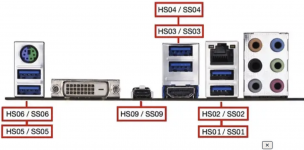
6. USB port mapping corrected (type 0->3, HS0 pairing) per community suggestion - no change, reboot persists in Recovery and full OS, only OpenCore picker shutdown (pre-XNU) is clean
7. USB port mapping fully completed (all physical ports mapped, including the last 2 that were previously unmapped, using a USB-C to USB-A adapter to scan them) - no change
8. Shutdown attempted immediately after boot, never slept beforehand - no change, reboot happens with zero prior sleep/wake cycles
9. FadtEnableReset OpenCore quirk - confirmed already false, not applicable
10. Kernel panic / crash check via DiagnosticReports, NVRAM panic log, unified log around shutdown timestamp - no panic found, AppleSMC confirms clean shutdown cause 5
11. BIOS-level USB0/1/2 native controller disable (AMD CBS -> FCH Common Options) - fixes it, but all native USB ports are lost for every OS, not just macOS. XH00 (discrete ASMedia controller) stays enabled during this test and shutdown still works clean, which rules out XH00 as the cause
12. Older BIOS (downgrade to 3.0.1, pre-3.08) - no change, same reboot, rules out "introduced by a specific AGESA update"
13. Safe Mode (third-party kexts disabled) - no change
14. macOS Sequoia clean install on same BIOS (3.0.1), same EFI, compared to Tahoe - no change, rules out a Tahoe-specific regression
15. SSDT-CPUR / SSDT-HPET / SSDT-SBUS-MCHC / SSDT-USB-Reset all disabled together - system fails to boot (stuck at Apple logo), reverted
16. SSDT-USB-Reset disabled alone - boots fine, shutdown tested - no change
17. BIOS "ACPI Power Button Method Support": Fixed vs Control Method - option identified - no change
18. BIOS "USB port disablement phase" (Auto / Before BIOS Setup / Before OS Boot) - setting "Before OS Boot" caused a complete failure to POST. Reverted to Auto (default). Not a usable test path
19. OCLP Patch revert - no change
CONCLUSION
The trigger is not reachable from ACPI (static tables or live GPE/PME registers, verified with correct device names this time), not tied to any USB device, driver, kext, or port-mapping completeness, not OS-version-specific (Sequoia = Tahoe), not BIOS-version-specific (3.0.1 = 4.20), and does not correlate with sleep history. SMC explicitly logs a clean software-initiated shutdown request (cause 5) with no panic anywhere in the chain.
The only reliable fix found (matching another user's experience on a similar AM5/ASRock board with the identical symptom) is disabling the native XHC controllers entirely at firmware level and, if USB is needed, replacing them with a discrete PCIe USB controller - a hardware workaround, not a software/ACPI fix. The discrete ASMedia controller already present on this board (XH00) is confirmed not to be the cause, since it remains active and functional even when the native controllers are disabled and shutdown works cleanly.
This strongly points to a firmware-level bug in AGESA/SMU handling of the S5 transition specific to the integrated FCH XHCI controllers on this platform, below anything an OS, any OS, can influence or any ACPI table can reach.
I really didn't want to give up without testing everything I could. Despite a stricter work of exclusion than any other public case I have found around I'm currently living with the reboot-after-shutdown behavior on BIOS 4.20 pending any future ASRock/AMD firmware fix (that will never happen LOL)
I attach my EFI for reference
Thanks
@etorix and
@leesurone for your interest and hints