Error during installation - Kernel panic !?

Who_Am_I

New member
AMD OS X Member
Jan 14, 2026
7
0
1
CPU:
Ryzen 5600G
I have a desktop with AMD Ryzen 5600G (no graphics card), Motherboard Gigabyte B450MDS3H V2. Tried the Opencore method to dual boot MacOS & Windows 11 and getting the below kernal panic
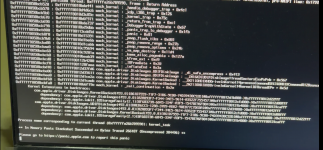
1768402662259.png

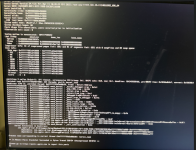
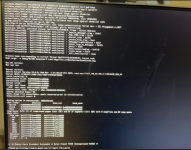
I have also tried the Olarila vanila image dual boot install using youtube video guide (
) but getting the error
1768402696810.png
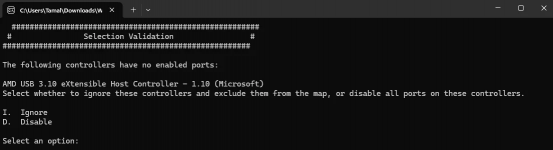
Also, while USB port detection I got this message which I didn't see on any tutorial videos. I've tried both Ignore & Disable options but the result is the same.
1768402734958.png
Can anyone help ?!
 
Post a copy of the EFI folder you are using so we can see what might need attention.

When dual booting macOS and Windows it is usually best to have each OS on a separate drive/SSD/NVMe is that the case in this instance?

It is also advisable to remove any Window or Data drives from the system while installing macOS, as it lessens the chance of unnecessary issues or formatting the wrong drive, which happens more often than you might expect.
 
Here is a copy of the EFI folder.

Regarding
When dual booting macOS and Windows it is usually best to have each OS on a separate drive/SSD/NVMe is that the case in this instance?
I have not yet reached the stage where I get to choose the drive/SSD/NVMe where I wish to install the macOS the error occurs before I can even see the Apple logo. However my Windows 11 is installed on a NVMe SSD and I have created a separate partition in the same SSD where I wish to install macOS.
 

Attachments

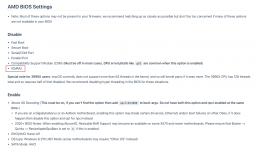
Have you set your bios as recommended in the Dortania Ryzen guide?


I am specifically interested to know if you have enabled Above 4G Decoding, as this is an essential setting, which if not enabled requires the addition of a Boot Argument in the config.plist (npci=0x3000). One or the other needs to be used, never both.

When using NootedRed.kext it is imperative that you not use any DeviceProperties in your config.plist. As these are known to cause issues with NootedRed.kext and NootRX.kext.
I have removed the DeviceProperties from your config.plist, not knowing what the first two are set to show as 'Builtin' I have not made any allowances for these entries. The third is the layout-ID for your Audio, so I have added alcid=98 to the boot arguments to deal with this entry.

I have gone through your config.plist and cleaned it up a little.
I have removed a few unnecessary kexts - BlueToolFixup.kext, CtlnaAHCIPort.kext. USBToolBox.kext and UTBDefault.kext as these kexts do nothing for your system during the installation process.
I have re-ordered the remaining kexts to best suit an AMD Hack

Non-natively supported Bluetooth devices require more than just BlueToolFixup.kext for the bluetooth device to work in macOS.
UTBDefault.kext does nothing, as it has an empty/blank info.plist.
CtlnaAHCIPort.kext is an Intel specific kext, it does nothing on an AMD system, and provides a purely cosmetic fix.

Try this revised EFI, see if it gets you any further.
 

Attachments

Hi @Edhawk
I've tried your revised EFI but the pendrive wont boot.
Have you set your bios as recommended in the Dortania Ryzen guide?

Ryzen and Threadripper(17h and 19h) | OpenCore Install Guide

I am specifically interested to know if you have enabled Above 4G Decoding, as this is an essential setting, which if not enabled requires the addition of a Boot Argument in the config.plist (npci=0x3000). One or the other needs to be used, never both.
I think I did.

BTW, I've attached my bios settings screenshots for your review.
 

Attachments

There were a few options that you might need to look at.

The first image on page 5 of 7.

SuperIO.png

SuperIO is common name for Serial Port, it should be disabled.

Page 7 of 7

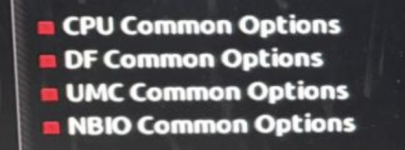
NBIO options.png

NBIO sub-menu usually contains a few common bios entries that may need attention.

Otherwise the bios looks OK.
 
Hi @Edhawk
I've attached the NBIO sub-menu screenshots & also disabled SuperIO as per your suggestion. Further, I initially copied the entire EFI folder after extracting your zip file which is why my pendrive wouldn't boot, then l looked inside it again & found "__MACOSX" & "EFI" folders. I then copied that "EFI" folder & then it booted & now I'm getting this below error !


1768659340169.png
 

Attachments

The IOMMU entry should be Disabled, not set to Auto.

Screenshot 2026-01-17 at 14.55.51.png

Which SSD/HDD or NVMe drive are you using for macOS?
Do you have any other drives present in the system?
If yes, can you temporarily remove the other OS or data drive(s) during the macOS installation.
It/they can be reconnected once macOS is installed and booting correctly.

It is never a good idea to have Windows installed on the drive before you try to install macOS. As the EFI folder required for macOS to boot needs to be the first partition on the drive. This is not possible if Windows or Linux is already installed on the same drive.

It is a simple enough process to install macOS first, with two or more partitions on the drive, and then install Windows to one of the unused partitions on the same drive. This setup has been common for many years on Intel systems.
 
OK, I disabled IOMMU. My motherboard has both USB-C ports as well as USB-A ports, my pendrive is USB-C. So, which port should I connect my pendrive or it doesn't matter.

I'm using the same SATA SSD in which my Windows 11 is already installed as the SSD to which I'm going to use for macOS, I've created a separate drive.

BTW, what does the error screenshots saying ? Aren't they suppose to inform what is wrong ?
 
The error is shown in the text that flies past before the verbose text stops. So we can't see the exact reason for the kernel panic. But the Backtrace and dependancies look towards the Disk you are using as being a possible cause.

If you continue with your plan to install macOS on a disk that already contains Windows 11, then don't expect to be able to boot in to Windows once the macOS installation commences. As it will mess up the hidden 'System' partition that Windows relies on to boot on your system.

I would strongly recommend you not continue with this plan.

Get another/separate disk for the macOS installation. Doesn't have to be a large drive, 128/256GB would be fine for an initial macOS installation.
 
Ok, noted that. I will disconnect the sata SSD where WIndows 11 is installed, then extract some space from the NVMe SSD to make a partition (I guess FAT32) for the macOS installation & try. Any other things to consider ?

BTW are you saying that even before the installation gets to the stage where I have to choose the SSD/Drive on which I wish to install macOS it can still cause problem at the very beginning stage ?
 
What’s currently on the NVME drive? Is it something you can backup to another spare drive?

Remember the hidden macOS EFI partition needs to be the first partition on the drive, so OpenCore is found and can boot your systems OS’s.

The macOS drive needs to be formatted as APFS with GUID partition table (not MBR) for any recent version of macOS.
 
What’s currently on the NVME drive? Is it something you can backup to another spare drive?
The NVMe SSD has only one partition currently which contains a lot of files but it is something that I can backup to another drive. Also what if I split that one partition into two partitions and in one partition I keep the files & the other partition is empty (to be used by macOS, note: At this time I can either format it as NTFS or FAT32 because I have no mac yet !!)

Remember the hidden macOS EFI partition needs to be the first partition on the drive, so OpenCore is found and can boot your systems OS’s.
Isn't the EFI partition in the pendrive at first from where I'm trying to install macOS ? I'm yet to successfully install macOS on my system...

The macOS drive needs to be formatted as APFS with GUID partition table (not MBR) for any recent version of macOS.
Isn't that a later part during installation where I use Disk Utility to format it ?
Right now I have not even reached that step yet !!
 
Yes, during the installation there will be an EFI folder on the USB pen drive, which you will use to boot into OpenCore and install macOS. However, once you have macOS installed you will need to copy the EFI folder from the USB drive to the hidden EFI partition on the macOS drive. So you don’t need to boot from the USB drive. This is the standard protocol for running macOS on a Hack.

Yes, you will get the option to format the drive or partition you plan to use for macOS in Disk Utility as part of the install process. So you can initially format the macOS partition or drive as NTFS or FAT32.

I would recommend you backup any files on the proposed macOS drive in case something goes wrong or unexpected happens. Better to be safe than sorry!
 
  AdBlock Detected
Sure, ad-blocking software does a great job at blocking ads, but it also blocks some useful and important features of our website. For the best possible site experience please take a moment to disable your AdBlocker.