Error Desktop - Ryzen 7 5700g - PCH-B550 - 16GB

renegadofp

New member
AMD OS X Member
Jul 1, 2026
4
0
1
CPU:
Ryzen 7 5700g
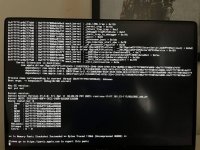
Hi, sorry for my English—I'm using Google Translate—but I was wondering if anyone could help me. I've been trying to perform the installation for nearly 20 days now and ran into several issues, some of which I managed to fix along the way. After resolving problems like the OpenCore boot stalling at EXITBUS:START, I got stuck on a kernel panic that I can't seem to get past. I created the EFI using OpenCore Simplify and tried a few pre-configured ones, but eventually, I took a base configuration from https://github.com/mikigal/ryzen-hackintosh and customized it for my specific setup.
 

Attachments

  • WhatsApp Image 2026-07-15 at 08.47.31.jpeg
    WhatsApp Image 2026-07-15 at 08.47.31.jpeg
    138.5 KB · Views: 1
  • config.plist
    config.plist
    39.9 KB · Views: 2
Points for you to look into.
  1. You have some unnecessary and duplicate SSDT’s in your /EFI/OC/ACPI folder and config.plist.
    1. You don’t need SSDT-USBW.aml with your B550 system. I would remove this ACPI table.
    2. SSDT-XOSI.aml won’t work if the accompanying ACPI Patch isn’t available in your config.plist. Either add the ACPI Patch or remove the SSDT.
    3. When using SSDT-EC-USBX-DESKTOP.aml table you don’t need a separate SSDT-USBX.aml table as well. Remove the separate SSDT-USBX table.
  2. You need to remove WhateverGreen.kext from your /EFI/OC/Kexts folder and config.plist, as you don’t need it when using NootedRed.kext with an AMD IGPU/APU.
    1. The two kexts clash when both are present and enabled in the config.plist.
  3. Also SecureBootModel should be set to ‘Disabled’ not left as ‘Default’.
See if making these changes help.
 
  • Like
Reactions: renegadofp
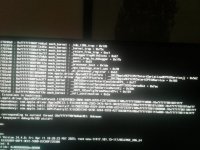
Thanks for the reply. I removed the USBW, XOSI, and USBX SSDTs, removed the WhateverGreen kext, and set SecureBootModel to disabled. However, I believe the same error persists; here is a screenshot—only a few numbers have changed. And just in case it helps, here is the EFI folder.
 

Attachments

  • image.jpg
    image.jpg
    137.2 KB · Views: 3
  • EFI.rar
    EFI.rar
    4.4 MB · Views: 1
If you need any more help it would be best if you posted (zipped and attached) a copy of your EFI folder, as the config.plist doesn't always tell us the whole story.

I have a couple of B550/B550M Hacks so providing details of the components (make & model) in your system would also be helpful. I also have a Mini ASRock Hack that uses the Ryzen 7 5700G CPU/APU.
 
Does your B550 motherboard contain a 1G or 2.5G Ethernet port? The kext in your OC folder is for a 1G Realtek Ethernet port, I ask because both of mine have a 2.5G Ethernet ports. The 2.5G Ethernet port requires a different kext compared to the 1G Realtek ethernet port.

Have you set the bios to allow macOS to run, including setting Above 4G Decoding to Enabled? Again I ask as it is possible you need to add 'npci=0x3000' boot argument to your config.plist, if Above 4G Decoding is disabled in your Bios.
 
Try this slightly revised EFI folder, see if this helps.
 

Attachments

Does your B550 motherboard contain a 1G or 2.5G Ethernet port? The kext in your OC folder is for a 1G Realtek Ethernet port, I ask because both of mine have a 2.5G Ethernet ports. The 2.5G Ethernet port requires a different kext compared to the 1G Realtek ethernet port.

Have you set the bios to allow macOS to run, including setting Above 4G Decoding to Enabled? Again I ask as it is possible you need to add 'npci=0x3000' boot argument to your config.plist, if Above 4G Decoding is disabled in your Bios.
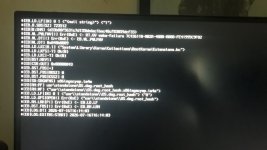
The network card is 1Gb, and regarding the EFI folder—I believe it hung while handing off to the macOS kernel; it stayed on that screen for about 10 minutes. I enabled logging to generate a file for easier review, and I've attached it here as well.

And thank you very much for the help.
 

Attachments

One thing I noticed is that SetupVirtualMap wasn't enabled in your EFI; when I tried enabling it, I ran into the same kernel panic mentioned in the first post.
 
Are the screenshot and OC log in post #7 from when you booted with my revised EFI or after you changed the SetupVirtualMap quirk?

I don't have the SetupVirtualMap Quirk enabled on either of my B550 hacks. If you read the OpenCore Ryzen guide, it recommends that B550 systems should set this quirk to Disabled/False.

Screenshot 2026-07-16 at 21.51.46.png

Which Drive are you using for the macOS installation in your B550 system, make and model of the drive might shed some light on the issues you are facing.

Do you have any other drives connected in your B550 system. If yes, try booting with the revised EFI when these other drives have been disconnected or removed from the system. You should only have the proposed macOS drive and the USB installation drive connected when installing macOS. This helps to avoid unnecessary issues and is just temporary while macOS is being installed. They can be reconnected/installed once macOS is up and running.

Check you have your bios set correctly to run macOS. See this link to the bottom of the Dortania OpenCore Ryzen guide.

 
  AdBlock Detected
Sure, ad-blocking software does a great job at blocking ads, but it also blocks some useful and important features of our website. For the best possible site experience please take a moment to disable your AdBlocker.