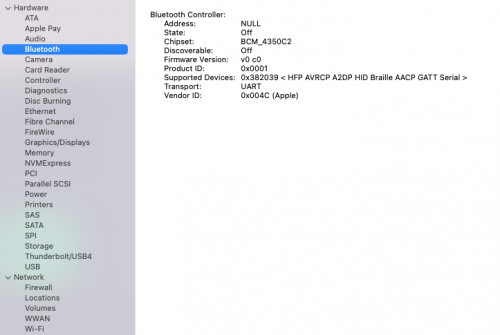
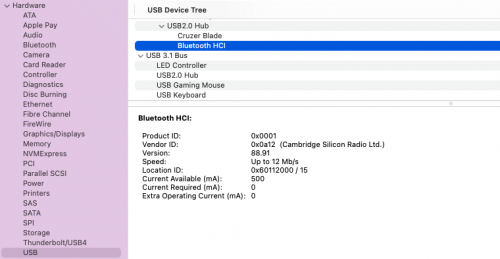
I am a newbie and know little bid on hackintosh. Already running Big Sur without any issue. Now Tried to have Monterey. But after so much of trouble successfully booted in to Monterey 12.6.1. But I could not make the following work :
1. TPLINK UB400 Blutooth dongle. -- Already tried BRCM patches
2. USB 2.0 Ports are not working -- Tried USBToolbox kexts
Any ideas, please help. Attached my plist for ready reference.
Can you post a copy of your Whole OC EFI, as you have a number of SSDT's and kexts that may be duplicating elements, causing conflicting actions or just aren't required for your system to boot Big Sur, Monterey or Ventura.
You have SSDT-HPET.aml listed in your config, but don't have the companion ACPI > Patches that are required for this SSDT to work.
Did you create the SSDT-SBUS-MCHC.aml for your system, based on the SMBUS entry in your system DSDT.aml? If not it may not be set correctly for your system.
Confirm which version of OpenCore you are using, as Monterey requires OC 0.7.4 as a minimum and Ventura requires OC 0.8.3 as a minimum. However, OC 0.8.5 is recommended even for Big Sur.
Your Bluetooth dongle uses a CSR chipset (Cambridge Silicon Radio) not a Broadcom chipset. It was known to work in macOS Catalina without any need to add any kexts. But this changed when Big Sur was released. The Broadcom kexts in your OC setup will not activate your TP-Link UB400 dongle as it doesn't use a Broadcom chip.
Have a look at the list of Broadcom compatible BT modules listed on the BrcmPatchRam Github page:
Hi.. Based on your advice, I have done some changes in my EFI. Have updated OC to 0.8.5, updated config.plist, removed unnecessary SSDTs and KEXTs. Now USB mapping is good. However, I could not enable my TP Link UB400 Bluetooth to work in Monterey 12.6.1. my EFI is enclosed herewith. pl. guide. Thanks.
Found a solution for Blutooth issue : Just use BRCM patch RAM version 2.6.2 not the latest one.. as the latest one (2.6.4) needs letest lilu. Now my blutooth working fine. Thanks guys for your support.
This site uses cookies to help personalise content, tailor your experience and to keep you logged in if you register.
By continuing to use this site, you are consenting to our use of cookies.
Sure, ad-blocking software does a great job at blocking ads, but it also blocks some useful and important features of our website. For the best possible site experience please take a moment to disable your AdBlocker.