
hi, its been a while since my last post on this site, hope everybody is doing well, this is my problem, i have been using hackintosh since 10.4 to 15, everything went well, since january, i change to Linux, now im trying to install tahoe on another disk, i want to keep my Linux install, im trying to boot from the usb but it hangs, i dont know what could be the problem, this is my hardware MSI X870 Tomahawk WIFI - AMD Ryzen 7 9700x - DDR5 64 Gb 6000 Mhz G.SKILL Trident Z5 (32 Gb x 2) - 2 TB Kingston NV2, 256 Gb Kioxia MacOs - ASRock Radeon rx 6600 8 Gb, i have a Realtek RTL8126, use @laobamac_yyds SIMPLEAERL v1.1 kernel patches, but i dont know whats happening, i dont know if it could be related to usb mapping, is there a way to map USB ports in Linux?, and also, i dont know if i have all the SSDTs i need, ryzen is still kind of new to me i have always used intel, if someone could give me hand i really apreciated
Can't install tahoe, hope someone can help
- Thread starter tr4c3r2k12
- Start date
-
Hello Guest. Before you post check the Troubleshooting guide here, Dortania Troubleshooting
You are using an out of date browser. It may not display this or other websites correctly.
You should upgrade or use an alternative browser.
You should upgrade or use an alternative browser.
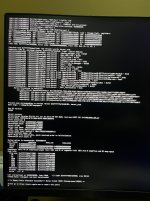
If anything, you have too many SSDTs: Keep only one of -CPUR and -PLUG-ALT, they serve the same function.
You alse have many disabled entries, which does not help reading the config.plist. And yet your DSDT may need some more patches to enable devices (see which ones, or post your ACPI tables).
Have you booted Sequoia, or earlier, on this system? Tahoe is more complicated, and installation may require trimming down the EFI (no unecessary kexts such as the AMD management ones).
Kernel panic has AppleRTL in backtrace, so I'd suggest to disable SimpleRTL patches and try with RTL812xLucy.kext instead.
You alse have many disabled entries, which does not help reading the config.plist. And yet your DSDT may need some more patches to enable devices (see which ones, or post your ACPI tables).
Have you booted Sequoia, or earlier, on this system? Tahoe is more complicated, and installation may require trimming down the EFI (no unecessary kexts such as the AMD management ones).
Kernel panic has AppleRTL in backtrace, so I'd suggest to disable SimpleRTL patches and try with RTL812xLucy.kext instead.

Good tips from @etorix . Attached is an EFI I was using with an MSI X870E Carbon Wifi board attempting to use SimpleBCM.kext. You should probably note the kext section of the EFI contains multiple kexts that are not enabled including USB Port mapping kexts. Its very likely you can boot Tahoe without USB Port mapping, you'd need to find one of the ports that gets activated by Tahoe to be able to finish the install. If the prohibited sign shows its face try another port. Once you complete the install you can use Hackintool or CorpNewts USBMaster to zone in on identifying an accurate port map.hi, its been a while since my last post on this site, hope everybody is doing well, this is my problem, i have been using hackintosh since 10.4 to 15, everything went well, since january, i change to Linux, now im trying to install tahoe on another disk, i want to keep my Linux install, im trying to boot from the usb but it hangs, i dont know what could be the problem, this is my hardware MSI X870 Tomahawk WIFI - AMD Ryzen 7 9700x - DDR5 64 Gb 6000 Mhz G.SKILL Trident Z5 (32 Gb x 2) - 2 TB Kingston NV2, 256 Gb Kioxia MacOs - ASRock Radeon rx 6600 8 Gb, i have a Realtek RTL8126, use @laobamac_yyds SIMPLEAERL v1.1 kernel patches, but i dont know whats happening, i dont know if it could be related to usb mapping, is there a way to map USB ports in Linux?, and also, i dont know if i have all the SSDTs i need, ryzen is still kind of new to me i have always used intel, if someone could give me hand i really apreciated
I don't have @laobamac_yyds SIMPLEAERL solution for the realtek RTL8126 but you can add it in. Maybe this will help get you off the ground.
In case it’s not immediately obvious you will need to adjust your CPU core counts.
Attachments
Last edited:

Extremely likely, though can't confirm with the OPs hardware, and not to suggest you shouldn't.Its very likely you can boot Tahoe without USB Port mapping
hi @etorix i used to have sequoia in this machine, i havent change anything, i did upgrade the bios to version 1.A93, the SSDTs, CPUR and PLUG-ALT, both are on the folder but only CPUR is enabled, with PLUG-ALT the machine freezes, i attach the acpi tables from SSDTtime, thanks for your replyIf anything, you have too many SSDTs: Keep only one of -CPUR and -PLUG-ALT, they serve the same function.
You alse have many disabled entries, which does not help reading the config.plist. And yet your DSDT may need some more patches to enable devices (see which ones, or post your ACPI tables).
Have you booted Sequoia, or earlier, on this system? Tahoe is more complicated, and installation may require trimming down the EFI (no unecessary kexts such as the AMD management ones).
Kernel panic has AppleRTL in backtrace, so I'd suggest to disable SimpleRTL patches and try with RTL812xLucy.kext instead.
Attachments
thanks @leesurone i will try it, and let you know what happendsGood tips from @etorix . Attached is an EFI I was using with an MSI X870E Carbon Wifi board attempting to use SimpleBCM.kext. You should probably note the kext section of the EFI contains multiple kexts that are not enabled including USB Port mapping kexts. Its very likely you can boot Tahoe without USB Port mapping, you'd need to find one of the ports that gets activated by Tahoe to be able to finish the install. If the prohibited sign shows its face try another port. Once you complete the install you can use Hackintool or CorpNewts USBMaster to zone in on identifying an accurate port map.
I don't have @laobamac_yyds SIMPLEAERL solution for the realtek RTL8126 but you can add it in. Maybe this will help get you off the ground.
In case it’s not immediately obvious you will need to adjust your CPU core counts.
i try without laobamac_yyds patches, and no kexts for network or wifi, the first efi y made only had lilu, virtualsmc and whatevergreen, restrictevents, and usbmap, cuald it be related to the usb ports not properly mapped, id there a way to map port on linux or is only for windows an mac? thanks for your reply @Edhawk, also what options in Bios should be enabled or disabled, i think i have them rigth but maybe i missed something.The Verbose text image provided by the OP shows an issue with the Ethernet setup. So going with a standard Realtek Ethernet kext would be recommended.

AMD Bios options should be as shown in the link below.
Hi everyone, i did some changes in config.plist, i think is now is booting, but need to remap my USB, what do you use to map your USB, corpnewt/USBMap?, or what tool do you recomend to map usb to make then tahoe compatible, i believe i read somewhere that usb from sequoia to tahoe change, thanks for you help, im closer to make the installer and the config.plist usuable
Attachments
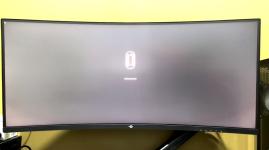
Use Corpnewt's USBMap script to create the Tahoe compatible USB kext.

 github.com
You are correct, Apple made some changes to the USB port naming and numbering conventions when Tahoe was released. So some additional entries are required in the kext to make it work with Tahoe, compared to Sequoia or and earlier version of macOS.
When discovering and configuring the USB ports in USBMap use these points to guide you.
USB2 (0) - Physical USB2 ports on rear I/O plate, these ports always have a Black coloured tang. These are the only ports that should be set as USB2 (O).
USB3 (3) - Physical USB3 ports on rear I/O plate, these Type-A ports can have a Red, Blue, Yellow or Cyan coloured tang.
Virtual USB2 ports - served from physical USB3 ports should be set the same as the physical port
USB3 (3) - Motherboard Header, usually serving the case front Type-A USB3 ports.
Virtual USB2 ports - served from physical USB3 ports should be set the same as the physical port
Internal (255) - Motherboard USB2 header, this will be any device served from a header port, such as Bluetooth module, case front USB2 ports, case front card reader etc.
Internal (255) - Built-in M.2 WiFi/BT connector, motherboard LEDs and CPU Cooler USB connection.
Type-c+sw (9) - will only show two ports being available, 1 x Physical Type-C and 1 x virtual USB2 port.
Type-c (10) - will show 4 x ports being available.
This occurs when the Type-C device initially inserted, then removed with the device flipped 180° and reinserted in the same port, 2 x Type-C and 2 x virtual USB2 ports.
GitHub - corpnewt/USBMap: Python script for mapping USB ports in macOS and creating a custom injector kext.
Python script for mapping USB ports in macOS and creating a custom injector kext. - corpnewt/USBMap
github.com
You are correct, Apple made some changes to the USB port naming and numbering conventions when Tahoe was released. So some additional entries are required in the kext to make it work with Tahoe, compared to Sequoia or and earlier version of macOS.
When discovering and configuring the USB ports in USBMap use these points to guide you.
USB2 (0) - Physical USB2 ports on rear I/O plate, these ports always have a Black coloured tang. These are the only ports that should be set as USB2 (O).
USB3 (3) - Physical USB3 ports on rear I/O plate, these Type-A ports can have a Red, Blue, Yellow or Cyan coloured tang.
Virtual USB2 ports - served from physical USB3 ports should be set the same as the physical port
USB3 (3) - Motherboard Header, usually serving the case front Type-A USB3 ports.
Virtual USB2 ports - served from physical USB3 ports should be set the same as the physical port
Internal (255) - Motherboard USB2 header, this will be any device served from a header port, such as Bluetooth module, case front USB2 ports, case front card reader etc.
Internal (255) - Built-in M.2 WiFi/BT connector, motherboard LEDs and CPU Cooler USB connection.
Type-c+sw (9) - will only show two ports being available, 1 x Physical Type-C and 1 x virtual USB2 port.
Type-c (10) - will show 4 x ports being available.
This occurs when the Type-C device initially inserted, then removed with the device flipped 180° and reinserted in the same port, 2 x Type-C and 2 x virtual USB2 ports.
Thanks for this piece for my little collection.hi @etorix i used to have sequoia in this machine, i havent change anything, i did upgrade the bios to version 1.A93, the SSDTs, CPUR and PLUG-ALT, both are on the folder but only CPUR is enabled, with PLUG-ALT the machine freezes, i attach the acpi tables from SSDTtime, thanks for your reply
As I expected, it fits the pattern for the _msi set of patches.