HP ProBook 435 G8 - NootedRed Black Screen

myx

New member
AMD OS X Member
Jul 6, 2026
11
0
1
CPU:
Ryzen 7 PRO 5850U
Hello,

I have installed Sequoia on my HP ProBook 435 G8 (R7 PRO 5850U), and when I go to enable NRed, I get a black screen. I have attached my config.plist

I have tried the workaround on Github (https://github.com/ChefKissInc/NootedRed/issues/235#issuecomment-4567109847) and still nothing. I have tried MacBookPro16,3 (and 16,2) and nothing. My VRAM size is 512mb and I tried increasing it by using smokelessUMAF but it is locked down. Also without NRed enabled, it boots into MacOS but with a white BG.
 

Attachments

You need to disable USBToolBox.kext and UTBDefault.kext if your USBMap.kext is correct. The first two kexts will do nothing positive for your system.

Remove the NRedDebug boot argument.

the amfi=0x80 should be replaced with -amfipassbeta boot argument.

Remove the incorrect revpatch=sbvm boot argument, you don't need it when you have the correct NVRAM entry for revpatch (sbvmm) in your config.

Which version of NootedRed.kext are you using (date/time stamp)? Are you suing the latest 'Nightly Build'?


You really need to find a way to increase the VRAM for the system to at least 1GB.

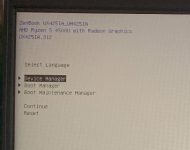
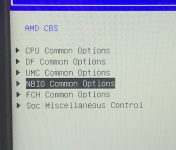
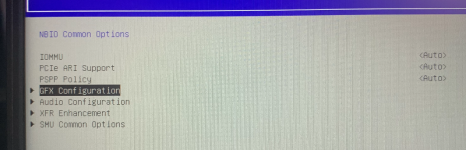
Which Options were available under the CBS and NB sections in your HP's bios when using Smokeless_UMAF?

Have a look at this post, showing another user where the VRAM options were in his Asus laptop. The HP hidden bios options should be somewhat similar.

 
You need to disable USBToolBox.kext and UTBDefault.kext if your USBMap.kext is correct. The first two kexts will do nothing positive for your system.

Remove the NRedDebug boot argument.

the amfi=0x80 should be replaced with -amfipassbeta boot argument.

Remove the incorrect revpatch=sbvm boot argument, you don't need it when you have the correct NVRAM entry for revpatch (sbvmm) in your config.

Which version of NootedRed.kext are you using (date/time stamp)? Are you suing the latest 'Nightly Build'?


You really need to find a way to increase the VRAM for the system to at least 1GB.

Which Options were available under the CBS and NB sections in your HP's bios when using Smokeless_UMAF?

Have a look at this post, showing another user where the VRAM options were in his Asus laptop. The HP hidden bios options should be somewhat similar.

I am using the latest NootedRed build, nightly debug. Also i get no options for CBS and PBS at all, they will not show as hard as I try. I will make the changes and let you know how it goes
 
Use the Release version, see if that makes any difference.

When you boot the laptop with NootedRed disabled, i.e. with the white screen, can you enter the OS and set options in System Settings? If yes, set the laptop to allow screen sharing.

Then try booting the HP with the kext enabled and see if you can login using another Hack or Mac via the screen sharing option. I am curious if the laptops screen is showing blacked out, but another system can see the desktop. Obviously this assumes you have another device that runs macOS to do the screen sharing.

Also try attaching an external monitor (if you have one) with a HDMI cable to the laptop. Does the external monitor show the desktop/login screen or a blacked out screen?
 
Use the Release version, see if that makes any difference.

When you boot the laptop with NootedRed disabled, i.e. with the white screen, can you enter the OS and set options in System Settings? If yes, set the laptop to allow screen sharing.

Then try booting the HP with the kext enabled and see if you can login using another Hack or Mac via the screen sharing option. I am curious if the laptops screen is showing blacked out, but another system can see the desktop. Obviously this assumes you have another device that runs macOS to do the screen sharing.

Also try attaching an external monitor (if you have one) with a HDMI cable to the laptop. Does the external monitor show the desktop/login screen or a blacked out screen?
I have tried the release version, with NRed disabled I can boot into MacOS, although the wallpaper is a white screen. I will try the screen sharing. Plugging into HDMI shows No signal but the backlight on the laptop is on.
 
Can you post a zipped copy of your whole EFI folder, so I can see exactly what you are using with your HP laptop. Sometimes a simple duplication or incorrect file can be found and changed/edited to solve an issue. Without this I am pretty much flying in the dark.
 
Can you post a zipped copy of your whole EFI folder, so I can see exactly what you are using with your HP laptop. Sometimes a simple duplication or incorrect file can be found and changed/edited to solve an issue. Without this I am pretty much flying in the dark.
Here you go!
 

Attachments

Try this revised EFI, see if this helps.
 

Attachments

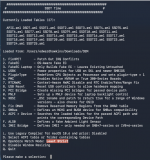
That Log file is an interesting and long read. I got the following from reading it.
  1. Your SSDT-PLUG-ALT.aml table is not configured for your AMD CPU. It appears to be aimed at an Intel CPU rather than an AMD CPU.
  2. It is likely that the other SSDT's are also incorrect for your system, but it manages to get by, somehow.
  3. Your system contains a Synaptic or an ELAN touchpad, which the current Voodooi2c kexts are failing to activate successfully.
  4. The last log, each subsequent log is appended to the end of the file.
  5. It was excessively long compared to those that preceded it, we are talking about 10 or 20 times longer, but at least didn't contain the NootedRed Debug entries.
  6. Your system is seeing a number of AMFI errors, which are thankfully not serious enough to cause a kernel panic that halts the system.
So I would recommend the following:
  1. Provide a copy of the ACPI tables from your laptop.
    1. These can be obtained from Windows, MacOS or Linux. Using this guide.
    2. https://dortania.github.io/Getting-Started-With-ACPI/Manual/dump.html#from-windows
    3. We can then look at creating a number of custom SSDT's that are specifically for your laptop bios.
    4. Some will be direct replacements for those already in your /EFI/OC/ACPI folder.
    5. Some will be new (SSDT-SBUS-MCHC.aml) but hopefully helpful with the White screen issue you are facing.
  2. Add one of the two kexts listed below and see which works. They need to be added individually so as not to confuse the issue.
    1. Add VoodooI2CELAN.kext and see if the trackpad is attached successfully.
    2. Add VoodooI2CSynaptics.kext and see if the trackpad is attached successfully.
  3. Add AMFIPass.kext v 1.4.1 to your /EFI/Oc/Kexts folder and config.plist, to see if this fixes the numerous non-fatal AMFI errors.
 
That Log file is an interesting and long read. I got the following from reading it.
  1. Your SSDT-PLUG-ALT.aml table is not configured for your AMD CPU. It appears to be aimed at an Intel CPU rather than an AMD CPU.
  2. It is likely that the other SSDT's are also incorrect for your system, but it manages to get by, somehow.
  3. Your system contains a Synaptic or an ELAN touchpad, which the current Voodooi2c kexts are failing to activate successfully.
  4. The last log, each subsequent log is appended to the end of the file.
  5. It was excessively long compared to those that preceded it, we are talking about 10 or 20 times longer, but at least didn't contain the NootedRed Debug entries.
  6. Your system is seeing a number of AMFI errors, which are thankfully not serious enough to cause a kernel panic that halts the system.
So I would recommend the following:
  1. Provide a copy of the ACPI tables from your laptop.
    1. These can be obtained from Windows, MacOS or Linux. Using this guide.
    2. https://dortania.github.io/Getting-Started-With-ACPI/Manual/dump.html#from-windows
    3. We can then look at creating a number of custom SSDT's that are specifically for your laptop bios.
    4. Some will be direct replacements for those already in your /EFI/OC/ACPI folder.
    5. Some will be new (SSDT-SBUS-MCHC.aml) but hopefully helpful with the White screen issue you are facing.
  2. Add one of the two kexts listed below and see which works. They need to be added individually so as not to confuse the issue.
    1. Add VoodooI2CELAN.kext and see if the trackpad is attached successfully.
    2. Add VoodooI2CSynaptics.kext and see if the trackpad is attached successfully.
  3. Add AMFIPass.kext v 1.4.1 to your /EFI/Oc/Kexts folder and config.plist, to see if this fixes the numerous non-fatal AMFI errors.
Hi, thank you for looking into it.

I got the ACPI tables, the trackpad works, and so does the touchscreen. I added the AMFI kext. And im kernel panicing, I tried recovery, nothing. I tried booting into recovery via a USB-Stick and I can't even mount the EFI to edit it.
 
Update: I fixed the Kernel Panic, I am guessing because there is two VoodooInputs? When I hit OC Snapshot both mustve turned on and the amfipass also did? Although I removed that AMFI kext
 
Update 2: I added the AMFI Kext back and it loads into MacOS, I added the AMFI in this reply, also in about this mac it still shows the Intel Core i7. . and not the one in restrictevents. Also the laptop is running full speed fans, and its hot and when left unattended for 5 minish it will lock but it will still show the desktop and then when I press a key it takes me to login but very laggy.
 

Attachments

I have used the ACPI tables you provided in the post above in the 'AMFI.zip' and Corpnewt's SSDTTime script to generate a number of custom SSDT's and ACPI patches for your laptop.

Screenshot 2026-07-08 at 17.28.38.png
The screenshot above is a view of Corpnewt's SSDTTime window with ACPIT tables used from your zipped folder.
I ran through the list of options only running those required for an AMD system, i.e. Options 1, 3, 4, 5, 8, 0, A, C & F.
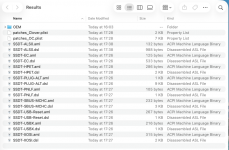
The contents of the Results folder generated can be seen below in the next screenshot and attached zipped 'Results' folder.

Screenshot 2026-07-08 at 17.40.43.png

I would recommend using the *.aml tables in the Results folder along with the patches from the 'patches_OC.plist' to update your OC setup.

Don't include/add any of the *.dsl (disassembled tables) in the /EFI/OC/ACPI folder, as they won't work.

The EFI-rev2 contains these custom SSDT's and associated patches. Try booting with this revised EFI and see if these help with regards the graphics issues you are facing.
 

Attachments

Hello, thanks for the EFI. Although I am still facing the black screen with NRed enabled. I provided another krnl.log. Also I am still facing the white bg on log on in MacOS. I am able to use the system but white bg and very sluggish.
 

Attachments

Update: I tried screen sharing but it didn't get detected (most likely bc of my shitty RTL8822CE driver) and I added SMCSuperIO.kext and SMCProcessor.kext to combat the heat and lower fan speed because it gets hot quick, battery dies quick, and fan is rampant but to no avail because it is still hot, quick fan speed and **** battery. I am still on the white bg in MacOS after login (still usable but white BG) and then when NRed is enabled it black screens.
 
  AdBlock Detected
Sure, ad-blocking software does a great job at blocking ads, but it also blocks some useful and important features of our website. For the best possible site experience please take a moment to disable your AdBlocker.