
Mac OS install on AMD Ryzen/INTEL (VMWare) Opencore - Improved Performance - Works with Tahoe / Sequoia / Sonoma / etc
- Thread starter tucano2000
- Start date
You are using an out of date browser. It may not display this or other websites correctly.
You should upgrade or use an alternative browser.
You should upgrade or use an alternative browser.

It should work the same, if you followed the same process you used to create the Tahoe ISO as you did when creating the Sequoia ISO.
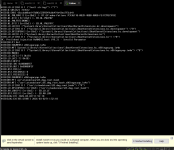
There is something wrong with the OC setup, could be core count, an incorrect SSDT, a patch in the config or any number of issues.
i redownloaded the oc from this page same error maybe some security issue this is with tahoe maybe the stuffs outdated because ventura sequoa work sonoma still doesnt work
Which OC setup did you download?
What was the patch core count set to?
Have you made any adjustments to the OC setup?
What was the patch core count set to?
Have you made any adjustments to the OC setup?
oc setup was the one i downloaded from the first page at the top amd 4 cores and i didnt do anyhing to it except after this picture i disabled the csr and some other security stuff using my mac os sequoia vm still didnt work and i was wondering if some has an opencore for legacy mac os like sierra and lower i want to try these old systems my specs are AMD Ryzen 5 2500u with 32gb ram and 512gb sk hynix nvme its a HP Elitebook 755G5 also can someone search if my laptop can be hackintosh i tried with opencore simplify its the best but i cant figure it out im new to this stuff
Last edited:
No legacy VM source on this site, as they would require a patched Kernel to run, which goes against the ethos for this site, I.e. Vanilla installation of macOS.
You might have a better chance of finding a legacy macOS VM guide over at InsanelyMac. As that is where most of the AMD Kernel development took place and was showcased for earlier versions of macOS/OS X.
You might have a better chance of finding a legacy macOS VM guide over at InsanelyMac. As that is where most of the AMD Kernel development took place and was showcased for earlier versions of macOS/OS X.

also only ventura and sequoia are working tahoe sanoma and catalina not working rest untested and can some one give me iso links other than torrents and megasync
Hello. New member. I've tried the guide on the first page about four times today and I can't get an macOS install to work for me. If someone could help me it'd be much appreciated. Notes of my setup and run are below.
Windows 11 Pro
OS Build 26200.7840
AMD Ryzen 9 5950X
128GB RAM
VMware Workstation Pro 25H2
25.0.0.24995812
NOTE: VMware Workstation Pro was patched before this install as I Monterey running in another VM. Using this macOS install tutorial as OS upgrades on a clone of the working Monterey install have all failed with "Your computer restarted because of a problem".
macOS Sequoia VM
Allocated 8 cpu cores and 32GB RAM
100GB disk drive (set as SATA 0:2)
macOS_Opencore_1.0.4_16_cores.vmdk (set as SATA 0:0)
macOS Sequoia 15.4 ISO
USB Controller set to 3.2
Network Adapter set to Bridged (Automatic)
Hyper-V disabled and removed from system
Entered: bcdedit /set hypervisorlaunchtype off
Entered: reg add "HKLM\SYSTEM\CurrentControlSet\Control\DeviceGuard\Scenarios\HypervisorEnforcedCodeIntegrity” /v “Enabled” /t REG_DWORD /d 0 /f
Start the VM and get the 'Install macOS Sequoia" window but few seconds later (click the install or not), I get the scrolling text and the infamous EXITBS:START
Am I doing something wrong? Did I miss something in the guide? What can I do to get this working?
Windows 11 Pro
OS Build 26200.7840
AMD Ryzen 9 5950X
128GB RAM
VMware Workstation Pro 25H2
25.0.0.24995812
NOTE: VMware Workstation Pro was patched before this install as I Monterey running in another VM. Using this macOS install tutorial as OS upgrades on a clone of the working Monterey install have all failed with "Your computer restarted because of a problem".
macOS Sequoia VM
Allocated 8 cpu cores and 32GB RAM
100GB disk drive (set as SATA 0:2)
macOS_Opencore_1.0.4_16_cores.vmdk (set as SATA 0:0)
macOS Sequoia 15.4 ISO
USB Controller set to 3.2
Network Adapter set to Bridged (Automatic)
Hyper-V disabled and removed from system
Entered: bcdedit /set hypervisorlaunchtype off
Entered: reg add "HKLM\SYSTEM\CurrentControlSet\Control\DeviceGuard\Scenarios\HypervisorEnforcedCodeIntegrity” /v “Enabled” /t REG_DWORD /d 0 /f
Start the VM and get the 'Install macOS Sequoia" window but few seconds later (click the install or not), I get the scrolling text and the infamous EXITBS:START
Am I doing something wrong? Did I miss something in the guide? What can I do to get this working?
Attachments
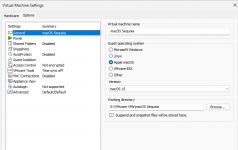
VMware Workstation Pro 25H2
Is that the version of VMWare the guide recommends you use? I don't think it is. Try using the version listed in the first post.
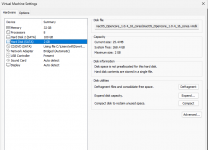
If you have set 8-cores to the VM, why haven't you used the 8_cores.vmdk? Using the vmdk with twice as many CPU cores is daft.
Is that the version of VMWare the guide recommends you use? I don't think it is. Try using the version listed in the first post.
If you have set 8-cores to the VM, why haven't you used the 8_cores.vmdk? Using the vmdk with twice as many CPU cores is daft.
Have a look at this guide for creating an ISO from a macOS installer.also only ventura and sequoia are working tahoe sanoma and catalina not working rest untested and can some one give me iso links other than torrents and megasync
How to Convert a MacOS Installer to ISO
Advanced Mac users may wish to convert a MacOS Installer application into an ISO file. Typically the resulting installer ISO files are used for installing macOS into virtual machines like VMWare or…
 osxdaily.com
If you use Corpnewt's gibMacOS script you can download any macOS installer directly from Apple's servers.
The script can be used in Windows too (gibMacOS.bat).
GitHub - corpnewt/gibMacOS: Py2/py3 script that can download macOS components direct from Apple
Py2/py3 script that can download macOS components direct from Apple - corpnewt/gibMacOS
 github.com
I thought the version of VMware Workstation Pro was the issue until I searched and found:VMware Workstation Pro 25H2
Is that the version of VMWare the guide recommends you use? I don't think it is. Try using the version listed in the first post.
If you have set 8-cores to the VM, why haven't you used the 8_cores.vmdk? Using the vmdk with twice as many CPU cores is daft.
VMWare Workstation Pro 25.0.0.24995812, macOS Tahoe Beta (25B5072a) handmade iso from official InstallAssistant, macOS_Opencore_Tahoe_1.0.5_8_cores from this topic. A bit luggish but fun to work with.
If you are writting about the unlocker, it works perfectly.Does anyone know if the patch will still work with VMware Workstation 25H2?
I'll try the 8 codr vmdk right now. Thank you.
Yeah, you are right about the version of VMWare, forgot I read those posts.
Best of luck with the 8-core vmdk.
Best of luck with the 8-core vmdk.
Anyone have problems with a connected iOS device dropping? I can connect my iPhone to the VM (Sequoia) but it will randomly drop the connection. When the drop happens, I'll check with 'idevice_id -l' in the terminal and it doesn't show, but VM->Removeable Devices->Apple iPhone will still show the option to disconnect the phone, as if it's still there.
I'm trying to do some app testing with Appium and the phone disconnects are a killer. I've tried disabling the device in Device Manager (suggested somewhere on another forum) but that didn't help.
I searched before asking this question but couldn't find anything. Any help would be appreciated as everything else is working swimmingly.
I'm trying to do some app testing with Appium and the phone disconnects are a killer. I've tried disabling the device in Device Manager (suggested somewhere on another forum) but that didn't help.
I searched before asking this question but couldn't find anything. Any help would be appreciated as everything else is working swimmingly.
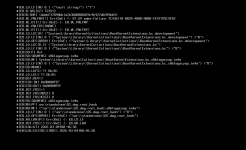
This is from sonoma this opencore worked with sequoia and ventura (edit) i was stupid i set cores to 3 instead of 4
Attachments
Last edited:
That’s a common screenshot, which means that OC has completed and is handing over to the macOS installation. But obviously something has gone wrong. Unfortunately there are too many causes for this error to know what to suggest as a definitive solution. There are a number of possible fixes in the OC Troubleshooting guide, but they shouldn’t be required for a VM following this guide, not if the vdmk file you are using is unaltered.