
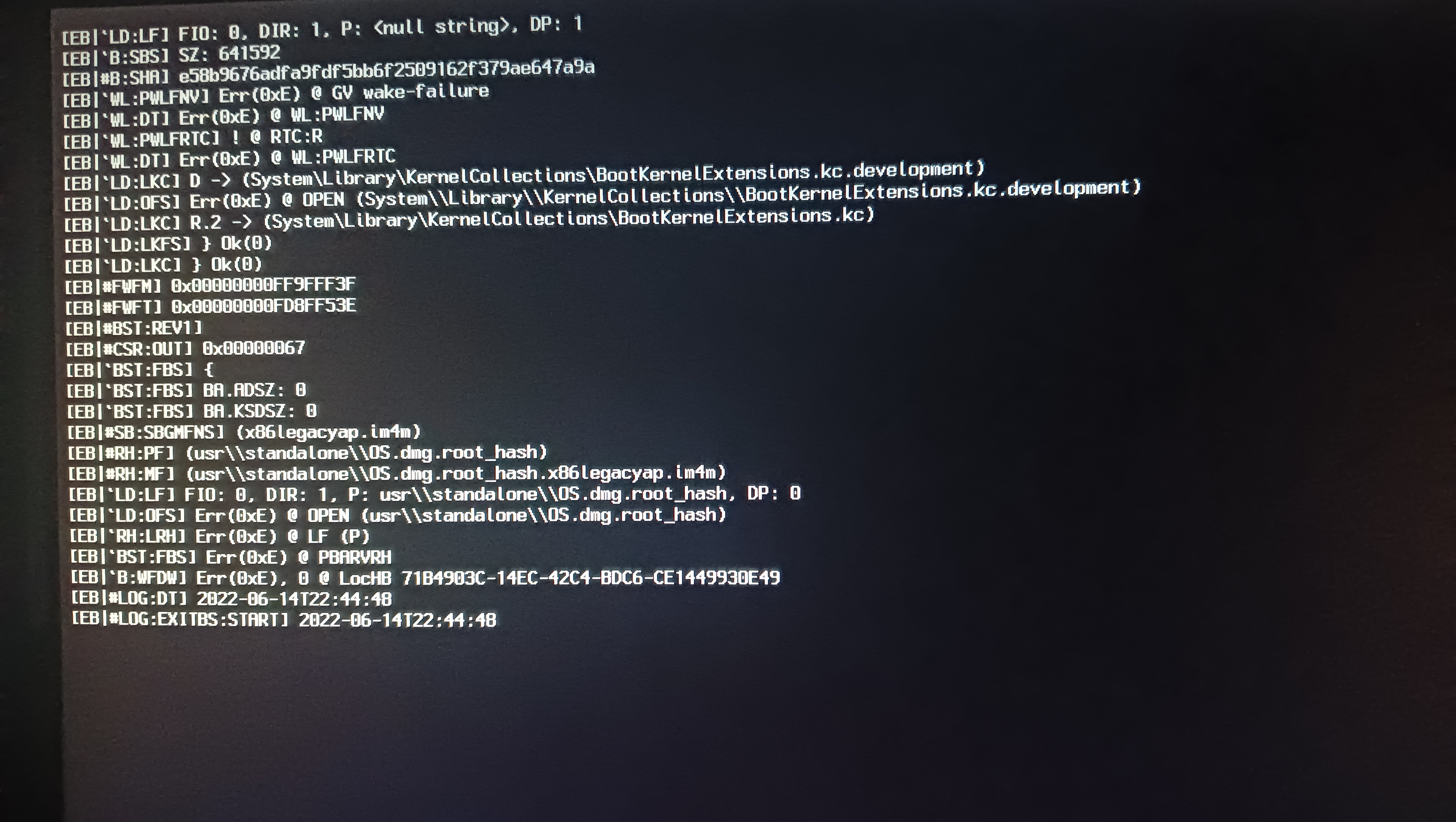
[Log:Exitibs:Start] 2022-06014t21:39:19

Haza

Member
AMD OS X Member
Jun 14, 2022
82
13
8
CPU:
Athlon 3000G
Hi!
I use an open core 0.6.1.
So when trying to install mac os, big sure stops at [Log:Exit is:Start] 2022-06014t21:39:19 and freezes, maybe someone has encountered such a problem?

I'll attach the photos
CPU: Athlon 3000g
RAM: Samsung 3x4 12 gb
Motherboard: Msi b450m pro vfh max
 
Last edited:
I added everything but I couldn't create a flash drive with monterey
Okay what did you use to create it before then?
 
Did you create the com.apple.recovery.boot folder inside the root directory? And then copied the new EFI folder I uploaded to the drive’s root directory?
yes, that's just my bios freezes on post code 50 without a flash drive, everything is OK, then it loads
 
  • Like
Reactions: Middleman
listen, and if you try to install mac os mojave (well, or high sierra), will it work?
No point to try High Sierra, your IGPU is not supported. For the Monterey build I’ve had to disable the Vega64 because I felt it was clashing with the onboard IGPU. Otherwise it should boot like my VCS has.
 
No point to try High Sierra, your IGPU is not supported. For the Monterey build I’ve had to disable the Vega64 because I felt it was clashing with the onboard IGPU. Otherwise it should boot like my VCS has.
and another question, I found mac os monterey version 12.4. Nothing terrible will happen?
 
  • Like
Reactions: Middleman
What was the issue that you were having with Opencore? It should be quite easy to do. You format it as a Fat32 drive and name the drive as EFI. Put a folder named com.recovery.apple.boot in the root directory and place the two Monterey chunk list and DMG files into that folder from Macrecovery. Then in the root directory of your drive copy over your EFI config folder for your system (the one I gave you). Then reboot.
 
What was the issue that you were having with Opencore? It should be quite easy to do. You format it as a Fat32 drive and name the drive as EFI. Put a folder named com.recovery.apple.boot in the root directory and place the two Monterey chunk list and DMG files into that folder from Macrecovery. Then in the root directory of your drive copy over your EFI config folder for your system (the one I gave you). Then reboot.
I did it, but with monterey, opencore does not want to load, the bios freezes on post code 50
 
  • Like
Reactions: Middleman
Right. Well, I have been to figure out what the problem of it is (why it isn’t booting on your system). I’ve got some ideas.
I think it is most likely to do with your GPU setting. If you try this - under UEFI in the config.plist check under Quirks and see if Vector Acceleration is turned on. You may have to turn it off. As I noticed this feature also prevented my VCS from booting.
 
Right. Well, I have been to figure out what the problem of it is (why it isn’t booting on your system). I’ve got some ideas.
I think it is most likely to do with your GPU setting. If you try this - under UEFI in the config.plist check under Quirks and see if Vector Acceleration is turned on. You may have to turn it off. As I noticed this feature also prevented my VCS from booting.
Vector acceleration is disabled in the config
 
Vector acceleration is disabled in the config
Okay. @Haza would you mind to do something for me? Could you send me a Clover BIOS dump of your system? If you have Clover running just press F4 at the menu - it will save into your EFI folder under ACPI/origin
 
Okay. @Haza would you mind to do something for me? Could you send me a Clover BIOS dump of your system? If you have Clover running just press F4 at the menu - it will save into your EFI folder under ACPI/origin
Sorry I didn't drop the file, I was very busy, I'll drop it to you as soon as I'm a little free
 
  • Like
Reactions: Middleman
  AdBlock Detected
Sure, ad-blocking software does a great job at blocking ads, but it also blocks some useful and important features of our website. For the best possible site experience please take a moment to disable your AdBlocker.