
[EB|#LOG:EXITBS:START: Im stuck here from few days

krishna

New member
AMD OS X Member
Mar 2, 2022
5
0
1
CPU:
amd 1700
hello.. im running bigsur 11.1 with oc 0.6.9 version from 1half year.
now im trying to get in to new version of mac after testing in another hard drive.
i did everything to. like created in mac, windows with oc 0.7.7&8 with no luck, changed booter settings with trail and error, made sure i followed patches guide but im just stuck. almost giving up with this..

[EB|#LOG:EXITBS:START

what should i do? im drained out god.. what am i missing?
someone help me😪
my specs: ryzen 1700
asrock x370
rx5700


Edit

Do i need to update kernel patches in my existing os drive too?
should i update oc version in both existing and test drive?
should i boot from usb? but when i tried that its only showing existing drive and when i press spacebar, it showing existing drive and recovery 11.2.1.. but no install.mac.
when i try to install from my existing drive, it getting stuck🤕.
 
Last edited:
Try this OC EFI, it is set for an 8-Core Ryzen CPU to run Big Sur or Monterey.

Only thing missing should be any WiFi/BT kexts you use and the corresponding config.plist settings.
 

Attachments

Try this OC EFI, it is set for an 8-Core Ryzen CPU to run Big Sur or Monterey.

Only thing missing should be any WiFi/BT kexts you use and the corresponding config.plist settings.
hey i tried your efi and i tried booter quirks too if thats causing issue but its still same.. should i use oc debugger ver? oc never been this hard to me😹… hope the screenshot help u to find the solution
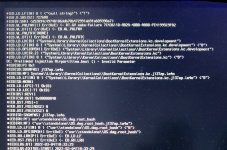
edit:
i should boot from usb right? it only showing black screen
 

Attachments

  • D1A55F40-82F6-4B45-9F7F-7635A0FAA5FD.jpeg
    D1A55F40-82F6-4B45-9F7F-7635A0FAA5FD.jpeg
    2.3 MB · Views: 23
Last edited:
If you added AirportItlwm.kext to the /OC/Kexts folder, did you also add the corresponding entry to the config.plist?

As the screenshot above shows an error relating to AirportItlwm.kext and the prelinked kernel.
 
If you added AirportItlwm.kext to the /OC/Kexts folder, did you also add the corresponding entry to the config.plist?

As the screenshot above shows an error relating to AirportItlwm.kext and the prelinked kernel.
actually idk why it showed like that.. i verified my usb efi and there is no wifi kext.. but its in my currently running efi..
ill check again and tell u what it showing
 
Have added any third party kexts to the /Library/Extensions folder? As they would now be part of the prelinked kernel and kernel cache.
 
Have added any third party kexts to the /Library/Extensions folder? As they would now be part of the prelinked kernel and kernel cache.
no i didnt add anything ever. but idk maybe in past.. so what should i do? ill verify my config again until then😪
edit
i just checked my kext and config.. there is no airport kext
 
hey thanks.. its working after i updated my bios and smbios with your efi but as soon as i enter in to recovery my keyboad and mouse not working…
it showing install monetary atleast😂

update: i changed xhci port limit to true and its working now😊
 
Last edited:
Hi, do you have EFI for your setup. I have the same with the x370 problem.
2nd post in this thread contains the EFI Folder.

Just make sure you change the Serial Number, MLB, ROM and SystemUUID entries so you don't have issues with iCloud, Messages etc.
 
  • Like
Reactions: emoka22
2nd post in this thread contains the EFI Folder.

Just make sure you change the Serial Number, MLB, ROM and SystemUUID entries so you don't have issues with iCloud, Messages etc.
I've used your EFI, but it doesnt work, it shows only 11:873 00:561 AAPL: #[EB|LOG:EXITBS:START
I have ryzen 7 2700, gigabyte b450 i aorus pro wifi and 16gb of ram
 

Attachments

That is because you have a B450 chipset in your motherboard, which requires different settings compared to the x370 chipset that was the basis for the EFI in post #2.

Booter > Quirks > SetupVirtualMap needs to be disabled in the config.plist for it to work with your B450 motherboard.
 
  AdBlock Detected
Sure, ad-blocking software does a great job at blocking ads, but it also blocks some useful and important features of our website. For the best possible site experience please take a moment to disable your AdBlocker.