
stuck at apple logo and progress bar
- Thread starter Chouko
- Start date
-
Hello Guest. Before you post check the Troubleshooting guide here, Dortania Troubleshooting
You are using an out of date browser. It may not display this or other websites correctly.
You should upgrade or use an alternative browser.
You should upgrade or use an alternative browser.

You've not got npci=0x2000 in your boot args so I'll assume you've got Above 4G enabled in the BIOS? If not add the boot arg along with
-v so you can see where it halts if it still does. You'll also need to add a kext for networking. Add this to your EFI and config, https://github.com/Mieze/RTL8111_driver_for_OS_X/releases/download/2.4.2/RealtekRTL8111-V2.4.2.zip

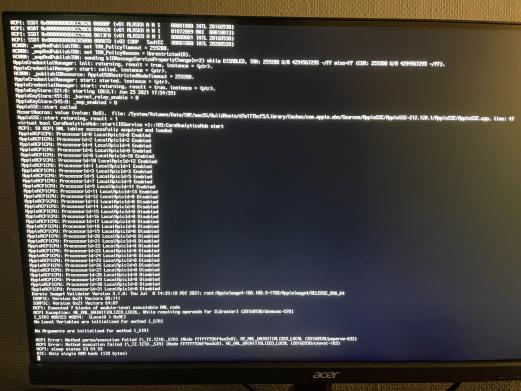
Check the troubleshooting guide here, https://dortania.github.io/OpenCore...tion-begins-previous-shutdown-hpet-hid-legacy
Thank you so much for the help. I booted it and installed Big Sur and everything is working. Now one thing is not working. Might be a bad idea do ask about this on the same thread but I will still do it. I can't seem to connect to my appleid. It says "Could not communicate with the server.". How would I fix this?Check the troubleshooting guide here, https://dortania.github.io/OpenCore...tion-begins-previous-shutdown-hpet-hid-legacy
hi, can you share your EFI folder, i have the same specification like yours, except for VGAThank you so much for the help. I booted it and installed Big Sur and everything is working. Now one thing is not working. Might be a bad idea do ask about this on the same thread but I will still do it. I can't seem to connect to my appleid. It says "Could not communicate with the server.". How would I fix this?
| Motherboard: | CPU Type | HexaCore AMD Ryzen 5 3600, 4200 MHz (42 x 100) |
| Motherboard Name | Gigabyte B450M Gaming (2 PCI-E x1, 1 PCI-E x16, 1 M.2, 2 DDR4 DIMM, Audio, Video, Gigabit LAN) | |
| Motherboard Chipset | AMD B450, AMD K17.7 FCH, AMD K17.7 IMC | |
| System Memory | 16328 MB | |
| DIMM3: GeIL CL18-22-22 D4-3600 | 8 GB DDR4-3600 DDR4 SDRAM (18-22-22-42 @ 1801 MHz) | |
| DIMM4: GeIL CL18-22-22 D4-3600 | 8 GB DDR4-3600 DDR4 SDRAM (18-22-22-42 @ 1801 MHz) | |
| BIOS Type | AMI (03/29/2021) | |
| Display: | Video Adapter | NVIDIA GeForce GTX 650 Ti BOOST (2 GB) |
thank you
