
Which smbios for ryzen 5 3600?
- Thread starter longcoming
- Start date
-
Hello Guest. Before you post check the Troubleshooting guide here, Dortania Troubleshooting
You are using an out of date browser. It may not display this or other websites correctly.
You should upgrade or use an alternative browser.
You should upgrade or use an alternative browser.

Te alternative to the iMacPro1,1 when using a RX 500 series card is the MacPro7,1 SMBIOS.

What should ı infer from this kernel panic?
panic(cpu 0 caller 0xffffff801752ea8c): "The global payload bytes pointer is NULL\n" @apfs_vfsops.c:2218
Panicked task 0xffffff8b6e74e670: 110 threads: pid 0: kernel_task
Backtrace (CPU 0), panicked thread: 0xffffff903b036aa0, Frame : Return Address
0xffffffd02f23ae50 : 0xffffff8014285ffd mach_kernel : _handle_debugger_trap + 0x41d
0xffffffd02f23aea0 : 0xffffff80143e6035 mach_kernel : _kdp_i386_trap + 0x145
0xffffffd02f23aee0 : 0xffffff80143d5803 mach_kernel : _kernel_trap + 0x533
0xffffffd02f23af30 : 0xffffff8014225a60 mach_kernel : _return_from_trap + 0xe0
0xffffffd02f23af50 : 0xffffff80142863cd mach_kernel : _DebuggerTrapWithState + 0xad
0xffffffd02f23b070 : 0xffffff8014285b86 mach_kernel : _panic_trap_to_debugger + 0x2b6
0xffffffd02f23b0d0 : 0xffffff8014b16409 mach_kernel : _panic + 0x54
0xffffffd02f23b140 : 0xffffff801752ea8c com.apple.filesystems.apfs : _apfs_vfsop_mount + 0x32ce
0xffffffd02f23b950 : 0xffffff801753810f com.apple.filesystems.apfs : _apfs_vfsop_mountroot + 0x3d
0xffffffd02f23b980 : 0xffffff80145334e0 mach_kernel : _vfs_mountroot + 0x140
0xffffffd02f23bb10 : 0xffffff8014819077 mach_kernel : _set_rootvnode + 0x2807
0xffffffd02f23be70 : 0xffffff80142bdec1 mach_kernel : _max_valid_stack_address + 0x1751
0xffffffd02f23bfa0 : 0xffffff801422518e mach_kernel : _call_continuation + 0x2e
Kernel Extensions in backtrace:
com.apple.filesystems.apfs(1933.80.3)[886ADF68-6365-32FB-A010-386D1BE73C92]@0xffffff80174ac000->0xffffff8017618fff
dependency: com.apple.driver.AppleEFINVRAM(2.1)[5F05CBBF-A46D-3AF2-9697-7F74004554F0]@0xffffff8015769000->0xffffff8015772fff
dependency: com.apple.driver.AppleEffaceableStorage(1.0)[99C121D4-65A8-3873-BA51-CF4D6953188F]@0xffffff801577f000->0xffffff8015784fff
dependency: com.apple.iokit.CoreAnalyticsFamily(1)[29188C8E-AA7F-3305-8017-0484A60E7BDC]@0xffffff8015c86000->0xffffff8015c8dfff
dependency: com.apple.iokit.IOStorageFamily(2.1)[160B70B8-9236-38ED-8AC9-A215D071A76B]@0xffffff8016f28000->0xffffff8016f3efff
dependency: com.apple.kec.corecrypto(12.0)[44A0CA49-31FF-3AEF-9C10-08A89B58646F]@0xffffff801764b000->0xffffff80176cbfff
dependency: com.apple.security.AppleImage4(4.2.0)[F3816F2E-8165-3DE2-9A20-3ECEB96DF3A1]@0xffffff8015805000->0xffffff801581dfff
Process name corresponding to current thread (0xffffff903b036aa0): kernel_task
Boot args: npci=0x2000 alcid=11 -v debug=0x100 keepsyms=1 chunklist-security-epoch=0 -chunklist-no-rev2-dev
Mac OS version:
Not yet set
Kernel version:
Darwin Kernel Version 21.3.0: Wed Jan 5 21:37:58 PST 2022; root:xnu-8019.80.24~20/RELEASE_X86_64
Kernel UUID: 93729D02-FE6F-355B-BA76-BA930AA7103F
KernelCache slide: 0x0000000014000000
KernelCache base: 0xffffff8014200000
Kernel slide: 0x0000000014010000
Kernel text base: 0xffffff8014210000
__HIB text base: 0xffffff8014100000
System model name: iMacPro1,1 (Mac-7BA5B2D9E42DDD94)
System shutdown begun: NO
Panic diags file unavailable, panic occurred prior to initialization
Hibernation exit count: 0
System uptime in nanoseconds: 878959887
Last Sleep: absolute base_tsc base_nano
Uptime : 0x0000000034b01695
Sleep : 0x0000000000000000 0x0000000000000000 0x0000000000000000
Wake : 0x0000000000000000 0x000000228bc73e5e 0x0000000000000000
Zone info:
Foreign : 0xffffff802360d000 - 0xffffff802361a000
Native : 0xffffff803b280000 - 0xffffffa03b280000
Readonly : 0xffffff8507f4c000 - 0xffffff86a18e0000
Metadata : 0xfffffff6a17f5000 - 0xfffffff6c1972000
Bitmaps : 0xfffffff6c1972000 - 0xfffffff6c7972000
panic(cpu 0 caller 0xffffff801752ea8c): "The global payload bytes pointer is NULL\n" @apfs_vfsops.c:2218
Panicked task 0xffffff8b6e74e670: 110 threads: pid 0: kernel_task
Backtrace (CPU 0), panicked thread: 0xffffff903b036aa0, Frame : Return Address
0xffffffd02f23ae50 : 0xffffff8014285ffd mach_kernel : _handle_debugger_trap + 0x41d
0xffffffd02f23aea0 : 0xffffff80143e6035 mach_kernel : _kdp_i386_trap + 0x145
0xffffffd02f23aee0 : 0xffffff80143d5803 mach_kernel : _kernel_trap + 0x533
0xffffffd02f23af30 : 0xffffff8014225a60 mach_kernel : _return_from_trap + 0xe0
0xffffffd02f23af50 : 0xffffff80142863cd mach_kernel : _DebuggerTrapWithState + 0xad
0xffffffd02f23b070 : 0xffffff8014285b86 mach_kernel : _panic_trap_to_debugger + 0x2b6
0xffffffd02f23b0d0 : 0xffffff8014b16409 mach_kernel : _panic + 0x54
0xffffffd02f23b140 : 0xffffff801752ea8c com.apple.filesystems.apfs : _apfs_vfsop_mount + 0x32ce
0xffffffd02f23b950 : 0xffffff801753810f com.apple.filesystems.apfs : _apfs_vfsop_mountroot + 0x3d
0xffffffd02f23b980 : 0xffffff80145334e0 mach_kernel : _vfs_mountroot + 0x140
0xffffffd02f23bb10 : 0xffffff8014819077 mach_kernel : _set_rootvnode + 0x2807
0xffffffd02f23be70 : 0xffffff80142bdec1 mach_kernel : _max_valid_stack_address + 0x1751
0xffffffd02f23bfa0 : 0xffffff801422518e mach_kernel : _call_continuation + 0x2e
Kernel Extensions in backtrace:
com.apple.filesystems.apfs(1933.80.3)[886ADF68-6365-32FB-A010-386D1BE73C92]@0xffffff80174ac000->0xffffff8017618fff
dependency: com.apple.driver.AppleEFINVRAM(2.1)[5F05CBBF-A46D-3AF2-9697-7F74004554F0]@0xffffff8015769000->0xffffff8015772fff
dependency: com.apple.driver.AppleEffaceableStorage(1.0)[99C121D4-65A8-3873-BA51-CF4D6953188F]@0xffffff801577f000->0xffffff8015784fff
dependency: com.apple.iokit.CoreAnalyticsFamily(1)[29188C8E-AA7F-3305-8017-0484A60E7BDC]@0xffffff8015c86000->0xffffff8015c8dfff
dependency: com.apple.iokit.IOStorageFamily(2.1)[160B70B8-9236-38ED-8AC9-A215D071A76B]@0xffffff8016f28000->0xffffff8016f3efff
dependency: com.apple.kec.corecrypto(12.0)[44A0CA49-31FF-3AEF-9C10-08A89B58646F]@0xffffff801764b000->0xffffff80176cbfff
dependency: com.apple.security.AppleImage4(4.2.0)[F3816F2E-8165-3DE2-9A20-3ECEB96DF3A1]@0xffffff8015805000->0xffffff801581dfff
Process name corresponding to current thread (0xffffff903b036aa0): kernel_task
Boot args: npci=0x2000 alcid=11 -v debug=0x100 keepsyms=1 chunklist-security-epoch=0 -chunklist-no-rev2-dev
Mac OS version:
Not yet set
Kernel version:
Darwin Kernel Version 21.3.0: Wed Jan 5 21:37:58 PST 2022; root:xnu-8019.80.24~20/RELEASE_X86_64
Kernel UUID: 93729D02-FE6F-355B-BA76-BA930AA7103F
KernelCache slide: 0x0000000014000000
KernelCache base: 0xffffff8014200000
Kernel slide: 0x0000000014010000
Kernel text base: 0xffffff8014210000
__HIB text base: 0xffffff8014100000
System model name: iMacPro1,1 (Mac-7BA5B2D9E42DDD94)
System shutdown begun: NO
Panic diags file unavailable, panic occurred prior to initialization
Hibernation exit count: 0
System uptime in nanoseconds: 878959887
Last Sleep: absolute base_tsc base_nano
Uptime : 0x0000000034b01695
Sleep : 0x0000000000000000 0x0000000000000000 0x0000000000000000
Wake : 0x0000000000000000 0x000000228bc73e5e 0x0000000000000000
Zone info:
Foreign : 0xffffff802360d000 - 0xffffff802361a000
Native : 0xffffff803b280000 - 0xffffffa03b280000
Readonly : 0xffffff8507f4c000 - 0xffffff86a18e0000
Metadata : 0xfffffff6a17f5000 - 0xfffffff6c1972000
Bitmaps : 0xfffffff6c1972000 - 0xfffffff6c7972000
Without any additional information I’d be looking at the UEFI > APFS > MinDate and MinVersion settings in the config.plist, to make sure the are set correctly for the version of macOS installed.
From a review of the config.plist attached in post #1 I would comment as follows:
You don't say which motherboard you are using so I have no idea if you require any additional or alternative entries for the more problematical boards such as the TRX40, B550 or A520 etc.
Do you need the Kernel > Emulate > DummyPowerManagement entry set as True, when you are using the AMDRyzenCPUPowerManagement.kext?
The Kernel > Quirks > ProvideCurrentCPUInfo entry is set as False, this should be set as True.
If you are installing a version of macOS Big Sur 11.3 or newer you should not be enabling the Kernel > Quirks > XhciPortLimit patch, as it is not functioning in the newer releases of macOS.
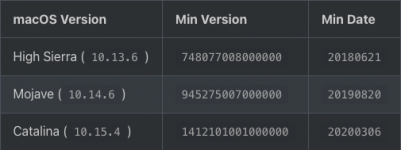
UEFI > APFS > MinDate and MinVersion are bot set as 0. This is fine if you are installing Big Sur or Monterey. If you are installing High Sierra, Mojave or Catalina these entries need to be changed to the options shown below.
As you don't state which version of OpenCore you are using I tested the config.plist against ocvalidate for 0.7.7, 0.7.6 and 0.7.5.
The only one to have no errors was ocvalidate for OC 0.7.5.
ocvalidate for OC 0.7.6 contained 3 errors.
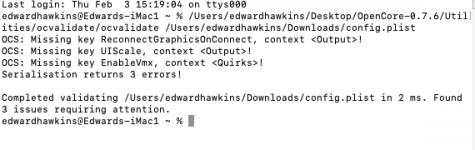
ocvalidate for OC 0.7.7 contained 14 errors.

Assumption is that your config.plist is part of an OC 0.7.5 setup.
Hope this helps.
You don't say which motherboard you are using so I have no idea if you require any additional or alternative entries for the more problematical boards such as the TRX40, B550 or A520 etc.
Do you need the Kernel > Emulate > DummyPowerManagement entry set as True, when you are using the AMDRyzenCPUPowerManagement.kext?
The Kernel > Quirks > ProvideCurrentCPUInfo entry is set as False, this should be set as True.
If you are installing a version of macOS Big Sur 11.3 or newer you should not be enabling the Kernel > Quirks > XhciPortLimit patch, as it is not functioning in the newer releases of macOS.
UEFI > APFS > MinDate and MinVersion are bot set as 0. This is fine if you are installing Big Sur or Monterey. If you are installing High Sierra, Mojave or Catalina these entries need to be changed to the options shown below.
As you don't state which version of OpenCore you are using I tested the config.plist against ocvalidate for 0.7.7, 0.7.6 and 0.7.5.
The only one to have no errors was ocvalidate for OC 0.7.5.
ocvalidate for OC 0.7.6 contained 3 errors.
ocvalidate for OC 0.7.7 contained 14 errors.
Assumption is that your config.plist is part of an OC 0.7.5 setup.
Hope this helps.
Thanks @Edhawk for your replies.
I am using Msi b450m pro m2 max mobo.
I had installed Monterey,after updating to 12.2 the problem started.
I am using opencore 0.7.7
It is a random kernel panic.
Sometimes pc boots,sometimes doesn't with the same kernel panic.
When ı unclick dummypowermanagement,system gives me kernel panic:
kernel Extensions in backtrace:
com.apple.driver.AppleIntelCPUPowerManagement(222.0)
I used Mikigal's updated efi,edited core count,for sleep ı remapped usb ports.System works fine.Also sleeps works fine.
Thanks again for your time.
I am using Msi b450m pro m2 max mobo.
I had installed Monterey,after updating to 12.2 the problem started.
I am using opencore 0.7.7
It is a random kernel panic.
Sometimes pc boots,sometimes doesn't with the same kernel panic.
When ı unclick dummypowermanagement,system gives me kernel panic:
kernel Extensions in backtrace:
com.apple.driver.AppleIntelCPUPowerManagement(222.0)
I used Mikigal's updated efi,edited core count,for sleep ı remapped usb ports.System works fine.Also sleeps works fine.
Thanks again for your time.
Last edited:
Using someone else’s EFI setup is fine as long as their setup is correct, the one you are using obviously isn’t correct given the errors shown in the ocvalidate screenshot above.
If you are using OC 0.7.7 then you need to fix the 14 issues shown in the Terminal window from the ocvalidate check screenshot. Plus dealing with the other issues I mentioned such as XhciPortLimit quirk.
Post a copy of your whole EFI folder, so we can see what you are using.
If you are using OC 0.7.7 then you need to fix the 14 issues shown in the Terminal window from the ocvalidate check screenshot. Plus dealing with the other issues I mentioned such as XhciPortLimit quirk.
Post a copy of your whole EFI folder, so we can see what you are using.
The efi is similiar to my config.I edited it.
here you go,thanks in advance.
I checked with ocvalidate,no issues.
here you go,thanks in advance.
I checked with ocvalidate,no issues.
Attachments
Last edited:
I take it the EFI linked above is the EFI you based your setup on. As that folder bears little resemblance to the config.plist I reviewed previously.
It contains entries for an SSDT-UIAC.aml and a USBPorts.kext. Neither would work in your setup if they were configured for the ASUS B350 Plus board used by the creator of the folder. Plus the two should never be used together, it is a case of either or, never both.
There is a statement in the Readme.md file, in the Software Compatibility section, which states the following:
There were some reports about issues that occur while using MSI motherboards on Monterey Beta 3. The only possible solution to this problem as of right now is to downgrade to Monterey Beta 2 and wait for a confirmed workaround.
Have you read through and made the changes recommended in the Readme.md file that accompanied the EFI folder, specifically those that mention your B450 Series motherboard?
The MSI & Monterey issue has not been fixed, as far as I am aware. So if you are looking to install macOS Monterey, then you need to change tack and install Big Sur instead, as MSI boards currently have major issues with macOS Monterey.
It contains entries for an SSDT-UIAC.aml and a USBPorts.kext. Neither would work in your setup if they were configured for the ASUS B350 Plus board used by the creator of the folder. Plus the two should never be used together, it is a case of either or, never both.
There is a statement in the Readme.md file, in the Software Compatibility section, which states the following:
There were some reports about issues that occur while using MSI motherboards on Monterey Beta 3. The only possible solution to this problem as of right now is to downgrade to Monterey Beta 2 and wait for a confirmed workaround.
Have you read through and made the changes recommended in the Readme.md file that accompanied the EFI folder, specifically those that mention your B450 Series motherboard?
The MSI & Monterey issue has not been fixed, as far as I am aware. So if you are looking to install macOS Monterey, then you need to change tack and install Big Sur instead, as MSI boards currently have major issues with macOS Monterey.
Assuming the two kernel panics were not caused by the EFI folder you have put together, then yes there is a workaround. But not one you would want. Install macOS Big Sur.
Until someone confirms what exactly is causing the kernel panics on the MSI boards and comes up with a fix for the issue(s) there is little anyone can do, bar downgrading to Big Sur.
Patience is required in this instance, it is the same for all MSI board owners.
The only other option you have is to buy a new motherboard, but not an MSI board. I know a few members here have gone down this route. Usually buying an Asus board, as they are fairly resilient and run macOS Monterey, at the moment.
Until someone confirms what exactly is causing the kernel panics on the MSI boards and comes up with a fix for the issue(s) there is little anyone can do, bar downgrading to Big Sur.
Patience is required in this instance, it is the same for all MSI board owners.
The only other option you have is to buy a new motherboard, but not an MSI board. I know a few members here have gone down this route. Usually buying an Asus board, as they are fairly resilient and run macOS Monterey, at the moment.