

The FX-8300 is not compatible with Mac OS.
- Thread starter jionhzhang
- Start date
-
Hello Guest. Before you post check the Troubleshooting guide here, Dortania Troubleshooting
You are using an out of date browser. It may not display this or other websites correctly.
You should upgrade or use an alternative browser.
You should upgrade or use an alternative browser.

Yes the FX-8320 and FX-8350 are both compatible with older versions of macOS, such as High Sierra up to and including Big Sur. After that they need extra help and become problematic.
See this success story post for details.
 forum.amd-osx.com
See this success story post for details.
Success - Asus Sabertooth 990FX R2.0 / FX 8350 / Nvidia GTX 690 / OC 0.7.6 - Big Sur 11.6.2 & Monterey 12.1
I have been playing around with my old AMD FX 8350 system (again) and decided to see if I could get it running macOS Big Sur. I used OpenCore 0.7.6 and followed the Dortania AMD Bulldozer guide when creating the EFI folder. I created my macOS Big Sur USB installer using the following...
forum.amd-osx.com
Does Big Sur have many bugs? The online tutorials are incomplete. If I have the EFI file, what else do I need to prepare? How do I install Mac OS?Yes the FX-8320 and FX-8350 are both compatible with older versions of macOS, such as High Sierra up to and including Big Sur. After that they need extra help and become problematic.
See this success story post for details.
Success - Asus Sabertooth 990FX R2.0 / FX 8350 / Nvidia GTX 690 / OC 0.7.6 - Big Sur 11.6.2 & Monterey 12.1
I have been playing around with my old AMD FX 8350 system (again) and decided to see if I could get it running macOS Big Sur. I used OpenCore 0.7.6 and followed the Dortania AMD Bulldozer guide when creating the EFI folder. I created my macOS Big Sur USB installer using the following...
My CPU is FX-8300. Are the EFI files of these CPUs also universal?Yes the FX-8320 and FX-8350 are both compatible with older versions of macOS, such as High Sierra up to and including Big Sur. After that they need extra help and become problematic.
See this success story post for details.
Success - Asus Sabertooth 990FX R2.0 / FX 8350 / Nvidia GTX 690 / OC 0.7.6 - Big Sur 11.6.2 & Monterey 12.1
I have been playing around with my old AMD FX 8350 system (again) and decided to see if I could get it running macOS Big Sur. I used OpenCore 0.7.6 and followed the Dortania AMD Bulldozer guide when creating the EFI folder. I created my macOS Big Sur USB installer using the following...
The FX-8300 is an 8/core CPU same as the other FX8320/50 CPU's I used. So there will be no difference when it comes to configuring the OC setup for your CPU. The AMD Kernel Patches in the EFI you downloaded will work with your CPU for Big Sur.
The difference will usually be found in the motherboard you are using, as the SSDT's and kexts you require to have your system boot macOS may be different.
My AMD FX systems ran Big Sur really well. No issues or complications once macOS was installed. Just be patient while installing macOS on one of these old FX systems, as they can appear to have stalled while still undertaking work in the background. I can't stress this enough, be really patient with the installation process.
I also dual booted Windows 10 & 11 with no issues using the same OC boot loader. Just make sure you install Windows on a separate SSD or HDD. I used Rufus to create the Windows USB installer, easy to select GPT & UEFI or Legacy if required. Just don't install Windows with MBR format, as OpenCore won't recognise the drive.
Which motherboard are you using?
Which discrete GPU are you using?
Which if any WiFi/BT card are you using?
Do you have any other accessories that require specific kexts or installers?
You may need to add a USB PCIe card to the system, as the USB ports on these old AMD motherboards can be problematic in macOS.
I used a couple of different USB PCIe cards, one utilising a Fresco Logic FL1100 chipset and another using an ASMedia 2142 chipset. Both worked natively in macOS.
The difference will usually be found in the motherboard you are using, as the SSDT's and kexts you require to have your system boot macOS may be different.
My AMD FX systems ran Big Sur really well. No issues or complications once macOS was installed. Just be patient while installing macOS on one of these old FX systems, as they can appear to have stalled while still undertaking work in the background. I can't stress this enough, be really patient with the installation process.
I also dual booted Windows 10 & 11 with no issues using the same OC boot loader. Just make sure you install Windows on a separate SSD or HDD. I used Rufus to create the Windows USB installer, easy to select GPT & UEFI or Legacy if required. Just don't install Windows with MBR format, as OpenCore won't recognise the drive.
Which motherboard are you using?
Which discrete GPU are you using?
Which if any WiFi/BT card are you using?
Do you have any other accessories that require specific kexts or installers?
You may need to add a USB PCIe card to the system, as the USB ports on these old AMD motherboards can be problematic in macOS.
I used a couple of different USB PCIe cards, one utilising a Fresco Logic FL1100 chipset and another using an ASMedia 2142 chipset. Both worked natively in macOS.

You also need to make sure you have your BIOS set correctly. See the OpenCore Bulldozer link below. The bios settings are at the bottom of the page/guide.
The motherboard I am using is an ASUS M51BC, which I understand might be a modified version of the M5A97.The FX-8300 is an 8/core CPU same as the other FX8320/50 CPU's I used. So there will be no difference when it comes to configuring the OC setup for your CPU. The AMD Kernel Patches in the EFI you downloaded will work with your CPU for Big Sur.
The difference will usually be found in the motherboard you are using, as the SSDT's and kexts you require to have your system boot macOS may be different.
My AMD FX systems ran Big Sur really well. No issues or complications once macOS was installed. Just be patient while installing macOS on one of these old FX systems, as they can appear to have stalled while still undertaking work in the background. I can't stress this enough, be really patient with the installation process.
I also dual booted Windows 10 & 11 with no issues using the same OC boot loader. Just make sure you install Windows on a separate SSD or HDD. I used Rufus to create the Windows USB installer, easy to select GPT & UEFI or Legacy if required. Just don't install Windows with MBR format, as OpenCore won't recognise the drive.
Which motherboard are you using?
Which discrete GPU are you using?
Which if any WiFi/BT card are you using?
Do you have any other accessories that require specific kexts or installers?
You may need to add a USB PCIe card to the system, as the USB ports on these old AMD motherboards can be problematic in macOS.
I used a couple of different USB PCIe cards, one utilising a Fresco Logic FL1100 chipset and another using an ASMedia 2142 chipset. Both worked natively in macOS.
My discrete GPU is an AMD RX590 GME.
I am not using Wi-Fi/BT.
I don't quite understand the specific kext files;
I just need to install macOS and have it work properly. Thank you!
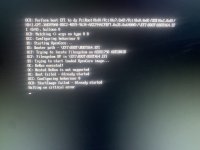
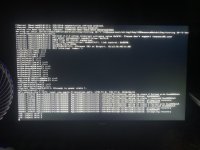
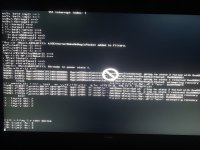
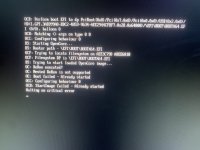
Good news, five hours ago I successfully entered OpenCore using the EFI attachment you provided under that post, and I managed to install MacOS 11.6.1. However, after the installation progress bar completed and the system automatically restarted, I couldn't enter the OpenCore boot menu. Instead, I started encountering errors (first image). I began adjusting BIOS settings repeatedly (similar to those in your post, but mine lacks overclocking options). Finally, I recreated the bootable USB using balenaetcher and copied the EFI files to the EFI partition, which allowed me to enter the OpenCore boot menu. However, when selecting options like "Install MacOS," I still encountered the error shown in the first image. After waiting for a while, I started seeing some code, but I still encountered a prohibited symbol (second image). I'm not sure what went wrong. Can you tell me what the problem might be and how to fix it?The FX-8300 is an 8/core CPU same as the other FX8320/50 CPU's I used. So there will be no difference when it comes to configuring the OC setup for your CPU. The AMD Kernel Patches in the EFI you downloaded will work with your CPU for Big Sur.
The difference will usually be found in the motherboard you are using, as the SSDT's and kexts you require to have your system boot macOS may be different.
My AMD FX systems ran Big Sur really well. No issues or complications once macOS was installed. Just be patient while installing macOS on one of these old FX systems, as they can appear to have stalled while still undertaking work in the background. I can't stress this enough, be really patient with the installation process.
I also dual booted Windows 10 & 11 with no issues using the same OC boot loader. Just make sure you install Windows on a separate SSD or HDD. I used Rufus to create the Windows USB installer, easy to select GPT & UEFI or Legacy if required. Just don't install Windows with MBR format, as OpenCore won't recognise the drive.
Which motherboard are you using?
Which discrete GPU are you using?
Which if any WiFi/BT card are you using?
Do you have any other accessories that require specific kexts or installers?
You may need to add a USB PCIe card to the system, as the USB ports on these old AMD motherboards can be problematic in macOS.
I used a couple of different USB PCIe cards, one utilising a Fresco Logic FL1100 chipset and another using an ASMedia 2142 chipset. Both worked natively in macOS.
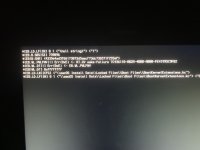
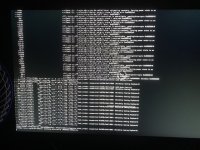
I have recorded the entire process of starting my computer, booting OpenCore, and encountering errors, and uploaded it to YouTube. If you're interested, you can click the link to view it:linkThe FX-8300 is an 8/core CPU same as the other FX8320/50 CPU's I used. So there will be no difference when it comes to configuring the OC setup for your CPU. The AMD Kernel Patches in the EFI you downloaded will work with your CPU for Big Sur.
The difference will usually be found in the motherboard you are using, as the SSDT's and kexts you require to have your system boot macOS may be different.
My AMD FX systems ran Big Sur really well. No issues or complications once macOS was installed. Just be patient while installing macOS on one of these old FX systems, as they can appear to have stalled while still undertaking work in the background. I can't stress this enough, be really patient with the installation process.
I also dual booted Windows 10 & 11 with no issues using the same OC boot loader. Just make sure you install Windows on a separate SSD or HDD. I used Rufus to create the Windows USB installer, easy to select GPT & UEFI or Legacy if required. Just don't install Windows with MBR format, as OpenCore won't recognise the drive.
Which motherboard are you using?
Which discrete GPU are you using?
Which if any WiFi/BT card are you using?
Do you have any other accessories that require specific kexts or installers?
You may need to add a USB PCIe card to the system, as the USB ports on these old AMD motherboards can be problematic in macOS.
I used a couple of different USB PCIe cards, one utilising a Fresco Logic FL1100 chipset and another using an ASMedia 2142 chipset. Both worked natively in macOS.
Do you know what's wrong with my device? I need your helpYou also need to make sure you have your BIOS set correctly. See the OpenCore Bulldozer link below. The bios settings are at the bottom of the page/guide.

The Prohibited sign (circle with diagonal line through it) is a common sight when USB issues arise during the installation process. Usually followed with the 'Still waiting for Root Device' message.
You need to use a different USB port when installing macOS on your system. The port you are using is not being activated as part of the installation process. Try using one of the USB2 ports on the rear of the case. You may need to try a few different ports until you find one that works.
I had an issue where the USB2 ports worked for the start of the process, but I then had to switch the installer to a USB3 port, before the Prohibited sign appeared for the installation process to continue. I used two USB extension leads so switching the USB installer from one port to the other was made easier. I had to keep doing the switch each time the system restarted during the installation process.
You need to use a different USB port when installing macOS on your system. The port you are using is not being activated as part of the installation process. Try using one of the USB2 ports on the rear of the case. You may need to try a few different ports until you find one that works.
I had an issue where the USB2 ports worked for the start of the process, but I then had to switch the installer to a USB3 port, before the Prohibited sign appeared for the installation process to continue. I used two USB extension leads so switching the USB installer from one port to the other was made easier. I had to keep doing the switch each time the system restarted during the installation process.
Hello dear Edhawk,The Prohibited sign (circle with diagonal line through it) is a common sight when USB issues arise during the installation process. Usually followed with the 'Still waiting for Root Device' message.
You need to use a different USB port when installing macOS on your system. The port you are using is not being activated as part of the installation process. Try using one of the USB2 ports on the rear of the case. You may need to try a few different ports until you find one that works.
I had an issue where the USB2 ports worked for the start of the process, but I then had to switch the installer to a USB3 port, before the Prohibited sign appeared for the installation process to continue. I used two USB extension leads so switching the USB installer from one port to the other was made easier. I had to keep doing the switch each time the system restarted during the installation process.
I'm sorry for not responding promptly.
I successfully installed macOS using your EFI, and I am very grateful for that!
However, I encountered an issue: initially, my VDA decoder showed decode failures, which I resolved by using the iMacPro1,1 SMBIOS.
But I think the decoder might not be the main issue... The problem is that when I listen to music in the Music app or watch videos in Safari, the applications crash with errors, and the errors seem to be related to audio. However, I am unable to fix it on my own.
Could you please help me?
Example, this error scenario occurs in the App Store.
When I open the App Store, there is a video on the homepage that seems to autoplay, which causes the App Store to crash and show an error.
I have copied the entire report and sent it to you, but I don’t understand it because my English is not good... Using translation software doesn’t provide me with the complete meaning.
Attachments
Sorry I never managed to get the built-in audio working on my FX system. so I don’t know what to suggest. I used a USB speaker for audio on that system.
I am using a USB headset and it plays audio, but when I watch a video on Safari the webpage crashes, but it works fine with Chrome or Firefox. Does your FX device have this problem?Sorry I never managed to get the built-in audio working on my FX system. so I don’t know what to suggest. I used a USB speaker for audio on that system.
Yes I had a similar issue, so I used Firefox as my default browser, as the FX system struggled with Safari.