Just wanted to share that I got macOS Sequoia running stable on the new Zen 5 platform. I am using a Ryzen 5 9600X with an MSI X870-P WiFi board and an ASUS RX 6600.
Performance is really good, feels similar to an M3 chip for my daily work and Xcode builds. The only hardware headache is networking. I couldn't get the onboard Ethernet or WiFi working, so I am using TP-Link USB adapters for now (AC1300 and AC600).
For BIOS, I just did the usual stuff like disabling Secure Boot and Resize BAR, and making sure Above 4G Decoding was enabled.
I started the config myself using the Sample.plist. I handled the USB mapping with native classes and sorted out the ACPI patches for the USB controllers since the X870 chipset is a bit tricky. But I kept getting stuck at the installation screen with about 12 minutes remaining.
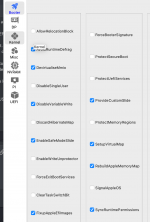
Big thanks to fabiosun on Discord who helped me out there. He tweaked the config and turned on DummyPowerManagement in the quirks which fixed the hang. We were both actually surprised that this specific MSI motherboard didn't need any MMIO Whitelisting. Usually X870 boards need that, but this one booted without it.
For the install, I followed fabiosun's advice and used CorpNewt's UnPlugged script instead of the standard media creator. I basically set up the USB with two partitions, one FAT32 for the EFI and one ExFAT for the install package, then built the installer from inside Recovery using the script.
One last thing that might help others: if you get a black screen after installing, try removing the -v verbose flag. I had no signal until I removed that boot argument on the advice of fabiosun.
Hope this helps anyone looking at these boards.
Performance is really good, feels similar to an M3 chip for my daily work and Xcode builds. The only hardware headache is networking. I couldn't get the onboard Ethernet or WiFi working, so I am using TP-Link USB adapters for now (AC1300 and AC600).
For BIOS, I just did the usual stuff like disabling Secure Boot and Resize BAR, and making sure Above 4G Decoding was enabled.
I started the config myself using the Sample.plist. I handled the USB mapping with native classes and sorted out the ACPI patches for the USB controllers since the X870 chipset is a bit tricky. But I kept getting stuck at the installation screen with about 12 minutes remaining.
Big thanks to fabiosun on Discord who helped me out there. He tweaked the config and turned on DummyPowerManagement in the quirks which fixed the hang. We were both actually surprised that this specific MSI motherboard didn't need any MMIO Whitelisting. Usually X870 boards need that, but this one booted without it.
For the install, I followed fabiosun's advice and used CorpNewt's UnPlugged script instead of the standard media creator. I basically set up the USB with two partitions, one FAT32 for the EFI and one ExFAT for the install package, then built the installer from inside Recovery using the script.
One last thing that might help others: if you get a black screen after installing, try removing the -v verbose flag. I had no signal until I removed that boot argument on the advice of fabiosun.
Hope this helps anyone looking at these boards.