Hi everyone,
I wanted to share a project that could be really useful for anyone running an AMD GPU on a Hackintosh, especially if you've ever tried local LLM inference on macOS and hit the usual walls.
The issue: most local LLM tooling on macOS is built for Apple Silicon. If you’re on an Intel Mac with a discrete AMD GPU, stock llama.cpp under Metal tends to produce corrupted output and runs painfully slow over PCIe.
That’s why I built ToshLLM.
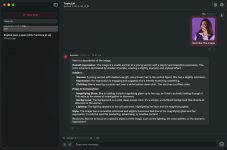
It’s a native SwiftUI app (pure Swift Package Manager, no external dependencies) that bundles llama.cpp with AMD-specific patches and wraps it in a real GUI. The goal is simple: make local LLMs actually usable on Intel Macs with AMD GPUs.
What you get:
Important: it’s still beta. The DMGs aren’t notarized yet, so on first launch you’ll need to use “Open Anyway” or run:
The AMD patches live in the repo (patches/), so if you prefer, you can also build from source.
License: GPL‑3.0. Repo, source, and DMG releases:
Link to GitHub Project
I’d really appreciate testing reports from other macOS-supported AMD cards:
RDNA 1: RX 5500 / 5600 / 5700
RDNA 2: RX 6600 / 6700 / 6800 / 6900
Older Polaris / Vega
At the moment it’s not working on GCN/Polaris GPUs like the RX 560 / RX 580, but I’m working on a patch for that and hope to get it fairly soon.
What’s new – June 18, 2026
Update (v0.81.25+):
As always, feedback and testing reports on other AMD cards are hugely appreciated.
I wanted to share a project that could be really useful for anyone running an AMD GPU on a Hackintosh, especially if you've ever tried local LLM inference on macOS and hit the usual walls.
The issue: most local LLM tooling on macOS is built for Apple Silicon. If you’re on an Intel Mac with a discrete AMD GPU, stock llama.cpp under Metal tends to produce corrupted output and runs painfully slow over PCIe.
That’s why I built ToshLLM.
It’s a native SwiftUI app (pure Swift Package Manager, no external dependencies) that bundles llama.cpp with AMD-specific patches and wraps it in a real GUI. The goal is simple: make local LLMs actually usable on Intel Macs with AMD GPUs.
What you get:
- Correct Metal output on AMD dGPUs at full speed
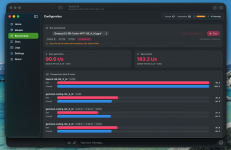
- Qwen3‑8B Q4: ~101 t/s prompt / ~57 t/s generation
- Qwen3.6‑35B‑A3B (MoE, hybrid offload): ~123 t/s / ~18.6 t/s, up to ~25.7 t/s with MTP
- Native chat UI with Markdown, code copy, and file attachments
- Model manager with per‑model VRAM/RAM estimates
- Automatic MoE CPU offload
- MTP speculative decoding
- Two engines (official + TurboQuant for 100k+ contexts)
- Built‑in benchmarks
- OpenAI‑compatible API
- Bilingual (English / Spanish)
- New macOS 26 “Tahoe” Liquid Glass interface (falls back to translucent materials on macOS 14/15)
Important: it’s still beta. The DMGs aren’t notarized yet, so on first launch you’ll need to use “Open Anyway” or run:
Bash:
xattr -dr com.apple.quarantine /path/to/ToshLLM.appThe AMD patches live in the repo (patches/), so if you prefer, you can also build from source.
License: GPL‑3.0. Repo, source, and DMG releases:
Link to GitHub Project
I’d really appreciate testing reports from other macOS-supported AMD cards:
RDNA 1: RX 5500 / 5600 / 5700
RDNA 2: RX 6600 / 6700 / 6800 / 6900
Older Polaris / Vega
At the moment it’s not working on GCN/Polaris GPUs like the RX 560 / RX 580, but I’m working on a patch for that and hope to get it fairly soon.
What’s new – June 18, 2026
Update (v0.81.25+):
- You can now attach files in chat, including PDFs. Text is extracted automatically, and scanned PDFs are read with on-device OCR. Image input for vision models is also landing: drop in a vision model with its mmproj (for example, gemma-3-4b) and you can attach an image and ask questions about it. Vision is experimental; the image encoder runs partly on CPU on AMD GPUs (some Metal ops aren’t supported), so it works but isn’t fully GPU-accelerated yet.
- AMD Flash Attention kernel (experimental engine): a from-scratch Metal kernel that runs attention on the AMD GPU for quantized/turbo KV caches, which otherwise fall back to the CPU and collapse at depth. Supports head dims 128, 256, and now 512, so Google’s Gemma 4 global-attention layers run on the GPU too (≈4× faster than the CPU fallback). Big win for long contexts and quantized KV.
- Remember conversations (disk cache): in testing, each chat’s KV cache is persisted. Reopening a conversation or restarting the app skips re-processing the prompt. Reload is byte-exact (verified faithful even under sampling); a long chat comes back in well under a second instead of re-prefilling.
- Faster cold start for external clients (VS Code / Cline): in testing, the engine now pre-warms its cache across restarts, so the big fixed 15–19k-token prompt those clients send isn’t re-processed from scratch on the first request (which used to take minutes).
- Split model across all GPUs: experimental. For machines with multiple cards, splits the model’s layers over every detected GPU. Flagged as unvalidated on AMD/Metal in the UI – testing reports from multi-GPU setups are very welcome.
- Redesigned model manager: card-based UI (Recommended / Browse / My models), hardware-aware recommendations per use case (fastest / balanced / quality / coding), live “Trending on Hugging Face,” and downloads with live progress + pause/resume.
- Dedicated Logs tab with search, severity filter, and diagnostics export, plus context size selectable up to 256k for testing.
- Default UI language is now English (switchable to Spanish in Settings).
As always, feedback and testing reports on other AMD cards are hugely appreciated.