Stuck on prohibited sign

silvergraphs

Member
AMD OS X Member
May 3, 2020
54
9
8
Hi there, I'm trying to install Tahoe 26 to another hard disk I've with my USB stick but it fails, i'm stuck on the prohibited sign
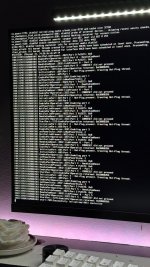
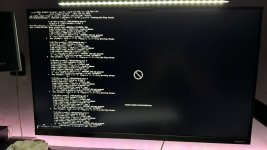
WhatsApp Image 2026-03-10 at 22.21.22.jpeg

WhatsApp Image 2026-03-10 at 22.21.26.jpeg

At the beginning i receive the prohibited sign instantly at picking at OC, switched from iMacPro1,1 to MacPro7,1 and that was solved (and also changed the serial numbers) but now i've that issue with the prohibited sign after the verbose logs

I've created the USBMap.kext with the utility on Windows but not worked

Any ideas?

My setup:

Gigabyte B550 AORUS ELITE AX V2

AMD Ryzen 7 5700X - Thermaltake Contac Silent 12

16GB RAM XPG Hunter DDR4 @ 3200 MHz

Sapphire Nitro+ RX 6700 XT 12G

WD Blue SN580 1TB NVMe

XPG S40G Spectrix 256GB NVMe

Corsair Carbide 100R

Windows 11 & macOS Sequoia (OpenCore 1.0.6)

---

My EFI folder is attached

Thanks
 

Attachments

You are seeing the common “Still waiting for root device” error, which is caused by the USB port you are using for the macOS being dropped by the installer. Try using a different USB port or better yet create a custom USB kext for your system. Use USBToolBox Tool in Windows to create aUTBMap.kext, which will work in Sequoia and earlier versions of macOS, just not Tahoe.
 
  • Like
Reactions: silvergraphs
You are seeing the common “Still waiting for root device” error, which is caused by the USB port you are using for the macOS being dropped by the installer. Try using a different USB port or better yet create a custom USB kext for your system. Use USBToolBox Tool in Windows to create aUTBMap.kext, which will work in Sequoia and earlier versions of macOS, just not Tahoe.
It worked with UTBMap! Thank you!!

I've a few minor problems, maybe somebody can help me?

  • Audio is not working T_T , I've AppleALC 1.9.4 with alcid=11
  • There's a message saying "Memory Modules Misconfigured", it is normal?
  • The processor name in About My Mac says "3,4 GHz 8-Core Intel Xeon W" but on OpenCore I've set up revcpuname with my CPU real name
  • WiFi and Bluetooth aren't working. There's an easy way to fix them? Anyway I don't use them since I´m connected through Ethernet (but for iPhone Mirroring or AirDrop it would have been useful)
 
Last edited:
Audio not working is fairly normal for Tahoe, as Apple removed AppleHDA.kext, which AppleALC.kext relies on to get the builtin Audio codec working. You need to enable AppleHDA.kext using a forked version of OpenCore Legacy Patcher (OCLP-Mod) to get audio working in Tahoe.


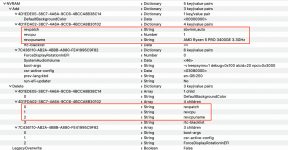
The Memory Modules issue is again normal, when using the MacPro7,1 SMBIOS. You need to add RestrictEvents.kext to your setup and either this boot argument revpatch=auto,sbvmm or a couple of NVRAM entries to fix the issue.


Screenshot 2026-03-11 at 20.29.47.png

RestrictEvents.kext will help with the CPU name in macOS. Read the text on the page linked above.
The revpatch, revcpuname and revcpu NVRAM options are what I use on all my AMD Hacks.

Which WiFi/BT card are you using, Intel or Broadcom?

For Broadcom WiFI you need to look in to the Modern Networking patches available from the OCLP-Mod app linked above.

For Intel WiFi you need to use Itlwm.kext and the Heliport App.


For Intel Bluetooth you need to use the following kexts (in the order shown):

IntelBluetoothFirmware.kext
IntelBTPatcher.kext
BlueToolFix.kext

Copies of these kexts are attached below.

Plus adding these entries in your config.plist in the NVRAM sections shown.

config-BT-NVRAM.png

A copy of these NVRAM entries is attached in the plist below.

The bluetooth working whether it is Intel or Broadcom also requires that the USB port serving the Bluetooth module is correctly configured and active in your USBMap.kext or USBPorts.kext. As UTBMap.kext doesn't work, due to port numbering and naming changes implemented by Apple with the release of Tahoe.
 

Attachments

Audio not working is fairly normal for Tahoe, as Apple removed AppleHDA.kext, which AppleALC.kext relies on to get the builtin Audio codec working. You need to enable AppleHDA.kext using a forked version of OpenCore Legacy Patcher (OCLP-Mod) to get audio working in Tahoe.


The Memory Modules issue is again normal, when using the MacPro7,1 SMBIOS. You need to add RestrictEvents.kext to your setup and either this boot argument revpatch=auto,sbvmm or a couple of NVRAM entries to fix the issue.


View attachment 19011

RestrictEvents.kext will help with the CPU name in macOS. Read the text on the page linked above.
The revpatch, revcpuname and revcpu NVRAM options are what I use on all my AMD Hacks.

Which WiFi/BT card are you using, Intel or Broadcom?

For Broadcom WiFI you need to look in to the Modern Networking patches available from the OCLP-Mod app linked above.

For Intel WiFi you need to use Itlwm.kext and the Heliport App.


For Intel Bluetooth you need to use the following kexts (in the order shown):

IntelBluetoothFirmware.kext
IntelBTPatcher.kext
BlueToolFix.kext

Copies of these kexts are attached below.

Plus adding these entries in your config.plist in the NVRAM sections shown.

View attachment 19008

A copy of these NVRAM entries is attached in the plist below.

The bluetooth working whether it is Intel or Broadcom also requires that the USB port serving the Bluetooth module is correctly configured and active in your USBMap.kext or USBPorts.kext. As UTBMap.kext doesn't work, due to port numbering and naming changes implemented by Apple with the release of Tahoe.
I've a Realtek RTL8852CE WiFi/BT card, there's no way to make it work right? I think we've talked about that in the past haha
 
Yeah, that Realtek card simply won't work with macOS.

You need a compatible Intel or Broadcom WiFi/BT card for macOS. These cards still require additional work to get them running correctly in macOS, especially Tahoe. As Apple are continuing to change things with each update to their latest OS.

Disabling the Realtek WiFi & Bluetooth options in the bios, and then adding a compatible PCIe mounted WiFi/BT card to your system might be your best option, if you require WiFi or Bluetooth in macOS.

For Airplay/AirDrop and other Continuity/Handoff features the best option is still an old natively supported Broadcom card from the BCM4360...... family.

There was hope the latest MacBook Neo would provide another avenue to use a Mediatek WiFi/BT card, but that is currently looking unlikely, as the kexts and dexts required for the Mediatek card don't appear to be present in the latest OS release 26.3.1.
 
Yeah, that Realtek card simply won't work with macOS.

You need a compatible Intel or Broadcom WiFi/BT card for macOS. These cards still require additional work to get them running correctly in macOS, especially Tahoe. As Apple are continuing to change things with each update to their latest OS.

Disabling the Realtek WiFi & Bluetooth options in the bios, and then adding a compatible PCIe mounted WiFi/BT card to your system might be your best option, if you require WiFi or Bluetooth in macOS.

For Airplay/AirDrop and other Continuity/Handoff features the best option is still an old natively supported Broadcom card from the BCM4360...... family.

There was hope the latest MacBook Neo would provide another avenue to use a Mediatek WiFi/BT card, but that is currently looking unlikely, as the kexts and dexts required for the Mediatek card don't appear to be present in the latest OS release 26.3.1.
Okay thank for you response

I tried the fixes you provided with RestrictEvents kext and they worked.

The only remaining thing is the audio. I've downloaded OCLP-Mod, applied csr-active-config to 03080000 and applied the patches. Restarted and it worked. But then i restored csr-active-config to 00000000 again and the system won't boot (it's a secondary hard drive so it's okay).

I need to maintain that SIP state to use the AppleALC approach? Is secure to have SIP partially disabled?
What about the VoodooHDA approach? I'll be on the same situation with the SIP? Why i'm asking so many questions? :ROFLMAO:
 
Yes, you need to maintain that SIP state (partially disabled to allow unsigned kexts) for the Audio to work.

I run all my Hacks with SIP partially disabled, with no adverse issues.

No idea about VoodooHDA.kext, I haven't used that kext for many years.

Because you want to know, before you take the step, not after when you know the steps you took were incorrect. That is why most people ask the question. Better to be safe than sorry.
 
  AdBlock Detected
Sure, ad-blocking software does a great job at blocking ads, but it also blocks some useful and important features of our website. For the best possible site experience please take a moment to disable your AdBlocker.