Hi all,
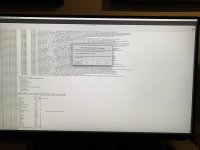
this is my second installation of a Catalina build on my system. I have Ryzen 3600 and RX3700 graphic card. I had a working system running 10.15.3 on OpenCore 0.5.9, but I had some issues with other softwares and wanted to upgrade to the latest Catalina. I followed again all the steps in the guide and have a working 0.6.3 USB bootable installer. I reach the installer no problem, I can use Disk Utility and start the installation, but after the first reboot (and choosing Mac OS Installer instead in OC) and a bit of loading, I reach a stop point. Attached is an image of where I cannot get out or continue. The installer basically says Mac OS cannot be installed in this machine. I can share the log from the installer if needed, but maybe there is a quick easy fix of something I might have overlooked?
Thanks for the help!
Cheers,
Marco
this is my second installation of a Catalina build on my system. I have Ryzen 3600 and RX3700 graphic card. I had a working system running 10.15.3 on OpenCore 0.5.9, but I had some issues with other softwares and wanted to upgrade to the latest Catalina. I followed again all the steps in the guide and have a working 0.6.3 USB bootable installer. I reach the installer no problem, I can use Disk Utility and start the installation, but after the first reboot (and choosing Mac OS Installer instead in OC) and a bit of loading, I reach a stop point. Attached is an image of where I cannot get out or continue. The installer basically says Mac OS cannot be installed in this machine. I can share the log from the installer if needed, but maybe there is a quick easy fix of something I might have overlooked?
Thanks for the help!
Cheers,
Marco