Sleep not working reliably on ThinkPad T495s

rakismac32

New member
AMD OS X Member
Aug 31, 2026
16
3
3
CPU:
AMD Ryzen 5 PRO 3500U w/ Radeon Vega Mobile Gfx
On my previous thread on this forum, I successfully got sequoia working on my ThinkPad. Almost everything works just to be good enough as my daily driver, but at the time i never tested sleep, i always shut down my laptop after use. But then one time i need to put my laptop to sleep, it wakes up to only black screen, so i need to hard reset it to boot it back up. But what i noticed is, when i tested it to put it on sleep then wake it up +- 5 minutes later, it wakes up fine, but if i leave it to sleep for longer time, it only wakes up to black screen. And it's not because it ran out of battery either, because after i hard reset it, it shows still plenty of battery left.

Here's the specs of my ThinkPad:

CPU: AMD Ryzen 5 PRO 3500U w/ Radeon Vega Mobile Gfx
RAM: 16GB DDR4 2400MHz
SSD: 256GB NVMe
Wifi card: Intel Wireless AC 9260
iGPU: AMD Radeon Vega 8 Graphics

Attached is my EFI and config file, hope anyone can help me out on this, thanks!
 

Attachments

Hello @rakismac32. Proper USB Port mapping is required for sleep to function correctly. There are countless posts describing your situation on multiple forums so don;t feel alone. or without hope. In your exceptionally full EFI kext section you have enabled both USBMap.kext and USBPorts.kext, that alone could be the reason. Disable one or the other, clear NVRAM and see if that helps. If not take a closer look at your port mapping in one or the other, I notice in both versions one of the controllers has an SS01 port mapped as 255 or internal. That is unusual. and probably incorrect.

This is what Lenovo says are the standard ports:
Standard Ports
1x USB 3.1 Gen 1 (Always On)•
1x USB 3.1 Gen 2•
2x USB-C 3.1 Gen 2 (support data transfer, Power Delivery and DisplayPortâ„¢ 1.4)

Here are some guidelines I stole from Ed Hawk on how to properly identify and map USB Ports

How to set USB Port Status

  1. USB2 (0) - Physical USB2 ports on rear I/O plate, these ports always have a Black coloured tang.
  2. USB3 (3) - Physical USB3 ports on rear I/O plate, these ports can have a Red, Blue, Cyan or Yellow coloured tang.
    1. Virtual USB2 ports - served from physical USB3 ports) should be set with the same connector type as the physical port
  3. USB3 (3) - Motherboard Header, usually serving the case front USB3 ports.
    1. Virtual USB2 ports - served from physical USB3 ports) should be set the same as the physical port
  4. Internal (255) - Motherboard USB2 header, this will be any device served from a header port, such as Bluetooth module, case front USB2 ports, case front card reader etc.
    1. Internal connector type should also be used for any Bluetooth USB connection from a built-in M.2 connector (on the Rear I/O plate).
  5. Type-c+sw (9) - Type-C connector on Rear I/O plate, will only show two ports being available,
    1. when the Type-C device is inserted, removed, flipped 180° and reinserted, 1 x Physical Type-C and 1 x virtual USB2 port.
  6. Type-c (10) - Type-C (E) motherboard header, will show four ports being available from a single Type-C connector,
    1. when the Type-C device is inserted, removed, flipped 180° and reinserted, 2 x Type-C and 2 x USB2.


This is the way you should be setting your USB port connector types, when creating a custom USB kext.
Thank you for the suggestions!

I made the USB kext by using USBMapTool when i was in Ventura, then Ed Hawk advised me to update it with Hackintool to make it work in Sequoia.
I just tried disabling USBMap.kext and USBPorts.kext one at a time, it resulted my laptop would wake up on its own after on sleep for a few minutes even when its closed, indicated by the red dot in "i" of the ThinkPad turned from blinking to solid red. And after opening it, it would only show a black screen, so that does not seem to be the cause.

Regarding the SS01 port mapped as internal, I believe it's the NVMe controller, because before i changed it to internal, my internal SSD would be detected as External.

1795764409947.png
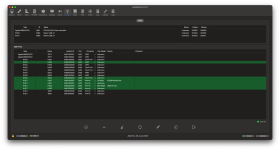
And since i didn't make the USB kexts myself, I might need help configuring USB Port status, and all that i can see in Hackintool is as attached here. I noticed there are some USB Ports listed that won't get marked green or active after i tried plugging a device on every usb ports available on my laptop, should i remove them or leave them as is? Including AppleUSBEHCIPCI entry that never gets marked as active
 
Last edited:
Hey @rakismac32 . USB Mapping can be confusing, to be clear you should only be loading one method of USB port mapping, you were or are loading two kinds and that's an issue. If disabling either still results in sleep issues then its most likely neither was mapping ports correctly, occasionally its caused by a program running in the background.

That your "Nvme Controller" is linked via USB is probably incorrect, I bet if you check the various devices in Hackintool it will show a stand alone storage controller. Internal drives showing as external can be resolved in other ways. Internal USB connections in your laptop would usually be limited to a camera, Bluetooth or an SD Card reader.

In Hackintool if a port is unused it can be deleted until only the functioning ports are listed at which point you would create the kext.
 
Last edited:
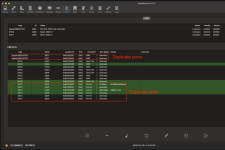
Looking at the Hackintool USB tab and the ports it shows, I would comment as follows:

You have 4 x ports that appear to be duplicated.
  1. The top Realtek controller PRT1 port, duplicated port has the same port name PRT1. This shouldn't be the case.
  2. The bottom 3 x ports HS01, HS02 & SS01 under the XHC1 controller are all duplicated.
Screenshot 2026-11-27 at 21.57.27.png

The 3 x XHC1 ports appear to be incorrectly set as 'Internal'. I doubt if these ports are actually internal ports. HS01 & SS01 are most likely served from a single USB3 port.
HS02 may be a USB2 port, it could also be correctly configured as internal. You need to test to see which port it actually serves.

As @leesurone stated in a laptop such as yours you would only see the Bluetooth, Webcam and a SD card reader attached to Internal USB ports. Your laptop going by the kexts you use, includes all three of these components/devices.

However you would never see a port named SS01 set last Internal, as any USB3 port served from an internal header should be set with connector type USB3. So would the virtual USB2 port that is served from the USB3 header port.

I would recommend you delete the USBMap.kext from your setup, as it is not configured for use in Tahoe. It only contains the old USB name and port number configuration, as shown in the screenshot below..
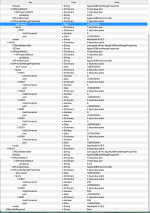
Screenshot 2026-11-27 at 22.29.40.png USBMap.kext/Contents/Info.plist as viewed in ProperTree.

Your USBPorts.kext, which activates exactly the same ports has been configured to work in Tahoe and is backwards compatible with macOS back to Catalina.
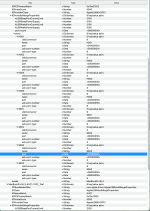
Screenshot 2026-11-27 at 22.31.19.png USBPorts.kext/Contents/Info.plist as viewed in ProperTree, with the Tahoe compatible configuration.

Having both kexts active in your setup may be the cause of the port duplication.

You would need to disable/remove the USBMap.kext, Reboot, Reset Nvram from the OC boot screen.
When you land back in the OS, Open Hackintool navigate to the USB tab, then select the 'Clear All' (sweeping brush icon) and then the 'Refresh' (circular arrow icon) to see what difference the kext removal makes to your USB port setup.

I would also recommend that you use the XHC1 to XHC2 ACPI rename patch, shown in the screenshot below in your config.plist. Apple use a USB controller named XHC1, you don't want the Apple USB port configuration being applied to your XHC1 ports. So renaming them to work under XHC2, which Apple don't use would be beneficial.
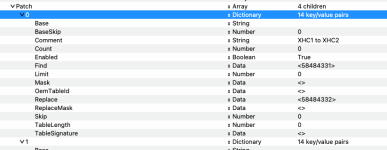
Screenshot 2026-11-27 at 22.16.38.png

You may have to manually edit the USBPorts.kext/Contents/Info.plist to reflect this USB controller change. The edit would be required in a in two places, as shown int he screenshot below.
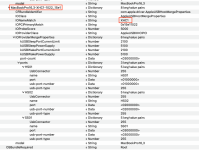
Screenshot 2026-11-27 at 22.33.50.png The two places where XHC1 would need to be changed to XHC2 are highlighted in the screenshot.

Hope this helps.

 
✖
  AdBlock Detected
Sure, ad-blocking software does a great job at blocking ads, but it also blocks some useful and important features of our website. For the best possible site experience please take a moment to disable your AdBlocker.