
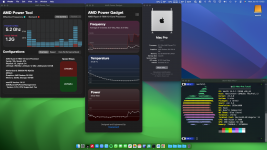
Ryzentosh - ASRock B650M PG Riptide - Ryzen 9 7900

sadwjp

New member
AMD OS X Member
Sep 9, 2020
2
2
3
thumbnail.png

macOS Version​

Current Version: macOS Sonoma - 14.3.1

OpenCore Version​

Current Version: 1.0.0 - Debug

Hardware​

  • Motherboard: ASRock B650M Riptide
  • CPU: AMD Ryzen 9 7900
  • RAM: 32 GB (2x16GB) Corsair Vengeance DDR5 6000Mhz CL30
  • GPU: Sapphire NITRO+ RX 590 SE
  • PSU: Corsair RM750e V2
  • HDD: Crucial P3 Plus SSD 1TB
  • WiFi/BT: Fenvi-T919 BCM4360KML

Working​

  • CPU Name
  • CPU Power Management
  • GPU Management
  • USB Ports
  • Sleep/Wake
  • WiFi/BT

GitLab repo

Credits​

Thanks to SchmockLord and LEE SEGUN for their work on their projects
 
Last edited:
  • Like
Reactions: craighazan
You might want to add Innie.kext to your setup, so the macOS icon (for the PCIe drive) on your desktop appears correctly, not as an external drive.

 
  • Like
Reactions: sadwjp
  AdBlock Detected
Sure, ad-blocking software does a great job at blocking ads, but it also blocks some useful and important features of our website. For the best possible site experience please take a moment to disable your AdBlocker.