
Radeon 5500 XT problem

laurent

Member
AMD OS X Member
Oct 30, 2020
140
13
18
53
France
CPU:
Amd Fx8350 Amd ryzen 7 5700x
Hello,
I'm having an issue with my Radeon 5500 XT OC 8GB graphics card.
When the computer is idle, after about 8 minutes, the graphics card temperature gradually rises—and the fans ramp up their speed accordingly—but as soon as I touch the mouse or keyboard, everything returns to normal. I reinstalled the graphics card's VBIOS, but nothing changed.
Tahoe 26.7, OpenCore 1.0.7, AMD Ryzen 5 3600 msi b450 tomahawk
I can't figure out if the graphics card is failing or if there's a problem with my configuration.
 

Attachments

  • Capture d’écran 2026-09-17 à 09.00.10.png
    Capture d’écran 2026-09-17 à 09.00.10.png
    161.7 KB · Views: 2
  • EFI.zip
    EFI.zip
    10.8 MB · Views: 1
It is unlikely to be an issue with your setup, but saying that you are using USBMapDummy.kext, when you should be using USBMap.kext. USBMapDummy.kext is normally only used while undertaking the USB port discovery, not as the end product of your custom USB configuration.

When the system is idle which background processes are running?

Test: Have Activity Monitor open, leave the system to idle and see which if any processes are running to make the dGPU fan and temperature ramp up.

Have you thought about dismantling the dGPU and replacing the thermal paste and pads used to cool the card?
 
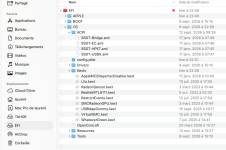
Looking in your /EFI/OC/Kexts folder I would try running with the RadeonSensor.kext and SMCRadeonGPU.kext disabled and see if that makes any difference. These sensor kexts can often be problematic in macOS.

In your config.plist you have enabled the 2 x Fix PAT Kernel Patches created by Shaneee/Zormeister. Have you tried switching to the alternative Kernel Patches by Algrey/Zormeister? Does this effect the way the dGPU behaves when the system idles?

Further to your USBMapDummy.kext, I note that both USB controllers (PXTH & XHC0) are set to work with 26 x ports, which will always cause an issue in macOS. As the most any one USB controller can activate is 15 x ports.
  1. Under PXTH 9 of the 26 x ports have been disabled (UK03 to UK11), so 17 x ports are being activated!
  2. Under XHC0 all 26 x ports are being activated!
  3. In both cases only the first 15 x ports will be activated by macOS. This marries up with the 15 x port limit imposed by Apple for each USB controller.
 
  • Like
Reactions: laurent
Looking in your /EFI/OC/Kexts folder I would try running with the RadeonSensor.kext and SMCRadeonGPU.kext disabled and see if that makes any difference. These sensor kexts can often be problematic in macOS.

In your config.plist you have enabled the 2 x Fix PAT Kernel Patches created by Shaneee/Zormeister. Have you tried switching to the alternative Kernel Patches by Algrey/Zormeister? Does this effect the way the dGPU behaves when the system idles?

Further to your USBMapDummy.kext, I note that both USB controllers (PXTH & XHC0) are set to work with 26 x ports, which will always cause an issue in macOS. As the most any one USB controller can activate is 15 x ports.
  1. Under PXTH 9 of the 26 x ports have been disabled (UK03 to UK11), so 17 x ports are being activated!
  2. Under XHC0 all 26 x ports are being activated!
  3. In both cases only the first 15 x ports will be activated by macOS. This marries up with the 15 x port limit imposed by Apple for each USB controller.
I disassembled the GPU, replaced the thermal pads and thermal paste of processor gpu, and fixed the USB ports, but the problem persists. Activity Monitor shows mediaanalysisd (PID 2192) using 72% of the CPU, accompanied by VTDecoderXPCService. It seems the primary culprit, mediaanalysisd, is part of the macOS Tahoe codebase. The Ryzen processor's AMD architecture lacks an integrated Intel graphics chip (iGPU)—a tool macOS normally uses to handle these AI tasks seamlessly in the background. For now, I’ve set the screen to turn on a screensaver after 5 minutes, and that seems to be working. I think I’ll have to either replace the GPU or revert to Sequoia—do you have any other ideas?
 
You should be using a System Definition that doesn’t have or expect an Intel IGPU to be present, I.e. MacPro7,1 SMBIOS with your AMD Hack. If you are using an iMac20,x SMBIOS, which expects an Intel IGPU you need to change it.

Changing the GPU for another compatible card sounds like a good idea.
 
  • Like
Reactions: laurent
  AdBlock Detected
Sure, ad-blocking software does a great job at blocking ads, but it also blocks some useful and important features of our website. For the best possible site experience please take a moment to disable your AdBlocker.