R9 5950X, X570 - keep getting stuck in macOS Ventura 13.3 Stuck in [EB|#LOG:EXITBS:START]

brada1983

New member
AMD OS X Member
Mar 12, 2023
12
2
3
CPU:
Ryzen 5950x
Hello everyone

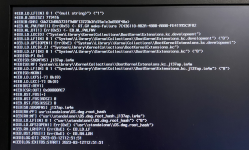
I can't get past [EB|#LOG:EXITBS:START] no matter how many times I started over.

My Hardware is:
Asus Prime X570-PRO
Ryzen 5950X
64GB DDR4 ram

I tried tried manually with Dortania's tutorial, then tried

OpenCore EFI for AMD Ryzen Hackintosh from GitHub​


and everytime the same thing happens.

Please help me out I really want to do this, this was the sole reason for investing this kind of money in this machine.

Here is a screenshot of my error, and my EFI folder attached.


Thanks
 

Attachments

  • tempImageLPO5RH.png
    tempImageLPO5RH.png
    7.1 MB · Views: 23
  • EFI.zip
    EFI.zip
    5.3 MB · Views: 22
Solution
Good to hear you were able to install macOS Ventura.

Try removing one of the XFX RX580 dGPU's, preferably the card in the second PCIe x16 slot. See if that helps with the random reboots.

You probably won't gain much from having 2 x RX 580 dGPU's installed. As the AMD drivers in macOS are very different from those found in Windows, where dual GPU's are fully supported.

I assume you are aware that some XFX dGPU's can be problematic in macOS. Due to XFX providing non-standard VBios's with their dGPU's.

See this section of the GPU Buyers Guide regarding XFX and Polaris dGPU's.

# Polaris 10 and 20 series
Hello everyone

I can't get past [EB|#LOG:EXITBS:START] no matter how many times I started over.

My Hardware is:
Asus Prime X570-PRO
Ryzen 5950X
64GB DDR4 ram

I tried tried manually with Dortania's tutorial, then tried

OpenCore EFI for AMD Ryzen Hackintosh from GitHub​


and everytime the same thing happens.

Please help me out I really want to do this, this was the sole reason for investing this kind of money in this machine.

Here is a screenshot of my error, and my EFI folder attached.


Thanks
What about your bios settings? They should reflect something similar to what is listed below. There are also some brands of SSDs that cause Mac OS grief, what are you using?

BIOS Settings:​

  • Enter BIOS -> Press Delete -> Enter Setup
  • Exit -> Load Optimised Defaults
  • Ai Tweaker -> Ai Overclock Tuner -> D.O.C.P.
  • Advanced -> APM Configuration -> Power On By PCIe -> Disabled
  • Advanced -> PCI Subsystem Settings -> Above 4G Decoding -> Enabled
  • Advanced -> PCI Subsystem Settings -> Re-Size BAR Support -> Disabled
  • Advanced -> USB Configuration -> Legacy USB Support -> Auto or Disabled
  • Boot -> Boot Configuration -> Fast boot -> Disabled
  • Boot -> CSM -> Launch CSM -> Disabled
  • Boot -> Secure boot -> OS Type -> Windows UEFI mode
  • Boot -> Secure boot -> Key Management -> Clear Secure Boot Keys
 
  • Like
Reactions: brada1983
What about your bios settings? They should reflect something similar to what is listed below. There are also some brands of SSDs that cause Mac OS grief, what are you using?

BIOS Settings:​

  • Enter BIOS -> Press Delete -> Enter Setup
  • Exit -> Load Optimised Defaults
  • Ai Tweaker -> Ai Overclock Tuner -> D.O.C.P.
  • Advanced -> APM Configuration -> Power On By PCIe -> Disabled
  • Advanced -> PCI Subsystem Settings -> Above 4G Decoding -> Enabled
  • Advanced -> PCI Subsystem Settings -> Re-Size BAR Support -> Disabled
  • Advanced -> USB Configuration -> Legacy USB Support -> Auto or Disabled
  • Boot -> Boot Configuration -> Fast boot -> Disabled
  • Boot -> CSM -> Launch CSM -> Disabled
  • Boot -> Secure boot -> OS Type -> Windows UEFI mode
  • Boot -> Secure boot -> Key Management -> Clear Secure Boot Keys
Hey

Thanks for reaching out.

I have done these BIOS settings exactly by this list.

As for SSD it’s a Samsung MZVLB512HAJQ-000L7 512 GB NVME ssd

Best regards
 
Hey

Thanks for reaching out.

I have done these BIOS settings exactly by this list.

As for SSD it’s a Samsung MZVLB512HAJQ-000L7 512 GB NVME ssd

Best regards
Double check the model against what I entered below, if it matches your SSD it is not supported, none of the PM981 series are.
Samsung MZVLB512HAJQ-000L7 - 512GB PCIe NVMe SSD PM981 M.2

 
Last edited:
I made a couple of changes to your config, see if it works.
 

Attachments

  • Like
Reactions: brada1983
Yeah that's the one. I'll remove that drive and use another, and try it like that

Best regards and thanks alot
Hey i removed the Samsung SSD and I got the same result.

Gonna try removing all hardware except for the basic setup and try again


BRB
 
Hey i removed the Samsung SSD and I got the same result.

Gonna try removing all hardware except for the basic setup and try again


BRB
Hey i removed the Samsung SSD and I got the same result.

Gonna try removing all hardware except for the basic setup and try again


BRB
Nope

still the same, without any drives and without any extras
 
still the same, without any drives and without any extras
The only other thing I can think of to suggest is to turn off USBToolBox.kext in your config.plist, it doesn't do anything anyway without also having UTBMap.kext (to define USB Ports which you don't have). Once you turn off USBToolBox.kext try a variety of port to see if you can get farther and install. If that works then you can work on mapping USB. One other alternative is to use windows and the USBToolBox utility to create a UTBMap.kext to then add to your EFI
 
  • Like
Reactions: brada1983
The only other thing I can think of to suggest is to turn off USBToolBox.kext in your config.plist, it doesn't do anything anyway without also having UTBMap.kext (to define USB Ports which you don't have). Once you turn off USBToolBox.kext try a variety of port to see if you can get farther and install. If that works then you can work on mapping USB. One other alternative is to use windows and the USBToolBox utility to create a UTBMap.kext to then add to your EFI
OK

will try both and let you know about results

thanks a lot mate, really helpful.

talk to you soon
 
  • Like
Reactions: leesurone
OK

will try both and let you know about results

thanks a lot mate, really helpful.

talk to you soon
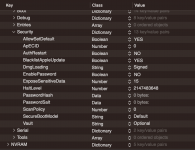
There could be one other thing to try, in your config.plist change Misc/Security/SecureBootModel to Disabled (from Default).
 

Attachments

  • SecureBootModel.png
    SecureBootModel.png
    174.8 KB · Views: 32
  • Like
Reactions: brada1983
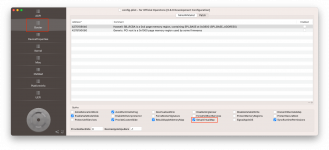
Try enabling SetupVIrtualMap:

Screenshot 2023-03-13 at 6.52.11 AM.png
 
  • Like
Reactions: brada1983
Try this revised EFI folder, see if this helps.
 

Attachments

  • Like
Reactions: brada1983
Try this revised EFI folder, see if this helps.
YES!!!!!!

This EFI worked, it started the install, will let you know if it finishes.

THanks man, thanks everyone, I'm so happy.


Will get back to you ASAP.
 
Try this revised EFI folder, see if this helps.Hi
Hi

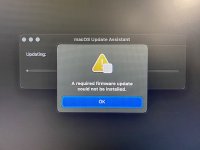
i think i got a bit overexcited

after the first reboot i get here.


Best regards
 

Attachments

  • IMG_0799.jpeg
    IMG_0799.jpeg
    4 MB · Views: 37
I am not familiar with that error message, so don't know what to suggest you do to fix the issue. I do have a couple of questions:
  1. Are you updating the system from a previous version of macOS, an earlier release of Ventura or running a clean installation of Ventura?
  2. How have you created your macOS Ventura installer, i.e. from within macOS on a real Mac or another Hack, or through the Windows USB creation process?
You may be best served downloading the full Ventura installation app in macOS, restoring Ventura to a USB pen drive, with the EFI I provided copied to the EFI partition on the USB drive. Then look to update or install a clean copy of Ventura.
 
  • Like
Reactions: brada1983
I am not familiar with that error message, so don't know what to suggest you do to fix the issue. I do have a couple of questions:
  1. Are you updating the system from a previous version of macOS, an earlier release of Ventura or running a clean installation of Ventura?
  2. How have you created your macOS Ventura installer, i.e. from within macOS on a real Mac or another Hack, or through the Windows USB creation process?
You may be best served downloading the full Ventura installation app in macOS, restoring Ventura to a USB pen drive, with the EFI I provided copied to the EFI partition on the USB drive. Then look to update or install a clean copy of Ventura.
I managed to install MAC OS X, on a different drive, perhaps my SSD was dying.

But now when I boot in MAC OS X, the system randomly resets

Damn so much trouble if I knew I probably would go some other alternative.
 
Good to hear you were able to install macOS Ventura.

Try removing one of the XFX RX580 dGPU's, preferably the card in the second PCIe x16 slot. See if that helps with the random reboots.

You probably won't gain much from having 2 x RX 580 dGPU's installed. As the AMD drivers in macOS are very different from those found in Windows, where dual GPU's are fully supported.

I assume you are aware that some XFX dGPU's can be problematic in macOS. Due to XFX providing non-standard VBios's with their dGPU's.

See this section of the GPU Buyers Guide regarding XFX and Polaris dGPU's.

# Polaris 10 and 20 series
 
  • Like
Reactions: brada1983
Solution
Good to hear you were able to install macOS Ventura.

Try removing one of the XFX RX580 dGPU's, preferably the card in the second PCIe x16 slot. See if that helps with the random reboots.

You probably won't gain much from having 2 x RX 580 dGPU's installed. As the AMD drivers in macOS are very different from those found in Windows, where dual GPU's are fully supported.

I assume you are aware that some XFX dGPU's can be problematic in macOS. Due to XFX providing non-standard VBios's with their dGPU's.

See this section of the GPU Buyers Guide regarding XFX and Polaris dGPU's.

# Polaris 10 and 20 series
Hello

sry for long time no feedback, but been busy as hell


still having random reboots, practically unusable, tried everything I even borrowed friends AMD card


still no joy

BR
 
✖
  AdBlock Detected
Sure, ad-blocking software does a great job at blocking ads, but it also blocks some useful and important features of our website. For the best possible site experience please take a moment to disable your AdBlocker.