

Hola a todos, llevo una semana desde que instalé Big Sur 11.6.1 en mi computadora, durante estos dias he estado modificando el archivo config.plist, añadiendo kexts y modificando lineas de arranque para evitar el DRM, y parecia que todo funcionaba correctamente.
Esta tarde queria copiar unas fotos que tengo en unos viejos dvds y me he fijado de que no aparece la unidad en la lista de dispositivos SATA.
Aqui les dejo una captura de los "AHCI Controllers".
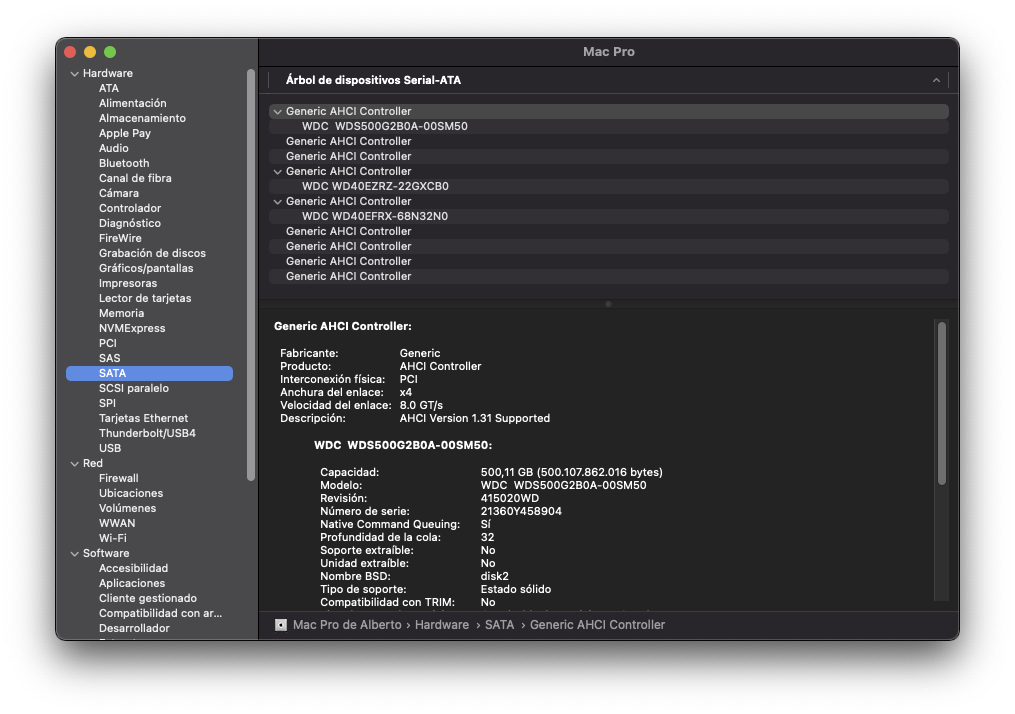
Una cosa que me extraña es que veo 9 "Generic AHCI Controllers".
Mi placa madre solo tiene 6 puertos SATA (supongo que 1 puerto SATA es 1 Generic AHCI Controller).
Si es asi, "sobran" 3 AHCI Controller.
La unidad Bluray SATA esta conectada en el ultimo puerto SATA, SATA_6 en la placa madre.
Deberia añadir algun kext para la controladora AHCI?
Un saludo y muchas gracias!
Esta tarde queria copiar unas fotos que tengo en unos viejos dvds y me he fijado de que no aparece la unidad en la lista de dispositivos SATA.
Aqui les dejo una captura de los "AHCI Controllers".
Hello everyone, it took a week since I installed Big Sur 11.6.1 on my computer, during these days I have been modifying the config.plist file, adding kexts and modifying boot lines to avoid DRM, and it seemed that everything was working correctly.
This afternoon I wanted to copy some photos that I have on some old DVDs and I have noticed that the unit does not appear in the list of SATA devices.
Here is a screenshot of the "AHCI Controllers".
Una cosa que me extraña es que veo 9 "Generic AHCI Controllers".
Mi placa madre solo tiene 6 puertos SATA (supongo que 1 puerto SATA es 1 Generic AHCI Controller).
Si es asi, "sobran" 3 AHCI Controller.
La unidad Bluray SATA esta conectada en el ultimo puerto SATA, SATA_6 en la placa madre.
Deberia añadir algun kext para la controladora AHCI?
Un saludo y muchas gracias!
One thing that puzzles me is that I see 9 "Generic AHCI Controllers".
My motherboard only has 6 SATA ports (I assume 1 SATA port is 1 Generic AHCI Controller).
If so, 3 AHCI Controllers are "left over".
The Bluray SATA drive is plugged into the last SATA port, SATA_6 on the motherboard.
Should I add any kext for the AHCI controller?
Regards, and thank you very much!
