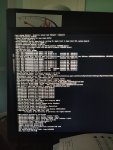
OpenCore boot Hangs

drake90001

New member
AMD OS X Member
May 2, 2020
16
1
1
The last 3 lines are:
Lilu rtc: @ rtc read failure 1 bytes from 180 E00002C2
VirtualSMC efend: @ no extra rtc memory is present for key erase
AMFILoadTrustedKe

And then it just stops.

I have the correct EC DSDT from the guide, running a 990FXA and an FX 8350 (OC 4.7GHz if it matters).

Thank you.
 
Do you have an option for HPET in your BIOS? If so enable it. If it's already enabled try adding this SSDT. Add it to your ACPI folder and remember to include it in your config.plist
 

Attachments

  • Like
Reactions: drake90001
Do you have an option for HPET in your BIOS? If so enable it. If it's already enabled try adding this SSDT. Add it to your ACPI folder and remember to include it in your config.plist
Will try and update you.
 
Do you have an option for HPET in your BIOS? If so enable it. If it's already enabled try adding this SSDT. Add it to your ACPI folder and remember to include it in your config.plist
Shaneee do I Include this with SSDT-EC-USBX-AMD.aml or replace it?

If include, what keys must go in the config.

I tried both and disabling hpet just in case, nothing.
 
Last edited:
Sorry for bumping.
 

Attachments

  • IMG_20200502_152531.jpg
    IMG_20200502_152531.jpg
    3.4 MB · Views: 43
Check your BIOS again. Disable CSM and if you have Above4G enable it and remove the npci boot arg.
 
  • Like
Reactions: drake90001
Check your BIOS again. Disable CSM and if you have Above4G enable it and remove the npci boot arg.
Thanks again for your reply. I do not have a CSM toggle (but an "is version" set to other OS).

I also do not have Above4G as an option either.

Again this is a 990FXA-UD3
 
Check your BIOS again. Disable CSM and if you have Above4G enable it and remove the npci boot arg.
After double checking everything, resetting bios, etc. The same errors remain and hang. My FX8350 is over locked @4.7ghz but even at stock it still hangs. I am also running raid on the bios side if that might not help.
\
Edit: Added config, forum doesn't allow plist files so its renamed to .txt.
 

Attachments

  • Like
Reactions: iamprabhuantony
  • Like
Reactions: drake90001
Include this SSDT, https://github.com/dortania/OpenCore-Desktop-Guide/raw/master/extra-files/SSDT-EC-USBX-AMD.aml

You are missing Whatevergreen.kext and one for your LAN too.

Remove alcid=1 and USBBusFix=Yes from your boot args.

I'm stilling hanging, this time at RTC only single ram bank

Attached is my new Config.plist, I believe I have it setup correctly?

All kexts added under Kernel Add,


AppleALC.kext
IOBDStorageFamily.kext
IOUSBFamily.kext
IOUSBHostFamily.kext
IOUSBMassStorageClass.kext
Lilu.kext
RealtekRTL8111.kext
WhateverGreen.kext
VirtualSMC.kext


remaining kexts (those missing Contents/MacOS):

AHCIPortInjector.kext
XLNCUSBFix.kext

These are not listed in the config, as I was unsure what to do with them.

All kexts are in BOOT/EFI/OC/Kexts/
 

Attachments

Not sure why you've got these,
IOBDStorageFamily.kext
IOUSBFamily.kext
IOUSBHostFamily.kext
IOUSBMassStorageClass.kext

Remove them. Read the OpenCore guide or OpenCore docs to see how to add kexts.
 
Not sure why you've got these,
IOBDStorageFamily.kext
IOUSBFamily.kext
IOUSBHostFamily.kext
IOUSBMassStorageClass.kext

Remove them. Read the OpenCore guide or OpenCore docs to see how to add kexts.
They were included in the zip from the vanilla guide. I'll try to find the part about kexts in the guide but searching yesterday I didn't find specifics on if they go in the config and if so, where.
 
Not sure why you've got these,
IOBDStorageFamily.kext
IOUSBFamily.kext
IOUSBHostFamily.kext
IOUSBMassStorageClass.kext

Remove them. Read the OpenCore guide or OpenCore docs to see how to add kexts.
Shane, after doing research and reading documentation, I've completed everything necessary and everything you've suggested.

I am still hanging on VirtualSMC stating authenticated reboot not authorized.
 
It's not the VirtualSMC it's sticking on it'll be something just before it. Check this, https://dortania.github.io/OpenCore...tion-begins-previous-shutdown-hpet-hid-legacy
Installation complete. Systems boots. Standard green button and tearing artifacts even with webdrivers. Gpu isn't being detected. NVRAM issue?

Edit: update security patch 2020-001 or whichever, was able to install webdrivers.

I am however still getting random black screen and USB shut off. Trying to diagnose.
 
Last edited:
  AdBlock Detected
Sure, ad-blocking software does a great job at blocking ads, but it also blocks some useful and important features of our website. For the best possible site experience please take a moment to disable your AdBlocker.