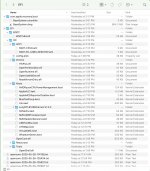
Attached is an OpenCore 1.0.4 EFI for you to try with your MSI B650 / R7 7700X / RX 6600 system.
You should only need to add the MacPro7,1 SMBIOS data to the config.plist, i.e. MLB, ROM, Serial Number and SystemUUID. Everything else should remain the same.
Just be aware that the built-in WiFi & Bluetooth are not being activated, as neither the AMD nor Realtek WiFI/BT cards provided with your MSI motherboard are supported in macOS. It is probably best that you disable both of these devices in your Bios, before you boot into OpenCore and macOS.
If you want/need WiFi or BT you need to do one of two things.
Add a compatible Broadcom native Apple WiFi/BT card to the system.
This will require the use of OpenCore Legacy Patcher in Sequoia or Sonoma.
Add a compatible Intel WiFi/BT card,
This would not be as good as the Broadcom option, but would suffice for most uses, just don't expect any Apple Continuity/Handoff/AirDrop functions to work.
You need to make sure you have set the System Bios to allow macOS to boot.
These are some of the Bios changes you would need to make.
Disable
Fast Boot
Secure Boot
Serial/COM Port
Parallel Port
Compatibility Support Module (CSM) (Must be off in most cases, GPU errors/stalls like gIO are common when this option is enabled)
IOMMU
Enable
Above 4G Decoding (This must be on, if you can't find the option then add npci=0x3000 to boot-args. Do not have both this option and npci enabled at the same time.)
If you are on a Gigabyte/Aorus or an AsRock motherboard, enabling this option may break certain drivers(ie. Ethernet) and/or boot failures on other OSes, if it does happen then disable this option and opt for npci instead
2020+ BIOS Notes: When enabling Above4G, Resizable BAR Support may become an available on some X570 and newer motherboards. Please ensure that Booter -> Quirks -> ResizeAppleGpuBars is set to 0 if this is enabled.
EHCI/XHCI Hand-off
OS type: Windows 8.1/10 UEFI Mode (some motherboards may require "Other OS" instead)
So if booting windows, I use the motherboard's wireless card, and if booting mac, I use the broadcom wireless card? Does that configure automatically during installation, or do I have to open bios every time I restart the computer and toggle what card I'm using? Or was bios not related to the card?
It looks like macs are going to be going away from broadcom soon too. I am going to be miffed if they decide that msi's built in wifi card is good enough after I buy the broadcom card, ha!
No, you permanently disable the builtin WiFi/BT card in the Bios, as it is not compatible with macOS. You use the replacement Broadcom WiFi/BT card in both macOS and Windows.
After some experimenting:
EFI-Avina didn't boot at all. It just ignored the usb installer, even though it should be the first thing to boot? I tried to create a bastardization of My EFI and EFI-Avina as well, and it still didn't recognize it. So I am still stuck with my original usb key that at least is recognized but throws out errors and goes back to the boot screen.
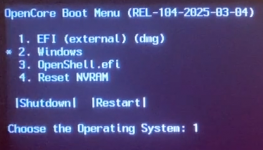
I tried both (and just checked right now too). If I don't rename EFI-Avina and put it on my usb key, nothing loads. If I do rename it to just EFI, it gets to the boot screen but doesn't show up on the boot screen. Now I am using only the folder that says EFI-Avina that has the BOOT and OC folders. If I try putting the root folder with the _MACOSX folder, nothing happens. If I copy paste the _MACOSX folder and EFI-Avina (without the -Avina) folder to be next to my com.apple.recovery.boot, it gets to the boot screen again but no further.
The _MACOSX folder doesn't actually have any valid files in it (I can't open its ._config.plist for example) so I presume its a leftover from creating the zip.
The _MACOS folder is a hidden folder, that can usually be seen in Windows. It should be left untouched.
If undertaking the USB prep in macOS, the Whole EFI folder attached below needs to be copied to the EFI partition on a HFS+ formatted USB pen drive, which should also contain your macOS installation files, for it to work and show the installation icon on the OC boot screen/Picker List.
Alternatively if you are using Windows to create the installer then the EFI folder needs to be placed on the roof of the FAT32 Formatted drive along with your macOS Recovery files.
Try this revised EFI, just add your Serial Number, MLB, ROM and SystemUUID to the config.plist. Do not change anything else.
Which drive are you trying to install macOS on to, make and model?
You also need to make sure you have set your Bios correctly so it will allow macOS to boot and run. These are the Bios Settings you need to use.
Some of these options may not be present in your Bios, just try matching up as closely as possible but don't be too concerned if some of these options are not available in your BIOS
Disable
Fast Boot
Secure Boot
Serial/COM Port
Parallel Port
Compatibility Support Module (CSM) (Must be off in most cases, GPU errors/stalls like gIO are common when this option is enabled)
IOMMU
Enable
Above 4G Decoding (This must be on, if you can't find the option then add npci=0x3000 to boot-args. Do not have both this option and npci enabled at the same time.)
If you are on a Gigabyte/Aorus or an AsRock motherboard, enabling this option may break certain drivers(ie. Ethernet) and/or boot failures on other OSes, if it does happen then disable this option and opt for npci instead
2020+ BIOS Notes: When enabling Above4G, Resizable BAR Support may become an available on some X570 and newer motherboards. Please ensure that Booter -> Quirks -> ResizeAppleGpuBars is set to 0 if this is enabled.
EHCI/XHCI Hand-off
OS type: Windows 8.1/10 UEFI Mode (some motherboards may require "Other OS" instead)
SATA Mode: AHCI
Just checking that you have set the PC to run macOS.
You also need to make sure you have set your Bios correctly so it will allow macOS to boot and run. These are the Bios Settings you need to use.
Some of these options may not be present in your Bios, just try matching up as closely as possible but don't be too concerned if some of these options are not available in your BIOS
Disable
Fast Boot
Secure Boot (disabled)
Serial/COM Port
Parallel Port
Compatibility Support Module (CSM) (Must be off in most cases, GPU errors/stalls like gIO are common when this option is enabled)
IOMMU (disabled)
Enable
Above 4G Decoding (This must be on, if you can't find the option then add npci=0x3000 to boot-args. Do not have both this option and npci enabled at the same time.)
If you are on a Gigabyte/Aorus or an AsRock motherboard, enabling this option may break certain drivers(ie. Ethernet) and/or boot failures on other OSes, if it does happen then disable this option and opt for npci instead
2020+ BIOS Notes: When enabling Above4G, Resizable BAR Support may become an available on some X570 and newer motherboards. Please ensure that Booter -> Quirks -> ResizeAppleGpuBars is set to 0 if this is enabled.
I did have to add to boot-args, I missed this earlier
EHCI/XHCI Hand-off
OS type: Windows 8.1/10 UEFI Mode (some motherboards may require "Other OS" instead)
SATA Mode: AHCI (enabled)
Just checking that you have set the PC to run macOS.
OC: Driver OpenPartitionDxe.efi at 1 cannot be found!
Halting on critical error
I am prepping on the windows. Hubby was trying to help out at first so I started on windows and am trying to do the whole thing on windows instead of traveling between windows and old mac. I'm trying to get to the boot screen / picker list at all before I take it apart again to get rid of the windows ssd and install the new network adapter. @-@
The SSD I am trying to put Sequoia on is WD_Black SN850X NVMe SSD (2TB)
Your system doesn’t need the OpenPartitionDxe.efi driver, so I removed it from the drivers folder.
When I used the Clean snapshot feature in ProperTree the listing for the driver should have been removed from the config.plist. Check that it isn’t still listed in the config.plist, if it is then remove the entry and try to boot the system again.
Have you checked your Bios settings, are they correct according to the list provided above? As much as they can be correct.
Have you used Option 4 ' Reset Nvram', if not please use it to see if anything changes. It will cause the system to automatically Reboot, so you will need to select your USB boot disk for OpenCore to load again.
I think you would be better served using your old Mac to create your USB installer. Create an 'Offline' installer, which would contain the whole macOS (15GB+) installation image and should add a new option to the OC boot screen ' Install macOS ......'.
This site uses cookies to help personalise content, tailor your experience and to keep you logged in if you register.
By continuing to use this site, you are consenting to our use of cookies.
Sure, ad-blocking software does a great job at blocking ads, but it also blocks some useful and important features of our website. For the best possible site experience please take a moment to disable your AdBlocker.