Need help with a bare metal Sequoia build

henrikato

New member
AMD OS X Member
Oct 2, 2026
5
0
1
CPU:
AMD Ryzen 9 7900X
I have spent the past few days attempting to get the installer for macOS Sequoia 15.8.1 to boot on my setup:

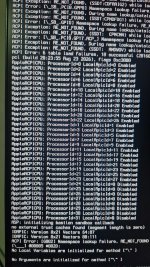
The problem is no matter what I do, I never get past this message:
"Registered CoreAnalyticsHub functions with xnu.virtual bool CoreAnalyticsHub::start(IOService *)::229:CoreAnalyticsHub start completed"
WhatsApp Image 2026-10-05 at 19.16.45.jpeg

By adding io=0x16 into my boot args the very last line that shows into the screen is:
"IOHIDProviderPropertyMerger[0x1000001ba]::probe fails"
WhatsApp Image 2026-10-04 at 23.12.54.jpeg

I have tried many different configurations, disabling WiFi, Bluetooth, Onboard audio, IOMMU, no SSDTs loaded, SSDTTime-generated ones, a misc of boot arguments (npci=0x2000, -radvesa, -wegnoegpu) and many more tweaks into config.plist to the point I have truly forgotten every one of them. No matter what I do I get stuck at the exact same point.
I'm honestly lost here. I first hoped it would be an SSDT issue, then moved into USB, then CPU core count, nothing helped me.
WhatsApp Image 2026-10-05 at 19.16.48.jpegWhatsApp Image 2026-10-04 at 22.37.47.jpeg

I'm attaching my current EFI folder. Thanks in advance!
 

Attachments

Where did you get the 2 x MmioWhitelist entries in your config.plist?
Did you follow this part of the OC troubleshooting guide when generating them?


Does your system not require any AM5 ACPI patches?
If you post a copy of your System ACPI tables, someone may have a look to see which if any patches your system requires.


You will need a copy of Miele's RTL812xLucy.kext for the Realtek 2.5G Ethernet port to work on your motherboard.

 
  • Like
Reactions: henrikato
I'm confident I must've have grabbed those MmioWhitelist entries from someone else's config.plist (that was showing the same symptom as I am).

I haven't read deep into KASLR but I will do later today after work.
I will also read the 'DSDT patch' post you added and see if I can figure something out.

I'm attaching the complete ACPI dump below, maybe someone can chime in to help.

Thanks!
 

Attachments

Quick update. I managed to boot into the installer by applying the three suggested patches on the 'DSDT patch' linked post.

I can format the disk just fine and start the graphical installer, however near the end of the installation the computer locks up (screen says "About 12 minutes remaining" but I know it's nowhere near a reliable estimate). No mouse movement, progress bar sits still.

On a second installation attempt I opened the installer logs and expanded to fill most of the screen to inspect whatever the installer is doing.
I added two screenshots from the logs below.

When the installation locked up I left it there for a solid 30 mins before restarting the PC.

OpenCore itself does not see any boot entries regarding any macOS preboot environment or the installed OS itself.
Just one entry for Windows, the macOS Installer on the USB drive itself and another entry to clear the NVRAM.

I will continue investigating, I'll probably have to keep digging into the DSDT itself to find for any more sections that need patching
 

Attachments

  • config.plist
    config.plist
    66.4 KB · Views: 1
  • WhatsApp Image 2026-10-06 at 15.20.57.jpeg
    WhatsApp Image 2026-10-06 at 15.20.57.jpeg
    1.4 MB · Views: 2
  • WhatsApp Image 2026-10-06 at 15.21.23.jpeg
    WhatsApp Image 2026-10-06 at 15.21.23.jpeg
    2 MB · Views: 2
OK, when your system DSDT.aml is checked in Hex Fiend, the 3 x AM5 Patches are all found. So that is all to the good.

Commonly the issue with a stalled installation at '12 minutes remaining' is a borked installation media/USB.
  1. Did you create a Full installer 15GB+ in size on the USB drive, normally created on a real Mac or another Hack?
  2. Did you create a 'Recovery' installer, which would be less than 1GB in size on the USB drive (normal Windows created installer)?
Whichever method you used, I would recommend wiping the USB and recreating the installer. Using the same installer will just put you back in the same stalled position as you currently find yourself.

I wouldn't mess with the OpenCore EFI anymore, not until you have macOS Sequoia installed. As doing so will just mess with your current booting EFI.

Have you temporarily removed the Lexar NVMe drive from the system, while installing macOS Sequoia? If not it might not be a bad idea to see if this helps, just for the installation phase. It can be reinstalled once you have Sequoia up and running. I am assuming this is your Windows drive and you are not using it for macOS.
 
Thanks! That's one more in my little collection.

And, unfortunately, the plot thickens… Your DSDT has the usual patterns from the general set #1, #2, #3… and then some more.

Short version: Here is an extended version of the "general" set with additional patches #4, #5, #6 and #7 for your DSDT. (It is quite possible that #7 serves no purpose, as the corresponding code should not be executed at the same time as the code under #5.)
I'll put the long version in the DSDT thread.

MMIO whitelist depend on installed memory, so you probably should follow the process of finding the right whitelist for your configuration.
 

Attachments

Quick update.

Reflashing the USB drive with a fresh Sequoia installer did not help. I tried USB 5G, USB 10G and USB2.0 ports, removed the WD Black SN770, but I'm still stuck at "About 12 minutes remaining" and the system freezes completely just like before.

I could try swapping the SSDs and using the SN770 for the hackintosh instead, but that's where my primary OS lives and I still haven't backed it up yet.
I was planning on using the Lexar NQ790 for the hackintosh in the first place since it gives me the capacity to dual boot macOS and Windows (thanks to kernel-level anti-cheat).

I did create the USB from a hackintosh VM (Headless Debian host, gpu and usb vfio passthrough) running on an older PC.

I'm not sure if could help but the next thing I'm about to try is mapping my USB ports just in case.

Otherwise I'm probably spending some time during the weekend to do more research and understand what's going on and what can be fixed.
Probably going to do some more research on ACPI, XHCI, or anything that gets involved in this lock up.
 
I would recommend cloning your current OS drive on to the Lexar and using the WD drive for macOS. The Lexar will not be compatible with macOS, as a boot drive. Whereas the Western Digital drive is a prime example of a perfectly good macOS boot drive.

Undertaking any research to better understand what is happening when running macOS on a Hack with OpenCore is never a bad thing.

When you say you recreated the Usb installer, did you use the original macOS dmg you downloaded and used to create your original installation USB?

If yes, then the issue may be using the same macOS dmg/recovery files regurgitated the same kernel panic. I doubt it is a USB issue at that late in the installation process. However, having a custom USB configuration, using USBToolBox in Windows, is never wrong. Just remember the following when creating the USB config/kext.

  1. USB2 (0) - Physical USB2 ports on rear I/O plate, these ports always have a Black coloured tang.
  2. USB3 (3) - Physical USB3 ports on rear I/O plate, these ports can have a Red, Blue, Cyan coloured tang.
    1. Virtual USB2 ports - served from physical USB3 ports) should be set the same as the physical port
  3. USB3 (3) - Motherboard Header, usually serving the case front USB3 ports.
    1. Virtual USB2 ports - (served from motherboard header USB3 ports) should be set the same as the physical Header port
  4. Internal (255) - Motherboard USB2 header, this will be any device served from a header port, such as Bluetooth module, case front USB2 ports, case front card reader, LED controller etc.
  5. Type-c+sw (9) - Type-C, will only show two ports being available, 1 x Physical Type-C and 1 x virtual USB2 port.
  6. Type-c (10) - Type-C, will show four ports being available when the Type-C device is flipped 180° and reinserted, 2 x Type-C and 2 x USB2.
Just so you understand the difference between a Type-c+sw & a Type-c port.
  1. Insert a Type-C device in to the physical Type-C port, a single Usb port will be highlighted, note this port number/id.
  2. Remove the Type-C device, flip it 180° and reinsert it in the same Type-C physical port.
  3. If the same port number/id is highlighted, then this is a Type-c+sw (9) connector type.
  4. If a different port number/id is highlighted, then this is a Type-c (10) connector type.
 
  • Like
Reactions: henrikato
When creating the USB installer I did download the official installer:

Code:
softwareupdate --fetch-full-installer --full-installer-version 15.7.9

Well, being that good I'm willing to try the WD Black then.
 
✖
  AdBlock Detected
Sure, ad-blocking software does a great job at blocking ads, but it also blocks some useful and important features of our website. For the best possible site experience please take a moment to disable your AdBlocker.