MacOS Sonoma on TRIGKEY Mini PC Ryzen 7 5700U

naweedipad

New member
AMD OS X Member
Mar 23, 2024
8
0
1
CPU:
Ryzen 7 5700I
Hi,

Has anyone been able to install MacOS (preferably Sonoma) on TRIGKEY Mini PC Ryzen 7 5700U. The link to the product is below (along with the specs).
  • TRIGKEY Mini PC Ryzen 7 5700U (8C/16T) up to 4.3GHz
  • 32G DDR4
  • 500G NVMe SSD
  • Supports DP, HDMI, Type-C Triple-screen Display, WiFi-6, BT 5.2, 1000M LAN, Auto Power on, Wake-on-LAN
https://www.amazon.co.uk/TRIGKEY-57...mzn1.fos.d7e5a2de-8759-4da3-993c-d11b6e3d217f

Thanks
 
See here, I have a different CPU but same core count.

 
See here, I have a different CPU but same core count.

Thanks. I will give it a go.
 
See here, I have a different CPU but same core count.


Thanks bro, it helped a lot. I copied your EFI and upgraded it to OC 0.9.9 with the latest versions of Kexts and Drivers, and installed Ventura successfully. Initially, I tried to install Sonoma 14.4 directly, but couldn't get past the boot screen. So, I tried with Ventura installer, and that worked. I will try to update to Sonoma later and hope that it will work. Earlier, I had an Intel i5 and I remember the pain to follow the OC guide and build the EFI from scratch. Your EFI saved me 1-2 days of trouble.

I am attaching my EFI for reference for others' benefit as well.
 

Attachments

Will have a look.

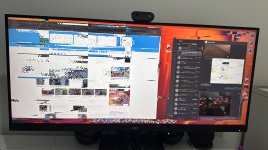
Meanwhile, the performance is very janky? The screen becomes RED for a while (occasionally) and the system seems to freeze of 3-5 seconds. Any idea about this?
 
Will have a look.

Meanwhile, the performance is very janky? The screen becomes RED for a while (occasionally) and the system seems to freeze of 3-5 seconds. Any idea about this?
You are talking about Ventura, right? Does your device sleep and wake successfully?
 
You are talking about Ventura, right? Does your device sleep and wake successfully?
Yes, Ventura. The wake and sleep seem to be working fine.

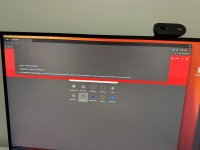
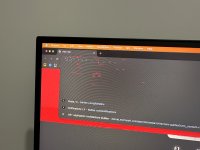
I have a feeling that hardware acceleration is not enabled. See the attached images. This is the kind of behavior I get when I use browsers (Chrome or Edge) first time after reboot. This stays like this (with system almost stuck) for half a minute to a minute, and then everything runs smoothly going forward.

However, I did feel that Hardware acceleration is not enabled and when I opened Figma in Chrome, it did tell me the same.
 

Attachments

  • IMG_3828.jpg
    IMG_3828.jpg
    2.9 MB · Views: 12
  • IMG_3829.JPG
    IMG_3829.JPG
    2.3 MB · Views: 11
  • IMG_3830.JPG
    IMG_3830.JPG
    1.7 MB · Views: 11
Yes, Ventura. The wake and sleep seem to be working fine.

I have a feeling that hardware acceleration is not enabled. See the attached images. This is the kind of behavior I get when I use browsers (Chrome or Edge) first time after reboot. This stays like this (with system almost stuck) for half a minute to a minute, and then everything runs smoothly going forward.

However, I did feel that Hardware acceleration is not enabled and when I opened Figma in Chrome, it did tell me the same.
Other users have reported problems with Chrome, that they couldn't run it at all. There is a newer version of NootedRed.kext that might help but if it doesn't don't be to surprised.
 
Other users have reported problems with Chrome, that they couldn't run it at all. There is a newer version of NootedRed.kext that might help but if it doesn't don't be to surprised.
Already tried the new version of NootedRed and it did not help. So far, I noticed this problem with Chrome and Edge only.
 
  AdBlock Detected
Sure, ad-blocking software does a great job at blocking ads, but it also blocks some useful and important features of our website. For the best possible site experience please take a moment to disable your AdBlocker.