Greetings.
I'm new to the forum, and this is my first post here, so please bear with me if I've missed anything or if there's a better way to provide information. I've tried to include as much detail as possible to make troubleshooting easier.
With that being said...
I'm trying to fix sleep on my AMD Hackintosh and I'm running out of ideas.
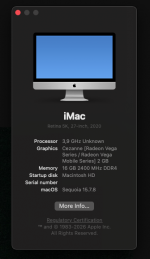
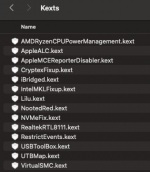
For reference, I've attached my EFI, config.plist, a Fastfetch screenshot with my system information, and screenshots of my ACPI and Kexts folders.
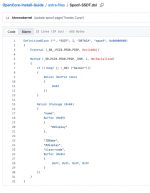
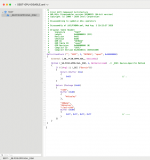
Because SSDT-GPU-DISABLE breaks my onboard audio, I'm injecting the NVIDIA dGPU's HDMI/DisplayPort audio device in DeviceProperties as external-audio, which allows AppleALC to initialize the internal Realtek audio correctly. Without this DeviceProperties injection, the onboard audio does not work. (See in config.plist DeviceProperties comments)
Any suggestions on what to inspect next or known fixes for a system that only turns off the displays but never actually enters sleep would be greatly appreciated.
Thanks in advance for any help!
I'm new to the forum, and this is my first post here, so please bear with me if I've missed anything or if there's a better way to provide information. I've tried to include as much detail as possible to make troubleshooting easier.
With that being said...
I'm trying to fix sleep on my AMD Hackintosh and I'm running out of ideas.
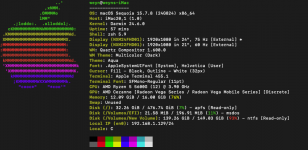
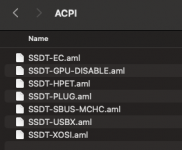
For reference, I've attached my EFI, config.plist, a Fastfetch screenshot with my system information, and screenshots of my ACPI and Kexts folders.
Hardware
- Motherboard: ASRock B450M Pro4 R2.0
- CPU: Ryzen 5 5600G
- iGPU: Vega (using NootedRed)
- dGPU: RTX 3050 (physically installed but unsupported/disabled)
- macOS: Sequoia 15.7.8
- SMBIOS: iMac20,1
- OpenCore (latest release)
Current behavior
When I choose Apple Menu → Sleep:- Both displays turn off.
- The PC never actually enters sleep.
- CPU/case fans continue spinning.
- Pressing or moving the mouse immediately turns the displays back on.
- There is no reboot or kernel panic.
EFI / Configuration
I'm using:- SSDT-EC
- SSDT-GPU-DISABLE
- SSDT-HPET
- SSDT-PLUG
- SSDT-SBUS-MCHC
- SSDT-USBX
- SSDT-XOSI
- USBToolBox.kext
- UTBMap.kext
- USBX SSDT
- XhciPortLimit = False
Because SSDT-GPU-DISABLE breaks my onboard audio, I'm injecting the NVIDIA dGPU's HDMI/DisplayPort audio device in DeviceProperties as external-audio, which allows AppleALC to initialize the internal Realtek audio correctly. Without this DeviceProperties injection, the onboard audio does not work. (See in config.plist DeviceProperties comments)
What I've already checked
- All USB ports have been properly mapped on Windows.
- pmset -g assertions only reports normal assertions such as Brave browser (audio/video), Bluetooth, and USB devices.
- GPRW, UPRW, and LANC do not exist in my ACPI (ioreg returns nothing for all three).
- Boot arguments currently are:
- -lilubetaall revpatch=sbvmm
- My IORegistry has already been inspected, and nothing obvious stood out regarding the disabled NVIDIA GPU.
- Taking a look at this post, I have not applied the AZAL → HDEF ACPI rename because it isn't clear whether it's actually needed on this board.
- In the BIOS, Wake on LAN, Wake on USB, Wake on Bluetooth, ErP, and TPM are all disabled.
Additional information
I'm not sure whether this could be caused by an ACPI quirk specific to my ASRock B450M Pro4 R2.0 motherboard, an issue related to NootedRed, or something else entirely.Any suggestions on what to inspect next or known fixes for a system that only turns off the displays but never actually enters sleep would be greatly appreciated.
Thanks in advance for any help!