Issues with bluetooth, sidecar - Fenvi T919. Opencore 1.0.4. Ventura.

cdp1522

New member
AMD OS X Member
Apr 14, 2025
10
2
3
40
Ipswich, UK
CPU:
5600x
Hi all,

My bluetooth was initially working post-install, but has now stopped working.

Bluetooth icon is there, I can switch it on/off, however, it does not discover any devices. I can discover it from other devices such as my phone, iPad, however when trying to connect it throws up an error message either saying it isn't compatible, or "make sure the device is on and in range".

I have tried x2 fresh installs and on both it will work perfectly initially, but then will stop working after a couple of reboots.

I have tried resetting NVRAM to no avail.

I have tried different antennas.

USB ports are mapped and bluetooth is set to internal both in config.plist and USBPorts.kext.

WiFi continues to work fine. Continuity features (such as web page from phone to mac, apple watch unlock) work fine. Continuity camera DOES NOT work wirelessly, only works via cable. It initially worked wirelessly then stopped working. Sidecar does not work either wirelessly (ipad just shows "connecting" screen continuously) despite FeatureUnlock.kext being present.

Any ideas??

Thanks :)
 
The Broadcom Bluetooth device on the Fenvi T919 card works out of the box in macOS (normally), so not sure what could be causing this problem. Post a copy of your whole EFI folder, so we can see what you are using to boot the system and to see if anything Bluetooth related needs attention.
 
  • Like
Reactions: cdp1522
The Broadcom Bluetooth device on the Fenvi T919 card works out of the box in macOS (normally), so not sure what could be causing this problem. Post a copy of your whole EFI folder, so we can see what you are using to boot the system and to see if anything Bluetooth related needs attention.
Yes that was my understanding too.

Will do after work, many thanks :)
 
Also, make sure the USB cable from the Fenvi T919 is fully connected to the adapter and motherboard header.

Check you don't have the two Bluetooth NVRAM entries required for Intel Bluetooth devices present in your config.plist. These would clash with the NVRAM entries automatically generated by the Broadcom Bluetooth device. As they are not the same.

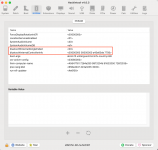
Example of Bluetooth Nvram entries for a Broadcom device shown below in the Hackintool > NVRAM tab in screenshot below.

Screenshot 2025-04-23 at 15.53.32.png Bluetooth Nvram entries generated by using Broadcom device highlighted.
 
Hiya, thanks for your replies and advice.

I've since done a fresh install of Sequoia. Went through config.plist to make sure I hadn't missed anything. My 10gig card arrived so got that installed and working well. Checked all connections. Bluetooth and wifi patched in using OCLP. Remapped all USB ports.

Magic Keyboard 2 and Magic Mouse 2 both now connected via bluetooth and working well!

Everything seems to be stable.

Having issues with DRM though, and still issues with screen mirroring, sidecar, wireless continuity camera.

AirDrop to/from, AirPlay audio both work.

I've attached my EFI to see if there is anything glaringly obvious as to why screen mirroring wouldn't be working. Have removed UUID etc from system info.

It's not a dealbreaker if I can't get these features to work but would be nice if I could get to the bottom of it.

Also a quick video of what happens when trying to screen mirror: https://share.icloud.com/photos/026UugchX8YCLG9C394H3yTpQ also tested with AppleTV4K.

Many thanks :)
 

Attachments

DeviceProperties > Shikigva = 128 doesn't work in versions of macOS since Mojave, i.e. Catalina and newer. It should be deleted.
I have never needed this property with either of my 2 x RX 5700 XT GPU's.

You are missing crs-active-config entry in the NVRAM > Delete > 7C436110-AB2A-4BBB-A880-FE41995C9F82 section of your config.plist.
It should be present in this section as well as the Add section, when SIP is changed to partially disabled for unauthorised Kexts.

Using iMacPro1,1 is a better SMBIOS, when wanting DRM working at its best in macOS.
Generate a new iMacPro1,1 SMBIOS, and remove your current MacPro7,1 SMBIOS data.
You will need to sign out of your Apple Services before rebooting with the new iMacPro1,1 SMBIOS data in place. You will also need to use the ResetNvram driver from the OC boot screen, before booting in to macOS with the new SMBIOS in place.

Config could be cleaned up a bit to remove a few unused/unnecessary entries, but that is just me being picky.

So as I see things, there is nothing fundamentally wrong with your OC setup. Just a couple of tweaks required to get it working a little better.

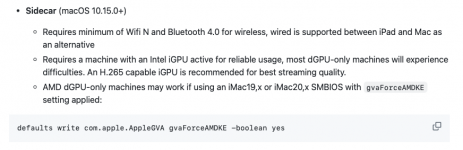
With regards FeatureUnlock.kext, have a read of this section from the Readme, it has a bearing on your issues.

Screenshot 2025-04-24 at 23.47.51.png
 
Thank you so much for your detailed reply.

I followed this guide https://chriswayg.gitbook.io/openco...y-patcher-oclp/broadcom-wifi-on-macos-sequoia to patch the Fenvi into Sequoia. So the steps I took were:
  • Added AMFIPass.kext, IOSkywalkFamily.kext, IO80211FamilyLegacy.kext to OC/Kexts, updated Kernel/Patch in config.
  • Allowed IOSkywalk downgrade in Kernel/Block.
  • Changed Securebootmodel to disabled.
  • Changed csr-active-config to 03080000 under NVRAM - Add - 7C436110-AB2A-4BBB-A880-FE41995C9F82.
  • Applied root patches via OCLP.
I wasn't aware I also required csr-active-config entry in the NVRAM > Delete > 7C436110-AB2A-4BBB-A880-FE41995C9F82. Do I also set this value to 03080000? Is there anything else I have missed from that process?

I will remove the shikigva entry from Device Properties. And I will give iMacPro1,1 SMBIOS a shot.

I am assuming then that sidecar is probably a no-go for my setup... I don't particularly need it, just a 'nice to have'

I'd be really grateful if you had a minute if you could point out any unused or unnecessary entries in the config - just so I can clean it up and get a better understanding of how exactly OC works.

Really do appreciate your time and effort, if you ever ventured to Ipswich I owe you a beer!! (Or a coffee)
 
@Edhawk just wondering if you seen this... thanks 😊
Thank you so much for your detailed reply.

I followed this guide https://chriswayg.gitbook.io/openco...y-patcher-oclp/broadcom-wifi-on-macos-sequoia to patch the Fenvi into Sequoia. So the steps I took were:
  • Added AMFIPass.kext, IOSkywalkFamily.kext, IO80211FamilyLegacy.kext to OC/Kexts, updated Kernel/Patch in config.
  • Allowed IOSkywalk downgrade in Kernel/Block.
  • Changed Securebootmodel to disabled.
  • Changed csr-active-config to 03080000 under NVRAM - Add - 7C436110-AB2A-4BBB-A880-FE41995C9F82.
  • Applied root patches via OCLP.
I wasn't aware I also required csr-active-config entry in the NVRAM > Delete > 7C436110-AB2A-4BBB-A880-FE41995C9F82. Do I also set this value to 03080000? Is there anything else I have missed from that process?

I will remove the shikigva entry from Device Properties. And I will give iMacPro1,1 SMBIOS a shot.

I am assuming then that sidecar is probably a no-go for my setup... I don't particularly need it, just a 'nice to have'

I'd be really grateful if you had a minute if you could point out any unused or unnecessary entries in the config - just so I can clean it up and get a better understanding of how exactly OC works.

Really do appreciate your time and effort, if you ever ventured to Ipswich I owe you a beer!! (Or a coffee)
@Edhawk just wondered if you had seen this... thanks 😊
 
  AdBlock Detected
Sure, ad-blocking software does a great job at blocking ads, but it also blocks some useful and important features of our website. For the best possible site experience please take a moment to disable your AdBlocker.