Intel I225-V Problem on 15.7.2

mitexxo

New member
AMD OS X Member
Nov 25, 2025
6
0
1
CPU:
Ryzen 5 3600
Hello everyone,

It's really nice to see an active community of AMD Hackintosh builders and I am really glad I found you. I have this configuration for a while now and my first try at Sequoia was last year and it failed. I have tried a lot of things but after all, I just lost motivation. Since then, I refreshed with NVMe drives and RX6800XT, updated Motherboard BIOS as well, and it seems that the major issue successfully going through installation and booting last year was older BIOS / BIOS settings. This time it all went through, 15.7.2 flashed to USB drive, OpenCore bootloader with AMD (Ryzen) friendly EFI (SSDT-CPUR), few kexts and there I was - the desktop shining in front of me.

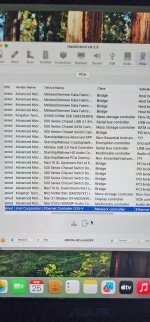
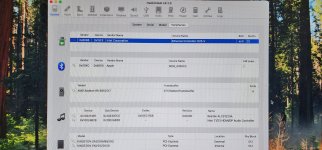
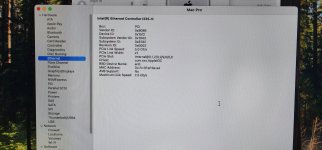
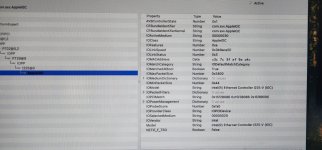
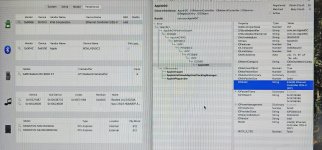
All seemed well and RX6800XT is fully supported, hardware acceleration, HD Audio to my monitor through HDMI... but, the thing making it unusable was also there, no internet. Intel I225-V just refuses to work normally. I can see the device is being detected everywhere and correct kext (driver) is on it - AppleIGC, I really have no idea what to try next. I tried various bootloader args but the one which actually makes the difference (I read around) is e1000=0. No luck with it or without it. Ethernet shows green when I plug the cable but then just takes some totally random IP through DHCP, setting it manually is also no joy, it even stays green connected status when I unplug the cable. Please see the screenshots and suggest the next move if you have any ideas :)

Thank you very much.
 

Attachments

  • 0001.jpg
    0001.jpg
    431.3 KB · Views: 4
  • 0002.jpg
    0002.jpg
    389.6 KB · Views: 4
  • 0003.jpg
    0003.jpg
    375.4 KB · Views: 4
  • 0004.jpg
    0004.jpg
    351.8 KB · Views: 3
If you check screenshot number 2 and 3 you will see that there are two different device ID’s reported for the NIC, 0x15F3 and 0x15F2 respectively. This should not be the case.

Did you use the ResetNvram option from the OC boot screen to clear the old NVRAM entries?

Can you post a copy of your OC EFI, so we can see what you are using to boot your 6-core B550 system. Just make sure to redact the serial number from the config.plist before posting a copy here.
 
Hello Edhawk,

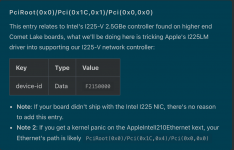
Yes, I notice the different device IDs now. I did clear the NVRAM at boot screen every time I made some changes. I also remember adding the following lines by hand as someone online suggested it (tricking it into supporting I225-V) Key: device-id, Type: Data, Value: F2150000. I probably made screenshots before and after, but I am not even sure anymore as I tried so many different things :)

The file attached is my EFI/OC folder which got me so far. I think there are some kexts which could (or should) be removed as they aren't doing anything for my hardware configuration - as: Atheros E2200Ethernet, IntelMausi, LucyRTL8125Ethernet, RealtekRTL8111. It's a learning curve :)

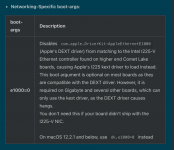
At my initial NVRAM boot args settings you will find: -v npci=0x2000 alcid=12 watchdog=0 agdpmod=pikera dk.e1000=0 e1000=0, but I changed this with alcid=5 to make my ALCS1220A audio codec working. After that, I experimented deleting dk.e1000 and e1000=0, trying with each one of them or none, did NVRAM reset at boot each time after saving changes. Of course, all of this is done after mounting EFI partition under macOS and copying everything there, booting from EFI partition directly, making/saving changes using configurator.
 

Attachments

Last edited:
As your motherboard contains the Intel i225-V 2.5Gb Ethernet controller you can remove those unnecessary Ethernet kexts.

AtherosE2200Ethernet, IntelMausi, LucyRTL8125Ethernet, RealtekRTL8111.

You shouldn’t need to add a kext if your config.plist is set correctly for the Intel i225-V controller.

Intel i225-V DeviceProperties .png DeviceProperties entry for Intel i225-V

Boot arg i225-V.png Boot arg for i225-V, it may not be required in Sequoia or Tahoe.
 
  • Like
Reactions: mitexxo
Update on my situation:

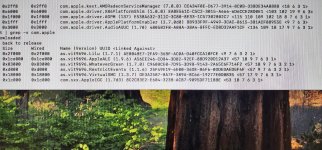
I created a new fresh "minimal" EFI according to my hardware using latest OpenCore and kext versions. It booted beautifully and installed correctly. Again, everything but network was there from the start. In the attachment are screenshots showing loaded third party kexts - it seems that everything is fine but I am just out of luck with my I225-V and this version of Sequoia. It detects the ethernet cable but it takes some totally random IP from the router (like 169....) instead of anything in 192.168.1.x range, manual IP configuration is just not working. Anyways, I ordered a USB ethernet dongle with RTL8156b onboard which is 2.5Gbps NIC hoping the LucyRTL8125.kext will cover it. I really want to make it work :)
 

Attachments

  • 10001.jpg
    10001.jpg
    747.3 KB · Views: 5
  • 10002.jpg
    10002.jpg
    585.3 KB · Views: 5
USB Ethernet adapters don’t need any kexts for them to work in macOS. Apple provide the kexts that work with most USB Ethernet adapters. You just need to make sure the USB port used is correctly activated in your custom USBMap.kext or UTBMap.kext.
 
That's really great to hear, I will learn more about USB ports activation and how to check them - so far all the USB ports seem to detect external drives very well - if that means something.
 
No, it doesn’t mean the ports are correctly activated. All it indicates is that the ports you have been using are working ports that Apple/macOS automatically enables. This might not remain the same following an update or other change within to the devices you are using or that may occur within macOS.
 
  • Like
Reactions: mitexxo
Thank you very much, Edhawk - I will get onto the subject and learn :)
 
Thank you very much, Edhawk - I will get onto the subject and learn :)
you can test with AppleIGC.kext to see if it work or not. if it doesn't work you can still use the old method which is adding AppleIntell210Ethernet.kext plus the boot args e1000=0
 
  • Like
Reactions: mitexxo
Hey there. I did test with the latest version of AppleIGC and no boot args (well I tried with e1000=0 too in the lack of ideas), but I didn't try with AppleItelL210Ethernet.kext and boot args. Let's see - I will wait for the USB Ethernet to arrive and see how to do the USB mapping before it arrives and test with it. I hope it will work.
 
if you need AppleIntelI210Ethernet.kext then I just add this kext for you. also if it doesn't work then you need combination `SSDT + this kext and boot args
 

Attachments

  • Like
Reactions: mitexxo
  AdBlock Detected
Sure, ad-blocking software does a great job at blocking ads, but it also blocks some useful and important features of our website. For the best possible site experience please take a moment to disable your AdBlocker.