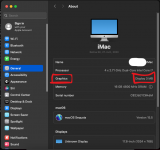
I followed this guide to install Sequoia 15.5 on VMware Workstation 25. My host is Ubuntu Desktop 25.04 running on Intel(R) Core(TM) i7-6820HQ CPU. Surprisingly, the Graphics memory is set to 3 MB. How do I increase it?
The User you linked probably followed the guide to allow the maximum Memory for his Intel i5, when running in VESA mode. I assume the user set 128MB as the DVMT pre-allocated limit for the IGPU in the bios.
You should be able to increase this to 256MB or more depending on your motherboard's bios and the amount of RAM available.
Also read and follow the helper pointers in the first few posts of the VM thread if the Bios tweak doesn't fix it.
I couldn't find anything relevant on tweaking the video memory in any post up until that post on that thread. Could you please point me to anything specific?
This site uses cookies to help personalise content, tailor your experience and to keep you logged in if you register.
By continuing to use this site, you are consenting to our use of cookies.
Sure, ad-blocking software does a great job at blocking ads, but it also blocks some useful and important features of our website. For the best possible site experience please take a moment to disable your AdBlocker.