HP 255 G7 / Ryzen 3 3200U: Ventura Recovery hangs; DLIL changes with CPU count

Alex130

New member
AMD OS X Member
Oct 28, 2026
6
0
1
CPU:
AMD Ryzen 3 3200U (Picasso), 2 cores / 4 threads
Hi everyone,


I need help diagnosing a freeze before the macOS Recovery GUI on an HP 255 G7.


Hardware and software:


  • Ryzen 3 3200U (Picasso), 2 cores / 4 threads, Vega 3, 8 GB RAM.
  • HP board 85EA, Insyde BIOS F.33; UEFI mode, Secure Boot and Legacy disabled.
  • Samsung PM991 256 GB, firmware HPS4NFXV.
  • Ventura 13.4.1 Recovery / Darwin 22.5.0; OpenCore 1.0.9 DEBUG.

The clearest comparison is between minimal configurations with NootedRed and both TSC-sync kexts disabled:


  • T9, cpus=1: the photo shows 1 CPU and DLIL Proceeding, but Recovery never appears.
  • T10, no CPU limit: the photo shows 4 CPUs and DLIL Waiting, without Proceeding.
  • T14, cpus=2: the photo shows 2 CPUs and Proceeding, then freezes before Recovery.

In T15 I kept cpus=2 and enabled NootedRed 0.8.10 with -NRedNoAccel. The new OpenCore log confirms the argument and NootedRed injection. The screen still stops around:


IOHDIXController: NOTE: administrator is creating non-ejectable disk image


ForgedInvariant and AmdTscSync 2.0.0 have already been tested separately without reaching Recovery. The AMD physical core-count patches remain 02. IONVMeFamily is excluded successfully in these diagnostic boots; the PM991 remains physically installed.


The attached ZIP contains:


  • An English test summary.
  • Redacted configurations and OpenCore logs.
  • The last complete received EFI, from T14, and the separate prepared T15 config.
  • Original ACPI tables, the Windows USB scan and boot photos.

No final custom UTBMap is present in the available files. The OpenCore logs stop at EXITBS:START; the later DLIL/IOHDIX messages are documented in the photos.


Could someone help interpret the CPU-count dependency and suggest a specific next diagnostic step? I would like to avoid repeating the same tests or changing several variables at once.


Thank you.
 
No files (zip) attached.
 
If you really want some help, you need to provide a copy of the OpenCore EFI folder you have created or obtained for your motherboard. Without this you won't get help of any sort.
 
Hi Edhawk, thank you for your reply. You’re right—the complete EFI folder was missing from my original post. Sorry for the confusion.


I’m attaching it here as a separate ZIP. This is the EFI used for test T14, with cpus=2. It passes the DLIL “Waiting” stage but freezes around IOHDIXController before reaching Recovery. Personal identifiers have been removed.


Thank you for taking a look.
 

Attachments

I will have a look at the EFI folder when I am next at my desk. I am currently on an iPad so interrogating the folder will have to wait.
 
You have a suspect NVMe drive - Samsung PM991 - which is known to misbehave when used as a boot disk for macOS. In fact your Samsung drive isn't supported at all according to the Anti-Hackintosh Buyers Guide (storage page).


1st recommendation would be to replace this Samsung drive with a Western Digital or SanDisk NVMe drive, one that is compatible with macOS. A Western Digital SN740 (256GB) would make a better macOS boot drive. These can be obtained from eBay for a reasonable price.

2nd recommendation would be to add another 8GB RAM to the system, so you don't have issues with the AMD Graphics and system trying to use the same Memory.

I understand if you don't wish to spend money on these two components. If you are serious about getting macOS installed and running on this laptop, then obtaining them would give you a better chance of getting a working HP Hack.

What are the chances of you providing a copy of your laptop's ACPI tables, as I have some concerns having reviewed the SSDT's in your /EFI/OC/ACPI folder.

I am going to run through the EFI folder contents and replace any kexts that are unnecessary or disabled in your setup. I will use my working Lenovo Thinkpad and my HP EliteDesk setups as a basis for revising yours, tweaking it to take in to account the different manufacturer etc. I will also revert your setup to OC 1.0.8, the latest OpenCore (Stable) Release.

I won't post the revised EFI until I can check the SSDT's required for your laptop.
 
You have a suspect NVMe drive - Samsung PM991 - which is known to misbehave when used as a boot disk for macOS. In fact your Samsung drive isn't supported at all according to the Anti-Hackintosh Buyers Guide (storage page).


1st recommendation would be to replace this Samsung drive with a Western Digital or SanDisk NVMe drive, one that is compatible with macOS. A Western Digital SN740 (256GB) would make a better macOS boot drive. These can be obtained from eBay for a reasonable price.

2nd recommendation would be to add another 8GB RAM to the system, so you don't have issues with the AMD Graphics and system trying to use the same Memory.

I understand if you don't wish to spend money on these two components. If you are serious about getting macOS installed and running on this laptop, then obtaining them would give you a better chance of getting a working HP Hack.

What are the chances of you providing a copy of your laptop's ACPI tables, as I have some concerns having reviewed the SSDT's in your /EFI/OC/ACPI folder.

I am going to run through the EFI folder contents and replace any kexts that are unnecessary or disabled in your setup. I will use my working Lenovo Thinkpad and my HP EliteDesk setups as a basis for revising yours, tweaking it to take in to account the different manufacturer etc. I will also revert your setup to OC 1.0.8, the latest OpenCore (Stable) Release.

I won't post the revised EFI until I can check the SSDT's required for your laptop.
Hi Edhawk, thank you for reviewing my EFI and offering to revise it.


I’ve attached the original ACPI tables from my HP 255 G7, with the Ryzen 3 3200U and Insyde F.33 BIOS. The ZIP contains the original DSDT, 16 SSDTs and the other collected tables, plus a decompiled DSDT for reference. These are separate from the custom SSDTs in the EFI folder.


Regarding the Samsung PM991, IONVMeFamily was successfully blocked during the diagnostic tests, but the drive remained physically installed. I haven’t tested with it physically removed.


Thank you again for your help.
 

Attachments

So using your ACLPI Original folder contents (converted to .aml tables) and Corpnewt's SSDTTime script I have generated the following custom SSDT's and ACPI patches for your laptop.

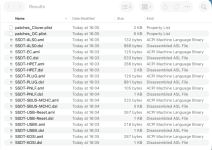
Screenshot 2026-10-29 at 16.08.07.png Just the *.aml tables are to be used.

These will look like this in your /EFI/OC/ACPI folder, alongside your existent SSDT-WLBU.aml table.

Screenshot 2026-10-29 at 16.11.55.png Revised ACPI folder contents.

There were also 5 x ACPI patches generated with the SSDT's, which have been added to the relevant section in your config.plist.

Try the revised EFI-108 folder attached below.

All you need to do is add your SMBIOS data to the config.plist and rename the folder to EFI.

Do not change anything else.

You will need to run the ResetNvramEnry.efi driver before you try to boot your macOS installer.
By default this will be hidden, so when you reach the OpenCore (GUI) boot screen simply press the 'Spacebar' to unhide the driver.

If the EFI fails to boot your system to the Installation wizard, take a photo of the Verbose text shown when the kernel panic occurs. We need a photo of the whole screen, not just the last few lines of text.
 

Attachments

So using your ACLPI Original folder contents (converted to .aml tables) and Corpnewt's SSDTTime script I have generated the following custom SSDT's and ACPI patches for your laptop.

View attachment 19759 Just the *.aml tables are to be used.

These will look like this in your /EFI/OC/ACPI folder, alongside your existent SSDT-WLBU.aml table.

View attachment 19760 Revised ACPI folder contents.

There were also 5 x ACPI patches generated with the SSDT's, which have been added to the relevant section in your config.plist.

Try the revised EFI-108 folder attached below.

All you need to do is add your SMBIOS data to the config.plist and rename the folder to EFI.

Do not change anything else.

You will need to run the ResetNvramEnry.efi driver before you try to boot your macOS installer.
By default this will be hidden, so when you reach the OpenCore (GUI) boot screen simply press the 'Spacebar' to unhide the driver.

If the EFI fails to boot your system to the Installation wizard, take a photo of the Verbose text shown when the kernel panic occurs. We need a photo of the whole screen, not just the last few lines of text.
Hi Edhawk, thank you for preparing the revised EFI.


I have now tested your original EFI-108 with only my SMBIOS identifiers added and the folder renamed to EFI, as you instructed. No other configuration settings were changed in this test. I also ran Reset NVRAM before booting.


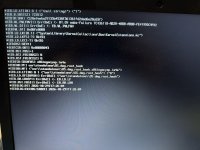
Unfortunately, it does not reach Recovery. The screen stops at:


[EB|LOG:EXITBS:START]


It remains unchanged, with no visible kernel panic or automatic reboot. I’ve attached a photo showing the output.


For context, I recreated the Ventura Recovery USB from Linux because I had reused the previous USB for installing Kubuntu. With the earlier T14 configuration, I could reach the DLIL and IOHDIXController messages; those messages do not appear in this test.


What would you recommend checking next? Thank you for your help.
 

Attachments

✖
  AdBlock Detected
Sure, ad-blocking software does a great job at blocking ads, but it also blocks some useful and important features of our website. For the best possible site experience please take a moment to disable your AdBlocker.