how to fix warp Stabilizer on premiere pro 24.1.0
- Thread starter ipyncD
- Start date
-
Hello Guest. Before you post check the Troubleshooting guide here, Dortania Troubleshooting
You are using an out of date browser. It may not display this or other websites correctly.
You should upgrade or use an alternative browser.
You should upgrade or use an alternative browser.
Use AMDFriend script for all ADOBE suite problem with AMD CPUneed help guys, how to fix warp stabilizer on premier pro, its suddenly crash when im using it

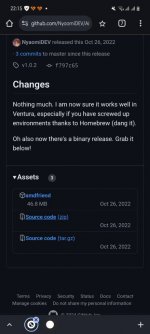
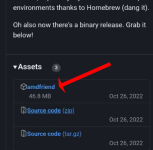
sudo (drag and drop amdfriend binary after a space) then write all you can see belowI just read the article & i don't got it [emoji28], then i found it, how to use it ? View attachment 14137
Sent from my SM-A528B using Tapatalk
 (here is a patch done for Photoshop app)
sudo amdfriend --in-place --sign --directories /Applications/Adobe\ Photoshop\ 2024/Adobe\ Photoshop\ 2024.app
if you like to learn something more:

[Discussion] AMDFriend, for (almost) all of your library patching needs
Note: There are at least two known variants of this method, https://github.com/Carnations-Botanica/IntelMKLFixup and https://github.com/JonathanFerraz/FriendlyAMD please remember to quote and/or write in this thread for discussing and talking with us about forking and developing this methodology....
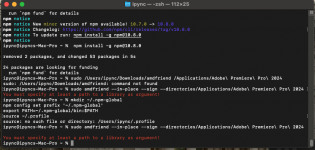
1. /bin/bash -c "$(curl -fsSL https://raw.githubusercontent.com/Homebrew/install/HEAD/install.sh)"
2. brew install nodejs
3. xattr -c /Users/shotem/Downloads/AMDFriend/amdfriend
4. chmod +x/Users/shotem/Downloads/AMDFriend/amdfriend
5. sudo npm install -g /Users/shotem/Downloads/AMDFriend/amdfriend
6. sudo npm install -g amdfriend
7. sudo amdfriend --in-place --sign --directories /Applications/Adobe\ Photoshop\ 2024/Adobe\ Photoshop\ 2024.app
then i got
You must specify at least a path to a library as argument!
2. brew install nodejs
3. xattr -c /Users/shotem/Downloads/AMDFriend/amdfriend
4. chmod +x/Users/shotem/Downloads/AMDFriend/amdfriend
5. sudo npm install -g /Users/shotem/Downloads/AMDFriend/amdfriend
6. sudo npm install -g amdfriend
7. sudo amdfriend --in-place --sign --directories /Applications/Adobe\ Photoshop\ 2024/Adobe\ Photoshop\ 2024.app
then i got
You must specify at least a path to a library as argument!
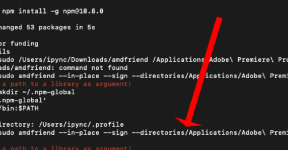
ehm..here you miss a space from directories command and application pathits right installation amdfriend ? whats the next step
so maybe this is your first problem and you did well the more complex procedure to download the script with brew and so on method