Hardware guide to update?

silvergraphs

Member
AMD OS X Member
May 3, 2020
50
9
8
Hi there, I want to update my Hackintosh hardware. Do you have any recommendations? My hard is detailed on my signature,.

Is moving to AM5 is a good idea or it's better to stay in AM4?

Greetings from Argentina
 
Depends on your budget, local costs and availability for components and what you want to do with the system.

These easy upgrades are available, while keeping your current X370 motherboard:
  1. AM4 CPU,
    1. A Ryzen 9 5900x or 5950x both will work with the latest motherboard bios. These are the highest rated 5000 series CPU's that will work with your Asrock motherboard.
    2. https://www.asrock.com/mb/AMD/X370M-HDV R4.0/index.asp#CPU
  2. Replace macOS drive with 1TB NVMe M.2 drive.
    1. Your Motherboard only has one M.2 connector so you are limited to running your most used OS on the NVMe drive, which I have assumed is macOS.
    2. A Western Digital SN5800 or SanDisk NVMe drive would be the best option as a boot drive for macOS. As the NVMe controllers for these manufacturers are supported by Apple.
  3. Replace your spinning HDDs with SSD SATA drives,
    1. 1TB & 2TB SSDs' would be readily available and shouldn't cost the earth.
    2. These will be much faster than any Spinning HDD.
    3. You seem to like Western Digital drives, so sticking with them or a SanDisk equivalent for the SSDs would be logical.
  4. Replace your GPU,
    1. An RX 6600 XT or any supported 6000 series AMD dGPU would be a huge improvement over your current dGPU.
    2. Don't go mental on the dGPU upgrade, as your PSU is fit to run the higher end 6000 series dGPUs.
  5. Upgrade your RAM,
    1. You only have 16GB of RAM.
    2. Replacing the 2 x 8GB DIMMS @3000MHz with 2 x 16GB DIMMS @3200MHz (your motherboard has a 32GB max)
The options above could be undertaken over time, if money was an issue.

If you replaced your motherboard with an AMD 600 or 800 series board, then an AMD 7000 or 9000 series CPU would be an option, but at a high cost.
 
Hi Edhawk, thank you for reply

Don't you think that using one of the latest CPU models supported by the motherboard could squeeze the most out of it? Creating a bottleneck or this could not happen?
 
I hadn't thought of that happening. I suppose it could happen, given the 'wrong' circumstances. I am using an R9 5900X in my X570 system and don't get close to causing a CPU bottleneck. But I am not a gamer, so a bottleneck is less likely to occur while I am using AutoCAD, Photoshop or any other standard desktop app.

A newer system brings new issues but could provide, depending on the motherboard/CPU and RAM selected, a decent performance increase over the older 5000 series CPU. It would be miles better than your current system, even if a lower level motherboard and CPU were purchased.

An alternative might be to replace the ASRock X370M motherboard with a B550 ITX motherboard. With the latest Bios that supports a decent 5000 series CPU, there shouldn't be any Bottleneck even if you are a gamer.
 
Finally i will to update to this configuration:

New CPU → Ryzen 7 5700X to maintain the 65w TDP to avoid VRM overheat
NVMe Replacement → 1TB Samsung 990 Pro or another cheaper with PCIe3 due I'm not using the PCIe 5.0 feature
New GPU → RX 6700 XT with NootRX kext
RAM upgrade for now i think isn't necessary, maybe in a future

My only doubt is with the graphics card, i've a 1080p 75hz Samsung monitor. A 6600 card is not enough and +6800 i think it's too much. 6700 XT it's good for my configuration but idk if works due macOS drivers problems. But i've seen that with NootRX the card works

WDYT @Edhawk ?

Depends on your budget, local costs and availability for components and what you want to do with the system.

These easy upgrades are available, while keeping your current X370 motherboard:
  1. AM4 CPU,
    1. A Ryzen 9 5900x or 5950x both will work with the latest motherboard bios. These are the highest rated 5000 series CPU's that will work with your Asrock motherboard.
    2. https://www.asrock.com/mb/AMD/X370M-HDV R4.0/index.asp#CPU
  2. Replace macOS drive with 1TB NVMe M.2 drive.
    1. Your Motherboard only has one M.2 connector so you are limited to running your most used OS on the NVMe drive, which I have assumed is macOS.
    2. A Western Digital SN5800 or SanDisk NVMe drive would be the best option as a boot drive for macOS. As the NVMe controllers for these manufacturers are supported by Apple.
  3. Replace your spinning HDDs with SSD SATA drives,
    1. 1TB & 2TB SSDs' would be readily available and shouldn't cost the earth.
    2. These will be much faster than any Spinning HDD.
    3. You seem to like Western Digital drives, so sticking with them or a SanDisk equivalent for the SSDs would be logical.
  4. Replace your GPU,
    1. An RX 6600 XT or any supported 6000 series AMD dGPU would be a huge improvement over your current dGPU.
    2. Don't go mental on the dGPU upgrade, as your PSU is fit to run the higher end 6000 series dGPUs.
  5. Upgrade your RAM,
    1. You only have 16GB of RAM.
    2. Replacing the 2 x 8GB DIMMS @3000MHz with 2 x 16GB DIMMS @3200MHz (your motherboard has a 32GB max)
The options above could be undertaken over time, if money was an issue.

If you replaced your motherboard with an AMD 600 or 800 series board, then an AMD 7000 or 9000 series CPU would be an option, but at a high cost.
 
Do not use a SAMSUNG NVMe drive as a macOS boot drive, they are not fully compatible with the task.

You would be better served getting a Western Digital SN580 or SN770 drive, as they are both known to work as macOS boot drives.


I use a PowerColor RX 6700 XT in macOS Sequoia with NootRX.kext and have not had any graphics issues. Dual 2560 x 1440 displays driven by good quality DP to DP cables.
 
  • Like
Reactions: silvergraphs
Do not use a SAMSUNG NVMe drive as a macOS boot drive, they are not fully compatible with the task.

You would be better served getting a Western Digital SN580 or SN770 drive, as they are both known to work as macOS boot drives.


I use a PowerColor RX 6700 XT in macOS Sequoia with NootRX.kext and have not had any graphics issues. Dual 2560 x 1440 displays driven by good quality DP to DP cables.
I haven't bought the nvme yet so you saved me haha

I'll update the components in the next weeks and probably I'll be posting the results here.

Thanks and happy new year @Edhawk
 
  • Like
Reactions: Edhawk
@Edhawk WDYT about SN850X? has 3k mb/s speed
 
The SN850X is a faster drive than the two I mentioned, but also more expensive. If you are not using the PCIe 5.0 option for your NVMe drive, then you will get as good a drive for less money going with either of the two I mentioned.

You can get a WD SN580 2TB drive for £100 and a 2TB SN770 for £105 on Amazon, while a 2TB SN850X will cost £145. So you could save £40-45 on a less expensive but just as capable drive. I doubt you would notice any difference in your day to day work processes, while using one of the less expensive Western Digital drive. IF you plan to undertake a lot of high-end graphics or rendering work, then the more expensive drive might be a better option.

Personally I would go with the SN770. I have bought 6-8 of these SN770 drives over the last few years, paying a lot more than £105 for a 1TB drive in the early days. I recently bought a pair of 1TB SN580's, which were on sale £42/each. These were as good as any other WD NVMe drive I have used.

Do not buy the SN750 SE drive, as it uses a different NVMe controller, which like the Samsung drive isn't suitable for macOS.

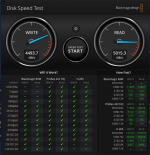
As an example, the machine I am currently using contains a Crucial P5 Plus 1TB NVMe drive and the speed test for this PCIe 4.0 drive is shown below. Similar read/write speeds to what I would get from one of my SN770 drives.

Screenshot 2025-01-03 at 21.02.22.png Speed Test for reasonable spec'd NVMe drive.
 
  • Like
Reactions: Max.1974
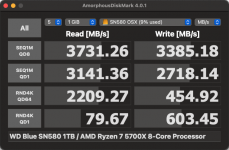
WD Blue SN580 1TB : AMD Ryzen 7 5700X 8-Core Processor             .png
Success update SN580 + R7 5700X
 
  • Like
Reactions: Edhawk
Hi again @Edhawk , after reinstalling both Windows and macOS clean installs, testing some game on windows (cs2) suddenly the computer shut downs, i've reviewed all temperatures and the mobo is the problem, the VRMs are overheating, that happens to me on AM3 with FX 6300 CPU haha, probably i need to change also the motherboard... what you recommend. Sorry for asking you so many questions, I'm going to drive you crazy.
 
What other components do you need to have in your system.
  1. Size of case, ATX or mATX?
  2. Number of M.2 drives?
  3. Number of SATA drives/DVD?
  4. PCIE cards, GPU and any others?
  5. RAM slots 2 or 4?
  6. Type-C connectors, speed/location?
  7. Case front connectors/devices?
  8. Your location, I.e country you live in?
Most importantly your budget!

Once we know the above we can discuss a replacement motherboard.

My favourite AM4 MB is my ASUS ROG STRIX X570-F Gaming board. But you won’t find many, if any available new.
 
What other components do you need to have in your system.
  1. Size of case, ATX or mATX?
  2. Number of M.2 drives?
  3. Number of SATA drives/DVD?
  4. PCIE cards, GPU and any others?
  5. RAM slots 2 or 4?
  6. Type-C connectors, speed/location?
  7. Case front connectors/devices?
  8. Your location, I.e country you live in?
Most importantly your budget!

Once we know the above we can discuss a replacement motherboard.

My favourite AM4 MB is my ASUS ROG STRIX X570-F Gaming board. But you won’t find many, if any available new.
Hi again, finally i decided to replace for a Gigabyte AORUS B550 ELITE AX V2 rev 1.5, that's on offer on 150 bucks brand new.
I've created another EFI OC from scratch and everything works except WiFi & BT due that MB has Realtek chip (RTL8852CE) and for now cannot make it work

Success upgrade thread here
 
  • Like
Reactions: Edhawk
I would recommend disabling the Realtek WiFi/BT card in the Bios.
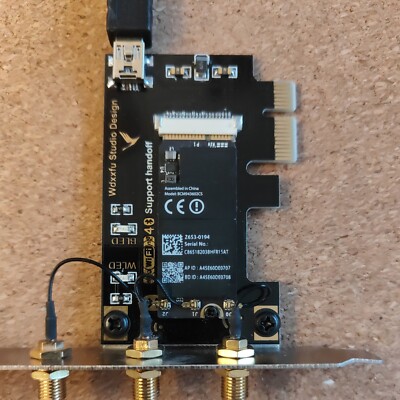
You can then add a Broadcom card to make the WiFi & BT work like a real Mac, using a PCIe x1 adapter to mount the native Apple Card.
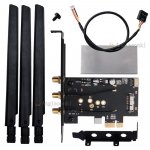
PCIe WiFi adapter.jpg Typical PCIe x1 adapter for Apple Broadcom WiFi/BT card. I use these Broadcom WiFi/BT cards and adapters in 8 x desktop hacks. I got fed up with the issues around the Intel WiFi kext and lack of Apple features from these cards and stripped out all the Intel WiFi/BT cards I purchased and reinstalled my Broadcom WiFi/BT cards.

A Broadcom BCM943602CS or BCM94360CS card would be the best option, these cost around £10-£15 on eBay.

Just be aware the the BCM94360CS2 cards, old laptop WiFi/BT cards, only have 2 x antenna and this limits the throughput for the WiFi. I have a fast Internet connection and the Broadcom WiFi cards I use work at 867mb/s.

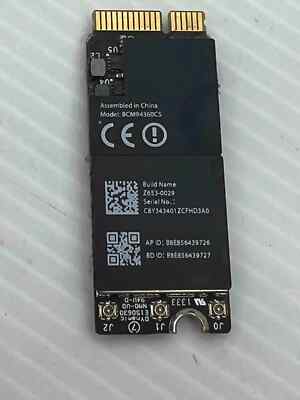
There are also Hackintosh users selling their old Broadcom WiFi/BT cards & PCIe adapters on eBay that would be perfect for the job. The one linked below is offered at a good price, but lacks the 3 x Antenna required to make it work correctly. Which would need to be purchased separately if you don't already own any antenna.


Broadcom WiFi/BT card on its own is £10 on eBay.


There are also pre-built adapters from Fenvi, T919 and AC1200 cards, that are available from Amazon for a reasonable price. These cards use the same old natively supported Broadcom cards as Apple used.


These Apple & Fenvi WiFi/BT cards are no longer natively supported in Sonoma and Sequoia but are easy to get working so you have the full range of Apple Continuity and Handoff features in the latest versions of macOS, including using an iPhone for FaceTime calls on your Hack.


If you went with one of these Broadcom cards you would need to install OpenCore Legacy Patcher and apply the Broadcom WiFi Root patches.


The pre-requisites for OCLP are also simple to apply.

You would need to add 3 x kexts to your OC Kexts folder and config.plist.
  1. AMFIPass.kext v1.4.1 or newer
  2. IO80211FamilyLegacy.kext v1.0.0 *
  3. IOSkywalkFamily.kext v1.2.0
*IO80211FamilyLegacy.kext contains AirPortBrcmNIC.kext as a Plugin, which would also be included in the OC setup.

SecureBootModel would need to set as 'Disabled'
SIP would need to be set as partially disabled, to allow unsigned kexts (crs-active-config set to <03080000>)

With the USB cable connected from the PCIe adapter to one of the internal USB2 headers on the motherboard, and the port active and set a 'Internal' (255) in your USBMap.kext, the Bluetooth module should work with no further input.

Let me know if you decide to go down this option, as I am happy to help if you get stuck.

 
  AdBlock Detected
Sure, ad-blocking software does a great job at blocking ads, but it also blocks some useful and important features of our website. For the best possible site experience please take a moment to disable your AdBlocker.