I would recommend disabling the Realtek WiFi/BT card in the Bios.
You can then add a Broadcom card to make the WiFi & BT work like a real Mac, using a PCIe x1 adapter to mount the native Apple Card.
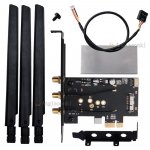
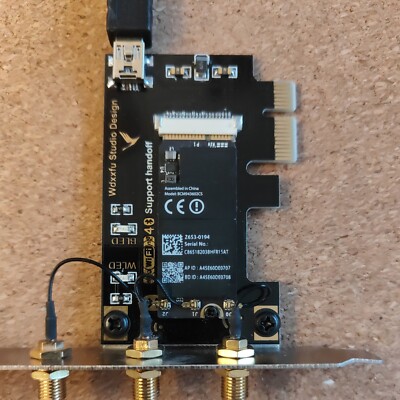
Typical PCIe x1 adapter for Apple Broadcom WiFi/BT card. I use these Broadcom WiFi/BT cards and adapters in 8 x desktop hacks. I got fed up with the issues around the Intel WiFi kext and lack of Apple features from these cards and stripped out all the Intel WiFi/BT cards I purchased and reinstalled my Broadcom WiFi/BT cards.
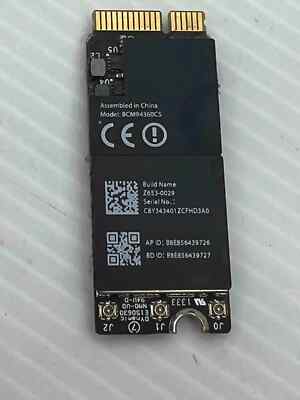
A Broadcom BCM943602CS or BCM94360CS card would be the best option, these cost around £10-£15 on eBay.
Just be aware the the BCM94360CS2 cards, old laptop WiFi/BT cards, only have 2 x antenna and this limits the throughput for the WiFi. I have a fast Internet connection and the Broadcom WiFi cards I use work at 867mb/s.
There are also Hackintosh users selling their old Broadcom WiFi/BT cards & PCIe adapters on eBay that would be perfect for the job. The one linked below is offered at a good price, but lacks the 3 x Antenna required to make it work correctly. Which would need to be purchased separately if you don't already own any antenna.
2653-0194 Serial No.: C865182038HFR15AT AP ID: A45E60DE0707 BD ID:A45E60DE0708 No antennas
www.ebay.co.uk
Broadcom WiFi/BT card on its own is £10 on eBay.
If Item Not Received.
www.ebay.co.uk
There are also pre-built adapters from Fenvi, T919 and AC1200 cards, that are available from Amazon for a reasonable price. These cards use the same old natively supported Broadcom cards as Apple used.
These Apple & Fenvi WiFi/BT cards are no longer natively supported in Sonoma and Sequoia but are easy to get working so you have the full range of Apple Continuity and Handoff features in the latest versions of macOS, including using an iPhone for FaceTime calls on your Hack.
If you went with one of these Broadcom cards you would need to install OpenCore Legacy Patcher and apply the Broadcom WiFi Root patches.
Experience macOS just like before. Contribute to dortania/OpenCore-Legacy-Patcher development by creating an account on GitHub.

github.com
The pre-requisites for OCLP are also simple to apply.
You would need to add 3 x kexts to your OC Kexts folder and config.plist.
- AMFIPass.kext v1.4.1 or newer
- IO80211FamilyLegacy.kext v1.0.0 *
- IOSkywalkFamily.kext v1.2.0
*IO80211FamilyLegacy.kext contains AirPortBrcmNIC.kext as a Plugin, which would also be included in the OC setup.
SecureBootModel would need to set as 'Disabled'
SIP would need to be set as partially disabled, to allow unsigned kexts (crs-active-config set to <03080000>)
With the USB cable connected from the PCIe adapter to one of the internal USB2 headers on the motherboard, and the port active and set a 'Internal' (255) in your USBMap.kext, the Bluetooth module should work with no further input.
Let me know if you decide to go down this option, as I am happy to help if you get stuck.