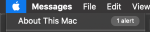
Getting rid of "1 alert" after trying MacPro7,1

bigmillz

New member
AMD OS X Member
May 4, 2020
10
1
3
Early in setting my system up, I decided to try MacPro7,1 to see if it would run any better. It didn't, and it started complaining that I have too much memory, and that the slots are too full.

Now back on iMacPro1,1 but the error persists. Sort of. The memory dialog is fine:
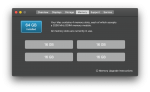
1589554327707.png
But "1 alert" is still there:
1589554346008.png

I found some kext that's supposed to fix this, but it didn't work. I've seen some others stuck on this but no real resolution. Any ideas?
 
I am still on MacPro7,1 with the Kext to disable, but the 1 alerts still comes up. No real way to suppress this untill someone makes a kext that injects to suppress the alert
 
@djmartain Nope exactly, I think that alert is persisted somewhere in the user settings. I only have it on the one user account I logged in before installing the kext. I'd assume deleting the ~/Library folder and starting fresh would also remove that alert. Could not yet figure out where exactly it is stored.
 
I am still on MacPro7,1 with the Kext to disable, but the 1 alerts still comes up. No real way to suppress this untill someone makes a kext that injects to suppress the alert

Use RestrictEvents kext. The just released 1.0.3 version resolves the "1 Alert" issue as well. You need to also use Lilu kext 1.5.4.
 
  AdBlock Detected
Sure, ad-blocking software does a great job at blocking ads, but it also blocks some useful and important features of our website. For the best possible site experience please take a moment to disable your AdBlocker.