

I have a Gigabyte X670 Aorus Elite AX with a 4070ti in the primary slot and a rx480 in the 2nd pcie slot for booting Ventura. It only boots if the RX480 is in the 1st slot. If its in the 2nd slot even with the 4070ti removed it will not boot. I have attached my EFI and my disabled gpu file up with a screen shot of my pci route. if anyone can assit?
dual boot dual gpu issue Gigabyte X670 Aorus Elite AX
- Thread starter MoneyT20
- Start date
You are using an out of date browser. It may not display this or other websites correctly.
You should upgrade or use an alternative browser.
You should upgrade or use an alternative browser.

Check your bios settings to see if there are any restrictions or limitations on the second x16 PCIe slot.
None that i can see only settings are for changing the Gen speed of each slot.
I saw someone had a similar issue but said theirs was because of needing the 2nd slot enabled as the 1st was damaged to asus. Asus sent them a modded bios to enable 2nd slot primary.
Mine just has intergraded graphics and pcie slot 1 as the only choices.
I saw someone had a similar issue but said theirs was because of needing the 2nd slot enabled as the 1st was damaged to asus. Asus sent them a modded bios to enable 2nd slot primary.
Mine just has intergraded graphics and pcie slot 1 as the only choices.
Sometimes the 2nd or 3rd PCIe slot shares bandwidth/PCIe lanes with a couple of SATA ports or one of the M.2 connectors. This if enabled can limit the number of PCIe lanes available to the slot. I am not familiar enough with your motherboard to know if this is the case for your setup.
I can disable the SATA ports and a few of the m.2 connectors in the bios and try. its just odd that the RX480 will boot in the 2nd slot with the system and to windows fine. but not with Ventura it makes it half way through boot and crashes. In the first slot its fine. I would swap and put the 4070 in the bottom slot but it doesnt fit. the ******* is too big and there are ports and cables from the motherboard in the way and the 480 doesn't have that clearance issue.
Which NVME card is located in each M.2 connector?
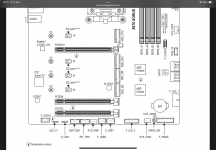 Partial motherboard layout showing M.2 connectors and 3 x PCIe slots
 Extract from manual regarding PCIe slot settings.
You may also need to review the Bifurcation settings for slot 1, as this may impact on the 2nd slot, which is only set to work at x4 speed, not x8 as would normally be the case when two GPUs are installed.
Partial motherboard layout showing M.2 connectors and 3 x PCIe slots Extract from manual regarding PCIe slot settings.You may also need to review the Bifurcation settings for slot 1, as this may impact on the 2nd slot, which is only set to work at x4 speed, not x8 as would normally be the case when two GPUs are installed.
I played around with that also it has the settings for auto, 8x8 , 8x4x4x, and 4x4x4x4x. I will test these out again and report back to see if there is any difference. hopefully its a quick fix that i need. I am unable to test the bottom slot because of no extension cable and space constraints. and removing the entire board would just be a headache.....but ima assume it would be same issue as the 4x slot.

The M.2 PCIe drives should all be fine. Assuming you have set them to work at x4 and not x2 speed. Bios should do this, but always best to check.
The CPUInfo.txt file says your system contains a Ryzen 9 7959X3D (16-core), your signature says you have a Ryzen 7 7800X3D (8-core). Which is correct? Your config.plist has the AMD kernel patches set for an 8-core CPU.
The PCIInfo.txt file doesn't contain any information for the Nvidia dGPU. Item 5 is the RX 480.
Have a try with this revised EFI folder. I have made a number of changes, removed a number of kexts, drivers and tools.
The CPUInfo.txt file says your system contains a Ryzen 9 7959X3D (16-core), your signature says you have a Ryzen 7 7800X3D (8-core). Which is correct? Your config.plist has the AMD kernel patches set for an 8-core CPU.
The PCIInfo.txt file doesn't contain any information for the Nvidia dGPU. Item 5 is the RX 480.
Have a try with this revised EFI folder. I have made a number of changes, removed a number of kexts, drivers and tools.
Attachments
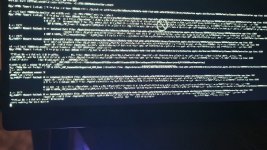
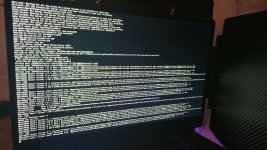
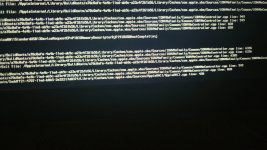
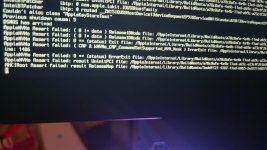
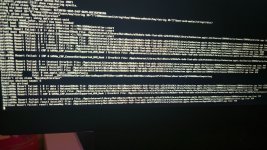
So update after making changes to the bios setting it to x4x4x4x4 bfrucation and changing the prom21 chipset disabling some ports it attempts to boot with my old efi. Putting the card back in the top slot or removing it completely it boots still but this is the closest to booting in the 2nd slot.
Got it to work with both cards after I removed the board to put the 4070 in the 2nd slot and the RX480 in the top slot (it didnt fit before). The speed in windows has dropped but it does boot both systems now. Just need to figure this out but wouldve been preferable with the normal setup to have full speed of both cards

Gonna have to figure something way to put it all back in but with bifrication on 8x8 and the 1st slot to gen 3, 2nd slot to gen 4, and 3rd slot set to gen1 speed. It worksGot it to work with both cards after I removed the board to put the 4070 in the 2nd slot and the RX480 in the top slot (it didnt fit before). The speed in windows has dropped but it does boot both systems now. Just need to figure this out but wouldve been preferable with the normal setup to have full speed of both cards