
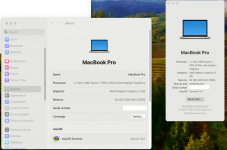
Thank you everyone. Your brilliance and readiness to share stories encouraged me to fiddle with MacOS on laptop. A week earlier I could get Ventura up and running on external NVMe drive by duplicating EFI shared by @Edhawk at https://forum.amd-osx.com/threads/macos-monterey-sometimes-boots-for-no-reason.4505/post-29645 . Generated aml at my end using SSDT-Time and USB re-mapping at my end. Ventura booted quite well with camera, touchpad and usb port operational. But for some reasons, I couldn't upgrade to sonoma on the external NVMe. After getting my hands to a compatible NVMe, I replaced the internal Samsung 970 NVMe drive of my Thinkpad L14 Gen 1 with HP SSD EX900 which was earlier hosting Ventura on an i5 7300u Acer Laptop. Booted thinkpad to existing ventura against new EFI and then eventually upgraded it to Sonoma.
I still have few issues to weed out. Will seek support on that in other threads on this forum. Thanks once again
I still have few issues to weed out. Will seek support on that in other threads on this forum. Thanks once again
