
Can't login on iCloud

surf3rninja

New member
AMD OS X Member
Sep 30, 2020
25
8
3
CPU:
Ryzen 5 3600
I tried everything but no luck for me. I am using Tp-Link WN725N. Everything works fine except iCloud. I have proper SMBIOS and Network Properties is en0. Then what's wrong with me?
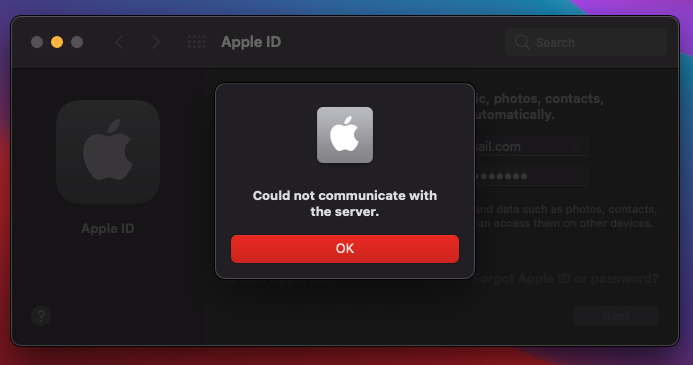


What's wrong with me? I already reset it twice but still shows en1
 
That’s correct. LAN should be en0 and must be working. Doesn’t need to be in use though.
 
Then why it says "Could not communicate with the server"?
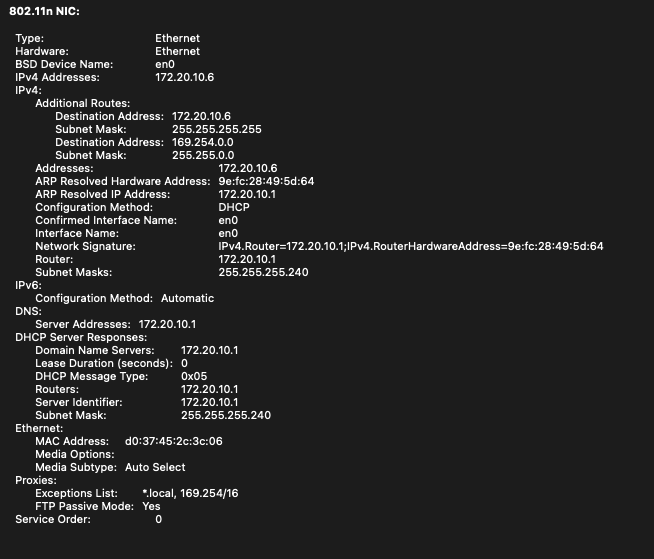
 
That’s correct. LAN should be en0 and must be working. Doesn’t need to be in use Then why it says "Could not communicate with the server"?
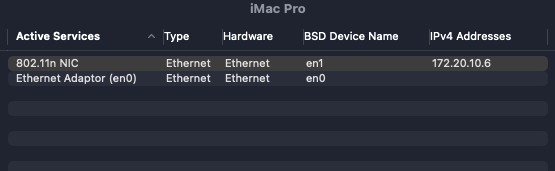
 
Then why it says "Could not communicate with the server"?
It looks like you've configured your WiFi set up wrong. Your router is somehow giving you IP addresses that are wrong that are not normal for home use.
I'd suggest you look into your routers settings and cabling such as your LAN IPs and gateway and follow a guide of some sort to sort it out.
Routers itself should always be set in this fashion (192.168.1.x) as IP (the x being a number of your choosing to 255) and (255.255.0.0) or (255.255.255.0) as subnet. If you have a separate router for WiFi you should always set it within (192.168.1.x) - the x being a number different to your main router, and set WiFi unit to bridge mode. That way your main router and wireless router can 'talk'. And ideally you should set your routers local LAN settings to DHCP to distribute IPs to the devices in your network, which all should start with IP (192.168.1.x), subnet mask (255.255.0.0) or (255.255.255.0) and gateway matching your main router's IP ie. (192.168.1.x).
 
  AdBlock Detected
Sure, ad-blocking software does a great job at blocking ads, but it also blocks some useful and important features of our website. For the best possible site experience please take a moment to disable your AdBlocker.