
Asus M1703QA model, Ryzen 5800H, no dedicated graphics card. With BIOS 16.4, installation is OK, but there's no display with NooTedRED. Without NooTedRED, the display is OK, but there's no graphics acceleration. Why is this?
Bios 16,4
- Thread starter 1960
- Start date
-
Hello Guest. Before you post check the Troubleshooting guide here, Dortania Troubleshooting
You are using an out of date browser. It may not display this or other websites correctly.
You should upgrade or use an alternative browser.
You should upgrade or use an alternative browser.

Use Debug versions of kexts and OpenCore, see this section of Dortania guide.
There is nothing obviously wrong with your EFI folder.
If you are trying to boot or install Tahoe, you may need to add a MaxKernel entry to the OCLP kexts.
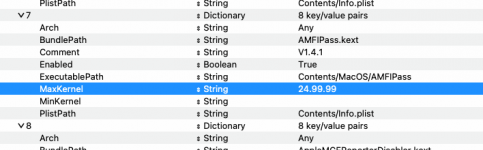 AMFIPass.kext with MaxKernel = 24.99.99
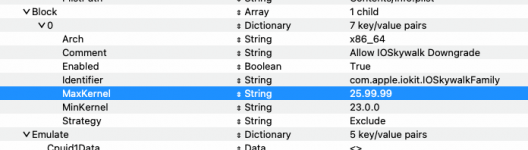 Block entry for IOSkywalkFamily.kext currently set to work in Tahoe.
 change MaxKernel to 24.99.99, so it isn't used in Tahoe.
Setting the MaxKernel entry to 24.99.99 will prevent these kexts and the Kernel > Block for the native IOSkywalkFamily.kext from being used in Tahoe.
I would also order the four kexts so the IOSkywalkFamily kext is injected first, as shown below.
 Order of kexts, with prescribed MinKernel and MaxKernel entries.
Once you have Tahoe installed and booting you can revert these MaxKernel entries to 25.99.99, so they are injected in to Tahoe. But I would recommend doing so with a copy of your EFI on a spare USB pen drive, not with your working EFI that should be saved in the EFI partition on your macOS drive.
Also, I am not sure why but you haven't enabled the DummyPowerManagement option, which is normally essential for an AMD system.
 Current setting as 'False'
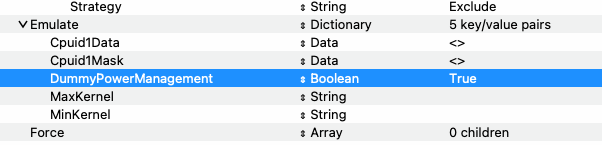 Normal setting as 'True'
These edits have been applied to the config.plist linked below. You can try booting with this config.plist to see if it helps.
If you are trying to boot or install Tahoe, you may need to add a MaxKernel entry to the OCLP kexts.
- AMFIPass.kext
- IO80211FamilyLegacy.kext
- IO80211FamilyLegacy.kext/Contents/PlugIns/AirPortBrcmNIC.kext
- IOSkywalkFamily.kext
AMFIPass.kext with MaxKernel = 24.99.99 Block entry for IOSkywalkFamily.kext currently set to work in Tahoe. change MaxKernel to 24.99.99, so it isn't used in Tahoe.Setting the MaxKernel entry to 24.99.99 will prevent these kexts and the Kernel > Block for the native IOSkywalkFamily.kext from being used in Tahoe.
I would also order the four kexts so the IOSkywalkFamily kext is injected first, as shown below.
Order of kexts, with prescribed MinKernel and MaxKernel entries.Once you have Tahoe installed and booting you can revert these MaxKernel entries to 25.99.99, so they are injected in to Tahoe. But I would recommend doing so with a copy of your EFI on a spare USB pen drive, not with your working EFI that should be saved in the EFI partition on your macOS drive.
Also, I am not sure why but you haven't enabled the DummyPowerManagement option, which is normally essential for an AMD system.
Current setting as 'False' Normal setting as 'True'These edits have been applied to the config.plist linked below. You can try booting with this config.plist to see if it helps.
Attachments