

Hi everyone,
I’m posting this after exhausting pretty much every reasonable (and unreasonable) debugging path I can think of. I’m specifically looking for advanced insight from people who have worked with AM5 / X870 / Zen 5, because at this point this does not feel like a basic EFI or kext issue anymore.
No kernel panic.
No reboot.
No watchdog reset.
At that point:
 Result is identical in all cases.
I have tried with minimal and all kexts. Also, just excluding AppleALC.
-> mportant behaviors:
I’m specifically asking:
Sorry for the long post, but I wanted to make it clear that this isn’t a low-effort or beginner issue.
Any advanced insight would be genuinely appreciated.
I’m posting this after exhausting pretty much every reasonable (and unreasonable) debugging path I can think of. I’m specifically looking for advanced insight from people who have worked with AM5 / X870 / Zen 5, because at this point this does not feel like a basic EFI or kext issue anymore.
Hardware
- Motherboard: MSI X870-P
- CPU: AMD Ryzen 5 9600X (6 cores / 12 threads)
- GPU: ASUS Dual Radeon RX 6600 (Navi 23)
- Storage: Crucial P310 1TB NVMe
- RAM: Patriot Viper Extreme DDR5 16x2 (No overclocking. Base 5600MT/S).
- BIOS: Latest available (also tested 1 version back)
macOS versions tested
- Sonoma
- Sequoia
The problem (100% reproducible)
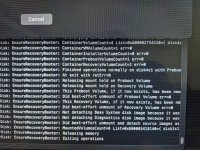
The installer always hangs at “12 minutes remaining”, right after this log line:Disk: EnsureRecoveryBooter: Exiting operationsNo kernel panic.
No reboot.
No watchdog reset.
At that point:
- Keyboard and mouse are completely dead
- Screen is frozen
- No further logs
- Waiting indefinitely does nothing
What I’ve already tried (in detail)
Install media
- First tried Olarila Vanilla images → same hang
- Then stopped using prebuilt images entirely
- Created full official installersusing:
- macOS in VMware
- softwareupdate --fetch-full-installer
- createinstallmedia to USB
Result is identical in all cases.ACPI work
- Extracted DSDT.aml
- Located the full ACPI paths of USB controllers
- Applied NoOp ACPI patches to force-enable USB controllers (UPC / PLD / RHUB)
- If I disable these ACPI NoOp patches → early EXITBS
- ACPI SSDTs in use:
- SSDT-EC
- SSDT-USBX
- SSDT-PLUG-ALT
USB
- Generated USBMap.kext on Windows using Native Classes, following the ChefKiss guide
- Without USBMap.kext → system waits for root device after AHCI initialization
- If I disable DevirtualiseMmio → same “waiting for root device”
- Tried multiple physical USB ports (rear + front + USB2.0 + USB3.0 )
- Tried different keyboards and mouse
CPU / Kernel
- Using AMD Vanilla kernel patches
- CPU core count patches are active
- Without these → system does not boot at all
- Core count is detected correctly in logs
GPU
- Tried multiple GPUs (different brands of RX6600) at a repair shop
- Allcards behave the same
- agdpmod=pikera in boot-args
- Resize BAR disabled in BIOS
- ResizeAppleGpuBars = 0 in OpenCore
OpenCore configuration
- SMBIOS: MacPro7,1
- SecureBootModel: Disabled
- DevirtualiseMmio: Enabled (required)
- Above 4G Decoding: Enabled/Disabled (Both Tested)
- npci=0x2000 in boot-args (with and without)
- Full debug logging enabled
- Tried both the debug and the release version of OpenCore 1.0.6
Kexts
- Lilu
- VirtualSMC
- WhateverGreen
- AppleALC
- SMCProcessorAMD
- SMCRadeonSensors
- AppleMCEReporterDisabler
- NVMeFix
- RestrictEvents
- LucyRTL8125Ethernet
- USBMap.kext
I have tried with minimal and all kexts. Also, just excluding AppleALC.
ACPI / Booter / Kernel
All listed in my attached config.plist (included below).-> mportant behaviors:
- Without USBMap.kext → waiting for root device
- Without DevirtualiseMmio → waiting for root device
- Without USB controller NoOp ACPI patches → early EXITBS
What I’m asking
At this point, I’m not looking for generic suggestions like:- “Try a different USB port”
- “Rebuild USBMap”
- “Remove kext X”
I’m specifically asking:
- Has anyone successfully fresh-installed Sonoma or Sequoia on X870 + Zen 5?
- Is this a known installer userspace hang on newer AGESA?
- Is there any ACPI / power / SMU quirk specific to X870 that macOS chokes on during the installer handoff?
- Or is this simply not realistically solvable yet without firmware or OS changes?
Logs + EFI + DSDT + List Of Files
I’m attaching my full EFI + Logs + DSDT.dsl + list of files that installer writes on the NVMe before freezing up, for review here:Sorry for the long post, but I wanted to make it clear that this isn’t a low-effort or beginner issue.
Any advanced insight would be genuinely appreciated.
Attachments
Last edited: