
Asus Tuf gaming X670e-wifi+AMD Ryzen 9 9950X3D efi help
- Thread starter my10ez
- Start date
-
Hello Guest. Before you post check the Troubleshooting guide here, Dortania Troubleshooting
You are using an out of date browser. It may not display this or other websites correctly.
You should upgrade or use an alternative browser.
You should upgrade or use an alternative browser.
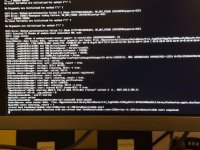

First thing you need to be aware of is that macOS Tahoe dropped support for the iMacPro1,1 system. So your config.plist would never work to install Tahoe. You would have more luck installing Sequoia with the current SMBIOS data. You need to use the MacPro7,1 SMBIOS for Tahoe.
Second is that Samsung drives are not a good choice when running macOS on a Hackintosh.

The OC EFI contents for my Asus Prime X670E-Pro system looks like this.
 Runs Sequoia and Tahoe, latest versions of both OS's.
I have attached a copy of my EFI folder for you to use as a base when setting up your own.
Things you need to be aware of with regards by EFI as it is set to work with the following:
Second is that Samsung drives are not a good choice when running macOS on a Hackintosh.
- Not sure you need the SSDT-Disable_Network_GPP7.aml table with this X670E board.
- You need to add apfs_aligned.efi to your /EFI/OC/Drivers folder and config.plist.
- You shouldn't require the GenericUSBXHCI.kext or XHCI-Unsupported.kext, if you generate a custom USB kext for your system.
- UTBDefault.kext does nothing helpful during macOS installation, as USBToolBox.kext hasn't been updated to work with Tahoe.
- You are lacking any ACPI patches, which seem to be mandatory for X670E systems.
- You are lacking the MmioWhitelist entries required for your motherboard.
- As you have an Nvidia dGPU I can see why you don't have a graphics related kext in your OC setup.
- For AppleALC.kext to work in Tahoe you need to add SimpleHDA.kext and a compatible layout ID for your Audio codec (ALC1220A)
- https://github.com/laobamac/SimpleHDA/blob/main/README.en.md
- There isn't a custom layout ID in AppleALC for the ALC1220A codec, so using alcid=1 would be reasonable during installation.
The OC EFI contents for my Asus Prime X670E-Pro system looks like this.
Runs Sequoia and Tahoe, latest versions of both OS's.I have attached a copy of my EFI folder for you to use as a base when setting up your own.
Things you need to be aware of with regards by EFI as it is set to work with the following:
- Asus Prime X670E-Pro motherboard
- Ryzen 7 9700X 8-core CPU
- AMD RX 5700 XT GPU (WhateverGreen.kext)
- Apple Broadcom Native WiFi/BT card (SimpleBCM.kext & AirportBrcmFixup.kext)
Attachments
Last edited:

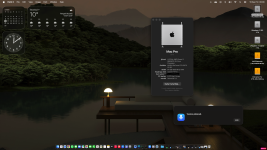
Do you have a Mediatek WiFi & Bluetooth card installed in your X870 system? If yes, have a look at this thread over at Tonymacx86, see if the process documented for bluetooth works with your card.
Specifically post #30.
Specifically post #30.

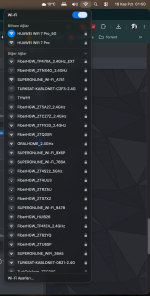
No,my friend helped me to remake a new efi for my x670 system,installed mediatek wifi-bluetooth kexts but only wifi is ok.So did the EFI provided in post #2 work for your system?
Care to post a copy of your Working EFI folder, with the Serial Number redacted/deleted from the config.plist. It would help others with the same board.
If you read through post #30 from the link above, you will see that the Tahoe kext has been limited to work with 3 x specific cards. So to get your Mediatek Bluetooth module working you need to do the following:
1. You need to edit the Tahoe kext and add your own idVendor/idProduct entries to the kext, using Hex Fiend.
2. You need to add a Bluetooth specific boot argument -bluetoothmediatek
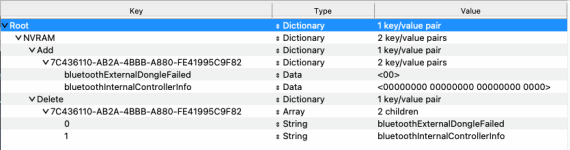
3. You need to add the Bluetooth NVRAM entries shown below (bluetoothInternalControllerInfo and bluetoothExternalDongleFailed) to your config.plist.
4. You need to ensure you have the USB port serving the Bluetooth module active and set as 'Internal' in your USBMap.kext or USBPorts.kext, whichever you are using.
Did you or your friend complete the above process for your Mediatek Bluetooth module?
1. You need to edit the Tahoe kext and add your own idVendor/idProduct entries to the kext, using Hex Fiend.
2. You need to add a Bluetooth specific boot argument -bluetoothmediatek
3. You need to add the Bluetooth NVRAM entries shown below (bluetoothInternalControllerInfo and bluetoothExternalDongleFailed) to your config.plist.
4. You need to ensure you have the USB port serving the Bluetooth module active and set as 'Internal' in your USBMap.kext or USBPorts.kext, whichever you are using.
Did you or your friend complete the above process for your Mediatek Bluetooth module?